Note
Access to this page requires authorization. You can try signing in or changing directories.
Access to this page requires authorization. You can try changing directories.
Certain scenarios require virtual machines or compute instances to have outbound connectivity to the internet. The frontend IPs of a public load balancer can be used to provide outbound connectivity to the internet for backend instances. This configuration uses source network address translation (SNAT) to translate virtual machine's private IP into the load balancer's public IP address. SNAT maps the IP address of the backend to the public IP address of your load balancer. SNAT prevents outside sources from having a direct address to the backend instances.
Azure's outbound connectivity methods
The following methods are Azure's most commonly used methods to enable outbound connectivity, listed in order of priority when multiple methods are used:
| # | Method | Type of port allocation | Production-grade? | Rating |
|---|---|---|---|---|
| 1 | Associate a NAT gateway to the subnet | Dynamic, explicit | Yes | Best |
| 2 | Assign a public IP to the virtual machine | Static, explicit | Yes | OK |
| 3 | Use the frontend IP address(es) of a load balancer for outbound via outbound rules | Static, explicit | Yes, but not at scale | OK |
| 4 | Use the frontend IP address(es) of a load balancer for outbound without outbound rules | Static, Implicit | No | Worst |
| 5 | Default outbound access | Implicit | No | Worst |
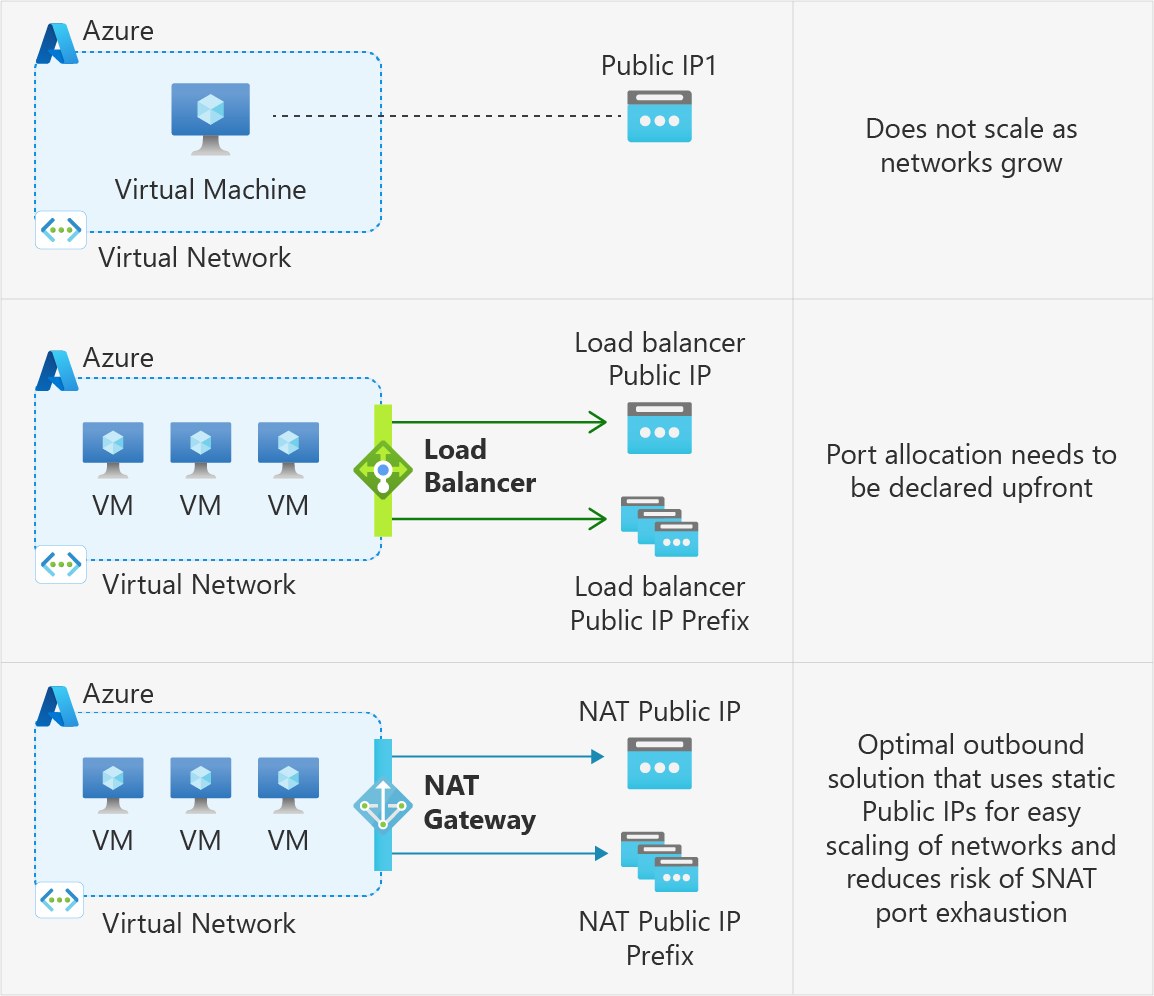
1. Associate a NAT gateway to the subnet
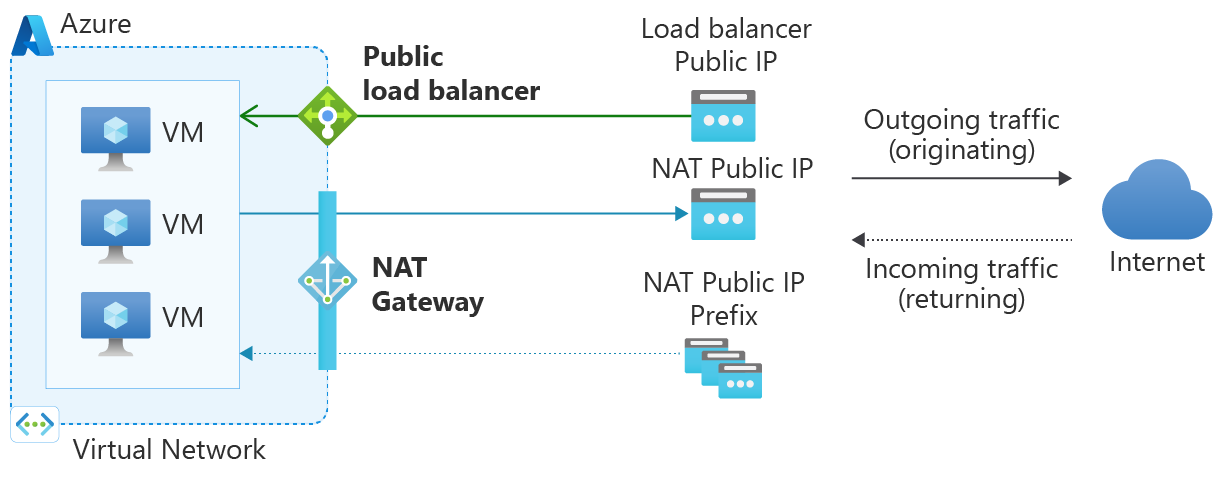
Azure NAT Gateway simplifies outbound-only Internet connectivity for virtual networks. When configured on a subnet, all outbound connectivity uses your specified static public IP addresses. Outbound connectivity is possible without load balancer or public IP addresses directly attached to virtual machines. NAT Gateway is fully managed and highly resilient.
Using a NAT gateway is the best method for outbound connectivity. A NAT gateway is highly extensible, reliable, and doesn't have the same concerns of SNAT port exhaustion.
NAT gateway takes precedence over other outbound connectivity methods, including a load balancer, instance-level public IP addresses, and Azure Firewall.
For more information about Azure NAT Gateway, see What is Azure NAT Gateway. For details on how SNAT behavior works with NAT Gateway, see SNAT with NAT Gateway.
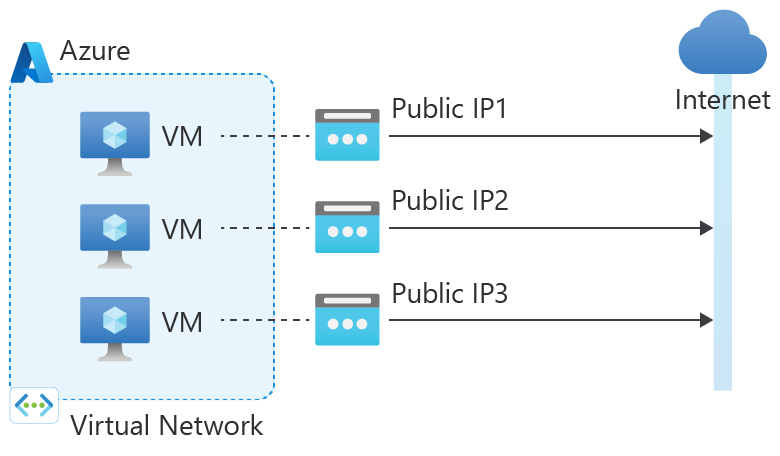
2. Assign a public IP to the virtual machine
| Associations | Method | IP protocols |
|---|---|---|
| Public IP on VM's NIC | SNAT (Source Network Address Translation) isn't used. |
TCP (Transmission Control Protocol) UDP (User Datagram Protocol) ICMP (Internet Control Message Protocol) ESP (Encapsulating Security Payload) |
Traffic returns to the requesting client from the virtual machine's public IP address (Instance Level IP).
Azure uses the public IP assigned to the IP configuration of the instance's NIC for all outbound flows. The instance has all ephemeral ports available. It doesn't matter whether the VM is load balanced or not. This scenario takes precedence over the others, except for NAT Gateway.
A public IP assigned to a VM is a 1:1 relationship (rather than 1: many) and implemented as a stateless 1:1 NAT.
3. Use the frontend IP address(es) of a load balancer for outbound via outbound rules
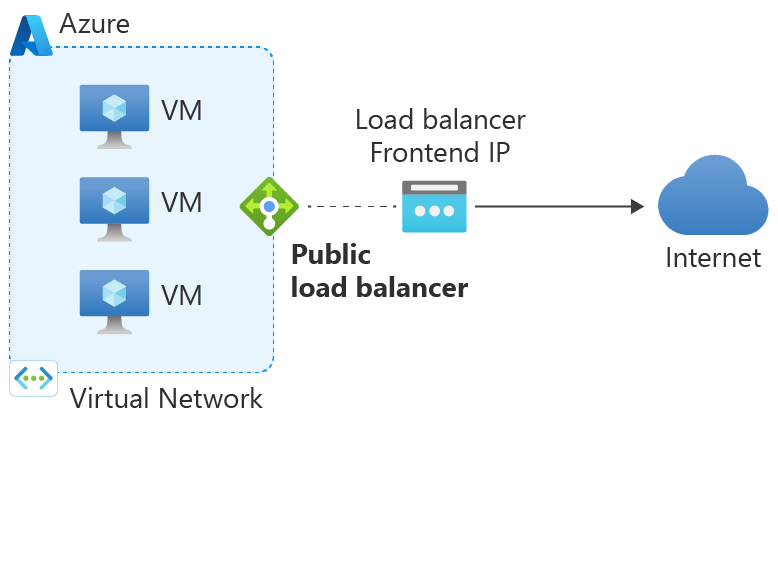
Outbound rules enable you to explicitly define SNAT (source network address translation) for a standard SKU public load balancer. This configuration allows you to use the public IP or IPs of your load balancer for outbound connectivity of the backend instances.
This configuration enables:
IP masquerading
Simplifying your allowlists
Reduces the number of public IP resources for deployment
With outbound rules, you have full declarative control over outbound internet connectivity. Outbound rules allow you to scale and tune this ability to your specific needs via manual port allocation. Manually allocating SNAT port based on the backend pool size and number of frontendIPConfigurations can help avoid SNAT exhaustion.
You can manually allocate SNAT ports either by "ports per instance" or "maximum number of backend instances". If you have virtual machines in the backend, it's recommended that you allocate ports by "ports per instance" to get maximum SNAT port usage.
Calculate ports per instance as follows:
Number of frontend IPs * 64K / Number of backend instances
If you have Virtual Machine Scale Sets in the backend, it's recommended to allocate ports by "maximum number of backend instances". If more VMs are added to the backend than remaining SNAT ports allowed, scale out of Virtual Machine Scale Sets could be blocked, or the new VMs won't receive sufficient SNAT ports.
Note
When multiple frontend IPs are configured using outbound rules, outbound connections can come from any of the frontend IPs configured to the backend instance. We don't recommend building any dependencies on which frontend IP can be selected for connections.
For more information about outbound rules, see Outbound rules.
4. Use the frontend IP address(es) of a load balancer for outbound without outbound rules
This option is similar to the previous one, except when no outbound rules are created. In this case, the load balancer frontend(s) are still used for outbound, but this is done implicitly without rules that specify which frontend would be used. Not using outbound rules also decreases scalability of outbound, as implicit outbound connectivity has a fixed number of SNAT ports per frontend IP address, which could lead to port exhaustion in high-traffic scenarios.
5. Default outbound access
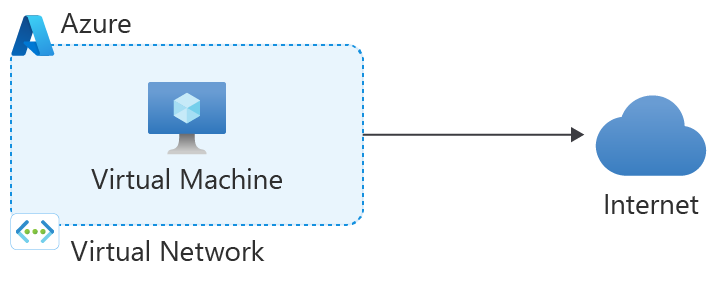
In Azure, virtual machines created in a virtual network without explicit outbound connectivity defined are assigned to a default outbound public IP address. This IP address enables outbound connectivity from the resources to the Internet. This access is referred to as default outbound access. This method of access is not recommended as it's insecure and the IP addresses are subject to change.
Important
On March 31, 2026, new virtual networks default to using private subnets. For more information, see the official announcement. Use one of the explicit forms of connectivity as shown in options 1-3 above.
What are SNAT ports?
Ports generate unique identifiers that maintain distinct flows. The internet uses a five-tuple to provide this distinction.
If you use a port for inbound connections, it has a listener for inbound connection requests on that port. That port can't be used for outbound connections. To establish an outbound connection, use an ephemeral port to provide the destination with a port on which to communicate and maintain a distinct traffic flow. When these ephemeral ports are used for SNAT, they're called SNAT ports.
By definition, every IP address has 65,535 ports. Each port can be used for either inbound or outbound connections for TCP (Transmission Control Protocol) and UDP (User Datagram Protocol). When you add a public IP address as a frontend IP to a load balancer, 64,000 ports are eligible for SNAT.
Each port used in a load balancing or inbound NAT rule consumes a range of eight ports from the 64,000 available SNAT ports. This usage reduces the number of ports eligible for SNAT, if the same frontend IP is used for outbound connectivity. If load-balancing or inbound NAT rules consumed ports are in the same block of eight ports consumed by another rule, the rules don't require extra ports.
Note
If you need to connect to any supported Azure PaaS services like Azure Storage, Azure SQL, or Azure Cosmos DB, use Azure Private Link to avoid SNAT entirely. Azure Private Link sends traffic from your virtual network to Azure services over the Azure backbone network instead of over the internet.
Private Link is the recommended option over service endpoints for private access to Azure hosted services. For more information on the difference between Private Link and service endpoints, see Compare Private Endpoints and Service Endpoints.
How does default SNAT work?
When a VM creates an outbound flow, Azure translates the source IP address to an ephemeral IP address. Azure performs this translation through SNAT.
If you use SNAT without outbound rules through a public load balancer, the system preallocates SNAT ports as described in the following default SNAT ports allocation table:
Default port allocation table
When you enable default port allocation, the system allocates SNAT ports based on the backend pool size. Each backend receives the number of ports defined by the table, per frontend IP, up to a maximum of 1,024 ports. Don't use default port allocation for production workloads, as it allocates a minimal number of ports to each backend instance and increases the risk of SNAT port exhaustion. Instead, consider using NAT Gateway or manually allocating ports on your load balancer outbound rules.
You can enable default port allocation in multiple ways:
- Configure a load balancing rule with
disableOutboundSnatset tofalse, or select the default port allocation option on a load balancer rule in the Azure portal. - Configure an outbound rule but set the
allocatedOutboundPortsproperty to0, or select Enable default port allocation in the Azure portal.
For example, with 100 VMs in a backend pool and only one frontend IP, each VM receives 512 ports. If you add a second frontend IP, each VM receives an extra 512 ports. This allocation means each VM is allocated a total of 1,024 ports. As a result, adding a third frontend IP doesn't increase the number of allocated SNAT ports beyond 1,024 ports.
As a rule of thumb, you can compute the number of SNAT ports provided when default port allocation is applied as: MIN(# of default SNAT ports provided based on pool size * number of frontend IPs associated with the pool, 1024).
The following table shows the SNAT port preallocations for a single frontend IP, depending on the backend pool size:
| Pool size (VM instances) | Default SNAT ports |
|---|---|
| 1-50 | 1,024 |
| 51-100 | 512 |
| 101-200 | 256 |
| 201-400 | 128 |
| 401-800 | 64 |
| 801-1,000 | 32 |
Port exhaustion
Every connection to the same destination IP and destination port uses a SNAT port. This connection maintains a distinct traffic flow from the backend instance or client to a server. This process gives the server a distinct port on which to address traffic. Without this process, the client machine is unaware of which flow a packet is part of.
Imagine having multiple browsers going to https://www.microsoft.com, which is:
Destination IP = 23.53.254.142
Destination Port = 443
Protocol = TCP
Without SNAT ports for the return traffic, the client has no way to separate one query result from another.
Outbound connections can burst. A backend instance can be allocated insufficient ports. Use connection reuse functionality within your application. Without connection reuse, the risk of SNAT port exhaustion is increased.
For more information about connection pooling with Azure App Service, see Troubleshooting intermittent outbound connection errors in Azure App Service.
New outbound connections to a destination IP fail when port exhaustion occurs. Connections succeed when a port becomes available. This exhaustion occurs when the 64,000 ports from an IP address are spread thin across many backend instances. For guidance on mitigation of SNAT port exhaustion, see Support and troubleshooting for Azure Load Balancer.
Port reuse
For TCP connections, the load balancer uses a single SNAT port for every destination IP and port. For connections to the same destination IP, a single SNAT port can be reused as long as the destination port differs. Reuse isn't possible when there's already a connection to the same destination IP and port.
For UDP connections, the load balancer uses a port-restricted cone NAT algorithm, which consumes one SNAT port per destination IP, regardless of the destination port.
You can reuse individual ports for an unlimited number of connections where reuse is permitted (when the destination IP or port is different).
In the example in the following table, a backend instance with private IP 10.0.0.1 makes TCP connections to destination IPs 23.53.254.142 and 26.108.254.155, while the load balancer is configured with frontend IP address 192.0.2.0. Because the destination IPs are different, the same SNAT port can be reused for multiple connections.
| Flow | Source tuple | Source tuple after SNAT | Destination tuple |
|---|---|---|---|
| 1 | 10.0.0.1:80 | 192.0.2.0:1 | 23.53.254.142:80 |
| 2 | 10.0.0.1:80 | 192.0.2.0:1 | 26.108.254.155:80 |
Constraints
When a connection is idle with no new packets being sent, the ports are released after 4 to 120 minutes.
You can configure this threshold through outbound rules.
Each IP address provides 64,000 ports that you can use for SNAT.
Each port can be used for both TCP and UDP connections to a destination IP address.
You need a UDP SNAT port whether the destination port is unique or not. For every UDP connection to a destination IP, one UDP SNAT port is used.
A TCP SNAT port can be used for multiple connections to the same destination IP as long as the destination ports are different.
SNAT exhaustion occurs when a backend instance runs out of given SNAT ports. A load balancer can still have unused SNAT ports. If a backend instance’s used SNAT ports exceed its given SNAT ports, it can't establish new outbound connections.
The system drops fragmented packets unless outbound is through an instance level public IP on the VM's NIC.
Outbound rules don't support secondary IPv4 configurations of a network interface. For outbound connectivity on secondary IPv4 configurations, attach instance level public IPs or use NAT Gateway instead.
Next steps
- Support and troubleshooting for Azure Load Balancer
- Review SNAT metrics and familiarize yourself with the correct way to filter, split, and view them.
- Learn how to migrate your existing outbound connectivity method to NAT gateway.