Note
Access to this page requires authorization. You can try signing in or changing directories.
Access to this page requires authorization. You can try changing directories.
Azure OpenAI GPT Realtime API for speech and audio is part of the GPT-4o model family that supports low-latency, "speech in, speech out" conversational interactions.
You can use the Realtime API via WebRTC, SIP, or WebSocket to send audio input to the model and receive audio responses in real time.
Follow the instructions in this article to get started with the Realtime API via WebSockets. Use the Realtime API via WebSockets in server-to-server scenarios where low latency isn't a requirement.
Tip
In most cases, use the Realtime API via WebRTC for real-time audio streaming in client-side applications such as a web application or mobile app. WebRTC is designed for low-latency, real-time audio streaming and is the best choice for most scenarios.
Use the following table to help you choose the right protocol for your scenario:
| Protocol | Best for | Latency | Complexity |
|---|---|---|---|
| WebRTC | Client-side apps (web, mobile) | Lowest (~50-100ms) | Higher |
| WebSocket | Server-to-server, batch processing | Moderate (~100-300ms) | Lower |
| SIP | Telephony integration | Varies | Highest |
Prerequisites
Before you can use GPT real-time audio, you need:
- An Azure subscription. Create one for free.
- A Microsoft Foundry resource. Create the resource in one of the supported regions. For setup steps, see Create a Microsoft Foundry resource.
- A deployment of a GPT realtime model in a supported region as described in the supported models section in this article.
- In the Foundry portal, load your project. Select Build in the upper-right menu, then select the Models tab on the left pane, and select Deploy a base model. Search for the model you want, and select Deploy on the model page.
- Required libraries:
- Python:
pip install websockets azure-identity - JavaScript/Node.js:
npm install ws @azure/identity
- Python:
Supported models
The GPT real-time models are available for global deployments in the East US 2 and Sweden Central regions.
gpt-4o-mini-realtime-preview(2024-12-17)gpt-4o-realtime-preview(2024-12-17)gpt-realtime(2025-08-28)gpt-realtime-mini(2025-10-06)gpt-realtime-mini(2025-12-15)gpt-realtime-1.5(2026-02-23)gpt-realtime-2(2026-05-07)gpt-realtime-translate(2026-05-06)gpt-realtime-whisper(2026-05-06)
For more information about supported models, see the models and versions documentation.
Connection and authentication
The Realtime API (via /realtime) is built on the WebSockets API to facilitate fully asynchronous streaming communication between the end user and model.
The Realtime API is accessed via a secure WebSocket connection to the /realtime endpoint of your Azure OpenAI resource.
You can construct a full request URI by concatenating:
- The secure WebSocket (
wss://) protocol. - Your Azure OpenAI resource endpoint hostname, for example,
my-aoai-resource.openai.azure.com - The API path:
openai/v1/realtimefor GA, oropenai/realtimefor preview. - A
modelquery string parameter with the name of yourgpt-realtime,gpt-realtime-1.5, orgpt-realtime-minimodel deployment. - (Preview version only) An
api-versionquery string parameter for a supported API version such as2025-04-01-previewand adeploymentquery parameter instead ofmodel.
The following example is a well-constructed /realtime request URI:
wss://my-eastus2-openai-resource.openai.azure.com/openai/v1/realtime?model=gpt-realtime-deployment-name
Note
The GA API uses the /openai/v1/realtime path with model= as the query parameter. The preview API uses /openai/realtime with api-version= and deployment= parameters. Using the wrong path or mixing GA/preview formats results in a 404 error.
To authenticate:
- Microsoft Entra (recommended): Use token-based authentication with the
/realtimeAPI for an Azure OpenAI resource with managed identity enabled. Apply a retrieved authentication token using aBearertoken with theAuthorizationheader. - API key: An
api-keycan be provided in one of two ways:- Using an
api-keyconnection header on the pre-handshake connection. This option isn't available in a browser environment. - Using an
api-keyquery string parameter on the request URI. Query string parameters are encrypted when using HTTPS/WSS.
- Using an
Transcribe audio in real-time
The following examples show how to stream microphone audio to the gpt-realtime-whisper model for real-time transcription.
Prerequisites for Python
Install required packages:
pip install websockets sounddevice azure-identity
Set environment variables:
export AZURE_OPENAI_ENDPOINT=https://<resource-name>.openai.azure.com
export AZURE_OPENAI_API_KEY=<api-key>
export AZURE_OPENAI_DEPLOYMENT_NAME=<deployment-name>
Transcription example
import asyncio
import base64
import json
import os
import signal
from urllib.parse import urlencode

import sounddevice as sd
import websockets

# Configuration
LANGUAGE = ""  # Optional: language hint like "en"
TRANSCRIPTION_DELAY = "medium"  # Supported values: minimal, low, medium, high, xhigh
SAMPLE_RATE = 24000
CHANNELS = 1
DTYPE = "int16"
BLOCK_MS = 100
COMMIT_SECONDS = 3


def azure_realtime_url() -> str:
    """Construct WebSocket URL for transcription."""
    endpoint = os.environ["AZURE_OPENAI_ENDPOINT"].strip().rstrip("/")
    if endpoint.lower().startswith("https://"):
        endpoint = "wss://" + endpoint[8:]
    endpoint_complete = f"{endpoint}/openai/v1/realtime?intent=transcription"
    return endpoint_complete


def session_update_message(language: str) -> str:
    """Create session configuration message."""
    deployment = os.environ["AZURE_OPENAI_DEPLOYMENT_NAME"].strip()
    transcription = {"model": deployment}
    if TRANSCRIPTION_DELAY.strip():
        transcription["delay"] = TRANSCRIPTION_DELAY.strip()
    if language.strip():
        transcription["language"] = language.strip()

    return json.dumps({
        "type": "session.update",
        "session": {
            "type": "transcription",
            "audio": {
                "input": {
                    "format": {
                        "type": "audio/pcm",
                        "rate": SAMPLE_RATE,
                    },
                    "turn_detection": None,
                    "transcription": transcription,
                },
            },
        },
    })


async def transcribe_audio() -> None:
    """Stream microphone audio and transcribe in real-time."""
    headers = {"api-key": os.environ["AZURE_OPENAI_API_KEY"].strip()}
    url = azure_realtime_url()
    stop = asyncio.Event()

    async def microphone_sender(ws):
        """Send microphone audio to WebSocket."""
        loop = asyncio.get_running_loop()
        queue = asyncio.Queue(maxsize=20)

        def enqueue_audio(audio_bytes: bytes) -> None:
            try:
                queue.put_nowait(audio_bytes)
            except asyncio.QueueFull:
                pass

        def on_audio(indata, frames, time, status):
            if status:
                print(f"Microphone warning: {status}")
            audio_bytes = bytes(indata)
            loop.call_soon_threadsafe(enqueue_audio, audio_bytes)

        blocksize = int(SAMPLE_RATE * BLOCK_MS / 1000)
        print(f"Starting transcription. Press Ctrl+C to stop.\n")

        with sd.RawInputStream(
            samplerate=SAMPLE_RATE,
            blocksize=blocksize,
            channels=CHANNELS,
            dtype=DTYPE,
            callback=on_audio,
        ):
            append_count = 0
            commit_count = 0
            chunks_since_commit = 0
            chunks_per_commit = max(1, int(COMMIT_SECONDS * 1000 / BLOCK_MS))

            while not stop.is_set():
                chunk = await queue.get()
                if stop.is_set():
                    break

                append_count += 1
                await ws.send(json.dumps({
                    "type": "input_audio_buffer.append",
                    "event_id": f"append_{append_count}",
                    "audio": base64.b64encode(chunk).decode("ascii"),
                }))

                chunks_since_commit += 1
                if chunks_since_commit >= chunks_per_commit:
                    commit_count += 1
                    await ws.send(json.dumps({
                        "type": "input_audio_buffer.commit",
                        "event_id": f"commit_{commit_count}",
                    }))
                    chunks_since_commit = 0

    async def transcription_receiver(ws):
        """Receive and print transcription results."""
        try:
            async for raw_message in ws:
                if stop.is_set():
                    break
                event = json.loads(raw_message)
                event_type = event.get("type")

                if event_type in {
                    "conversation.item.input_audio_transcription.completed",
                    "response.text.done",
                }:
                    text = event.get("text") or event.get("transcript")
                    if text:
                        print(text, flush=True)
                elif event_type == "conversation.item.input_audio_transcription.failed":
                    print(f"Transcription failed: {event.get('error', event)}")
        except asyncio.CancelledError:
            pass

    async with websockets.connect(url, additional_headers=headers) as ws:
        # Configure session
        await ws.send(session_update_message(LANGUAGE))
        async for raw_message in ws:
            event = json.loads(raw_message)
            if event.get("type") == "session.updated":
                print("Transcription session configured.")
                break

        # Start sender and receiver tasks
        sender = asyncio.create_task(microphone_sender(ws))
        receiver = asyncio.create_task(transcription_receiver(ws))

        try:
            await asyncio.sleep(3600)  # Run for 1 hour or until Ctrl+C
        except KeyboardInterrupt:
            print("\nStopping transcription.")
        finally:
            stop.set()
            sender.cancel()
            receiver.cancel()
            await asyncio.gather(sender, receiver, return_exceptions=True)


if __name__ == "__main__":
    try:
        asyncio.run(transcribe_audio())
    except KeyboardInterrupt:
        pass
Translate audio in real time
The following examples show how to stream microphone audio to the gpt-realtime-translate model for real-time translation.
Translation example
import asyncio
import base64
import json
import os

import sounddevice as sd
import websockets

# Configuration
TARGET_LANGUAGE = "de"  # German - set to desired target language
SAMPLE_RATE = 24_000
CHANNELS = 1
DTYPE = "int16"
BLOCK_MS = 100


def azure_realtime_url() -> str:
    """Construct WebSocket URL for translation."""
    endpoint = os.environ["AZURE_OPENAI_ENDPOINT"].strip().rstrip("/")
    if endpoint.lower().startswith("https://"):
        endpoint = "wss://" + endpoint[8:]
    deployment = os.environ["AZURE_OPENAI_DEPLOYMENT_NAME"].strip()
    endpoint_complete = f"{endpoint}/openai/v1/realtime/translations?model={deployment}"
    return endpoint_complete


def session_update_message(target_language: str) -> str:
    """Create session configuration message for translation."""
    return json.dumps({
        "type": "session.update",
        "session": {
            "audio": {
                "output": {
                    "language": target_language,
                },
            },
        },
    })


async def translate_audio() -> None:
    """Stream microphone audio and translate in real-time."""
    headers = {"api-key": os.environ["AZURE_OPENAI_API_KEY"].strip()}
    url = azure_realtime_url()
    stop = asyncio.Event()

    async def microphone_sender(ws):
        """Send microphone audio to WebSocket."""
        loop = asyncio.get_running_loop()
        queue = asyncio.Queue(maxsize=20)

        def enqueue_audio(audio_bytes: bytes) -> None:
            try:
                queue.put_nowait(audio_bytes)
            except asyncio.QueueFull:
                pass

        def on_audio(indata, frames, time, status):
            if status:
                print(f"Microphone warning: {status}")
            audio_bytes = bytes(indata)
            loop.call_soon_threadsafe(enqueue_audio, audio_bytes)

        blocksize = int(SAMPLE_RATE * BLOCK_MS / 1000)
        print(f"Starting translation to {TARGET_LANGUAGE}. Press Ctrl+C to stop.\n")

        with sd.RawInputStream(
            samplerate=SAMPLE_RATE,
            blocksize=blocksize,
            channels=CHANNELS,
            dtype=DTYPE,
            callback=on_audio,
        ):
            while not stop.is_set():
                chunk = await queue.get()
                if stop.is_set():
                    break
                await ws.send(json.dumps({
                    "type": "session.input_audio_buffer.append",
                    "audio": base64.b64encode(chunk).decode("ascii"),
                }))

    async def translation_receiver(ws):
        """Receive and print translation results."""
        try:
            async for raw_message in ws:
                if stop.is_set():
                    break
                event = json.loads(raw_message)
                event_type = event.get("type")

                # Print translation deltas and final translations
                if event_type == "response.text.delta":
                    text = event.get("text", "")
                    if text:
                        print(text, end="", flush=True)
                elif event_type == "response.text.done":
                    print()  # Newline after translation completes
        except asyncio.CancelledError:
            pass

    async with websockets.connect(url, additional_headers=headers) as ws:
        # Configure session
        await ws.send(session_update_message(TARGET_LANGUAGE))
        async for raw_message in ws:
            event = json.loads(raw_message)
            if event.get("type") == "session.updated":
                print("Translation session configured.")
                break

        # Start sender and receiver tasks
        sender = asyncio.create_task(microphone_sender(ws))
        receiver = asyncio.create_task(translation_receiver(ws))

        try:
            await asyncio.sleep(3600)
        except KeyboardInterrupt:
            print("\nStopping translation.")
        finally:
            stop.set()
            sender.cancel()
            receiver.cancel()
            await asyncio.gather(sender, receiver, return_exceptions=True)


if __name__ == "__main__":
    try:
        asyncio.run(translate_audio())
    except KeyboardInterrupt:
        pass
Realtime API via WebSockets architecture
Once the WebSocket connection session to /realtime is established and authenticated, the functional interaction takes place via events for sending and receiving WebSocket messages. These events each take the form of a JSON object.
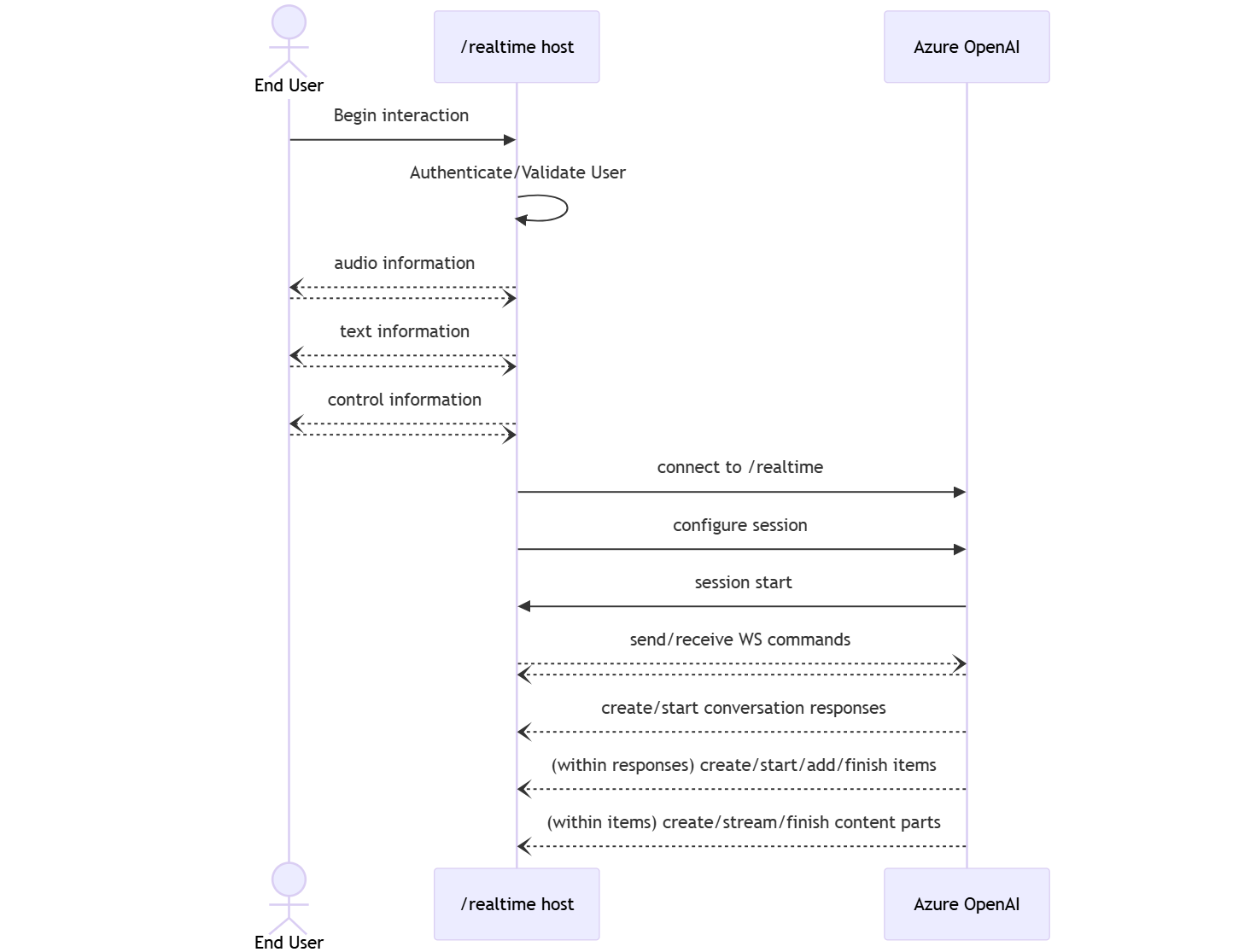
Events can be sent and received in parallel and applications should generally handle them both concurrently and asynchronously.
- A client-side caller establishes a connection to
/realtime, which starts a newsession. - A
sessionautomatically creates a defaultconversation. Multiple concurrent conversations aren't supported. - The
conversationaccumulates input signals until aresponseis started, either via a direct event by the caller or automatically by voice activity detection (VAD). - Each
responseconsists of one or moreitems, which can encapsulate messages, function calls, and other information. - Each message
itemhascontent_part, allowing multiple modalities (text and audio) to be represented across a single item. - The
sessionmanages configuration of caller input handling (for example, user audio) and common output generation handling. - Each caller-initiated
response.createcan override some of the outputresponsebehavior, if desired. - Server-created
itemand thecontent_partin messages can be populated asynchronously and in parallel. For example, receiving audio, text, and function information concurrently in a round robin fashion.
Try the quickstart
Now that you've done the above steps, you can follow the instructions in the Realtime API quickstart to get started with the Realtime API via WebSockets.
Related content
- Try the real-time audio quickstart
- See the Realtime API reference
- Learn more about Azure OpenAI quotas and limits