Developer technologies | C#
An object-oriented and type-safe programming language that has its roots in the C family of languages and includes support for component-oriented programming.
This browser is no longer supported.
Upgrade to Microsoft Edge to take advantage of the latest features, security updates, and technical support.
' cx='32' cy='32' r='32' /%3E%3Ctext x='50%25' y='55%25' dominant-baseline='middle' text-anchor='middle' fill='%23FFF' %3ENP%3C/text%3E%3C/svg%3E)
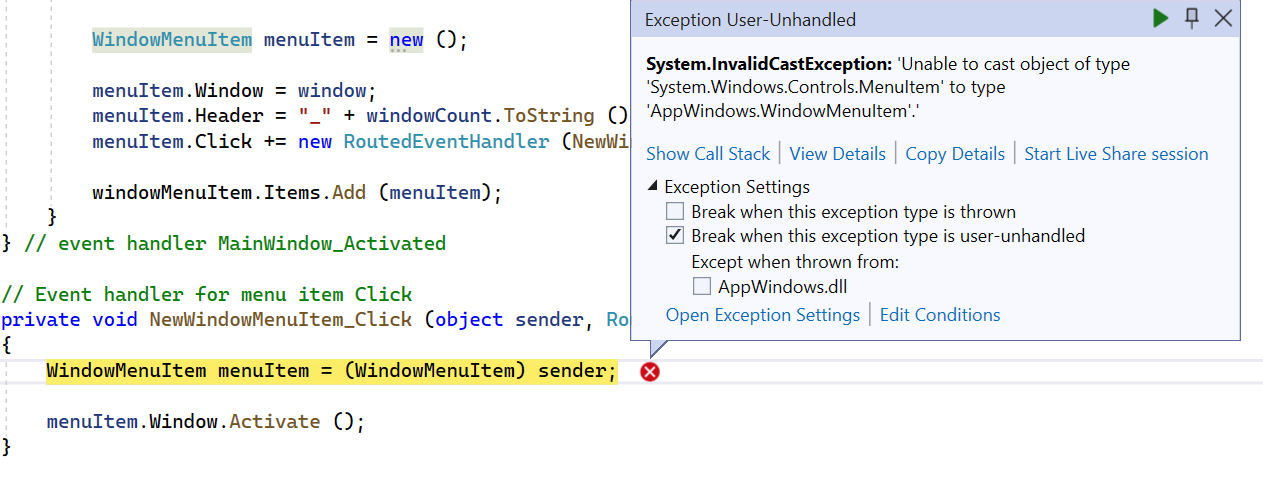
In the Windows Desktop 6.0 documentation at this link (https://learn.microsoft.com/en-us/dotnet/api/system.windows.application.windows?view=windowsdesktop-6.0) there is an example showing how to use the Windows property. I coded a WPF (.NET 6) application with that code, built it, and ran it. However, if I select the menu item File > New Window, it displays the InvalidCastException shown in the attachment. The menuItem is being created as a WindowMenuItem not a System.Windows.Controls.MenuItem so I don't know why I'm getting that exception. AppWindows is the name of my namespace. What am I doing wrong?
An object-oriented and type-safe programming language that has its roots in the C family of languages and includes support for component-oriented programming.
Answer accepted by question author
' cx='32' cy='32' r='32' /%3E%3Ctext x='50%25' y='55%25' dominant-baseline='middle' text-anchor='middle' fill='%23FFF' %3EA%3C/text%3E%3C/svg%3E)
Hi @Nicholas Piazza , Welcome to Microsoft Q&A.
For event handler for menuitem_click, please do not add it as click event in Xaml.
They are not the same, you should write newwindowmenuitem_click, don't confuse it with menuitem_click.
That's why you got this error.
you could try the following code to get what you wanted.
Xaml:
<Window x:Class="WpfApp1.MainWindow"
        xmlns="http://schemas.microsoft.com/winfx/2006/xaml/presentation"
        xmlns:x="http://schemas.microsoft.com/winfx/2006/xaml"
        xmlns:d="http://schemas.microsoft.com/expression/blend/2008"
        xmlns:mc="http://schemas.openxmlformats.org/markup-compatibility/2006"
        xmlns:local="clr-namespace:WpfApp1"
        mc:Ignorable="d"
         Title="CSharp" Height="300" Width="300" Activated="MainWindow_Activated">
    <StackPanel>
        <Menu>
            <MenuItem Header="_File">
                <MenuItem Name="newWindowMenuItem" Click="newWindowMenuItem_Click" Header="_New Window"></MenuItem>
                <Separator></Separator>
                <MenuItem Name="exitMenuItem" Click="exitMenuItem_Click" Header="E_xit"></MenuItem>
            </MenuItem>
            <MenuItem Name="windowMenuItem" Header="_Window">
            </MenuItem>
        </Menu>
        <Canvas></Canvas>
    </StackPanel>
</Window>
Code:
using System;
using System.Windows;
using System.Windows.Controls;

namespace WpfApp1
{
	/// <summary>
	/// Interaction logic for MainWindow.xaml
	/// </summary>
	public partial class MainWindow : Window
	{
		public MainWindow()
		{
			InitializeComponent();
		}
		//Add a current window counter

		private int newWindowCount = 0;

		//When the main window is active, add menu items to the submenus of windowMenuItem,
		//each menu item displays the title of the window
		void MainWindow_Activated(object sender, EventArgs e)
		{
			this.windowMenuItem.Items.Clear();
			int windowCount = 0;
			foreach (Window window in Application.Current.Windows)
			{
				++windowCount;
				MenuItem menuItem = new MenuItem();
				menuItem.Tag = window;
				menuItem.Header = window.Title;
				menuItem.Click += new RoutedEventHandler(menuItem_Click);
				this.windowMenuItem.Items.Add(menuItem);
			}
		}

		//Activate the window when the menu item is clicked
		private void menuItem_Click(object sender, RoutedEventArgs e)
		{
			MenuItem menuItem = (MenuItem)sender;
			((Window)menuItem.Tag).Activate();
		}

		//When the New button is clicked,
		//a new window is created and the current window content is set as the window title
		private void newWindowMenuItem_Click(object sender, RoutedEventArgs e)
		{
			Window win1 = new Window();
			win1.Height = 300;
			win1.Width = 300;
			++newWindowCount;
			win1.Content = win1.Title = "This is the" + newWindowCount.ToString().PadLeft(2, '0') + "mchild window.";
			win1.Show();
		}

		private void exitMenuItem_Click(object sender, RoutedEventArgs e)
		{
			Application.Current.MainWindow.Close();
		}
	}
}
Best Regards,
Jiale
If the answer is the right solution, please click "Accept Answer" and kindly upvote it. If you have extra questions about this answer, please click "Comment".
Note: Please follow the steps in our documentation to enable e-mail notifications if you want to receive the related email notification for this thread.