Microsoft Security | Intune | Configuration Manager | Other
Other Configuration Manager-related features and issues

This browser is no longer supported.
Upgrade to Microsoft Edge to take advantage of the latest features, security updates, and technical support.
' cx='32' cy='32' r='32' /%3E%3Ctext x='50%25' y='55%25' dominant-baseline='middle' text-anchor='middle' fill='%23FFF' %3ERF%3C/text%3E%3C/svg%3E)
Hi All
i want to install configuration manager admin console on one of my other server so that i can install and manage it, what is the path of this file stored in configuration manager server so that i can copy it in other server and install it.
Other Configuration Manager-related features and issues
Answer accepted by question author

Hi,
Thanks for posting in Microsoft MECM Q&A forum.
We can go to the following path to find the SCCM Console Source Files:
<Configuration Manager site server installation path>\Tools\ConsoleSetup
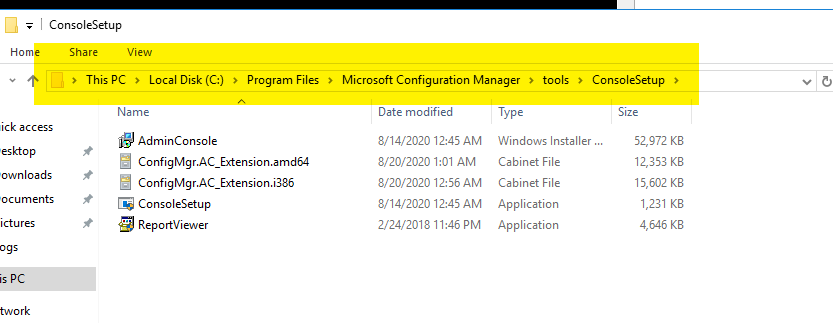
For more detailed steps and information, please refer to:
Install SCCM Console On Windows 10
Install the Configuration Manager console
Thanks for your time.
Best regards,
Simon
If the response is helpful, please click "Accept Answer" and upvote it.
Note: Please follow the steps in our documentation to enable e-mail notifications if you want to receive the related email notification for this thread.
Hi,
Just checking in to see if there is any update. May we know the current status of the question? If there is any other assistance we can provide, please feel free to let us know, we will do our best to help you.
Thanks and regards,
Simon

Hi @Rising Flight ,
I suggest you read through the official Microsoft documentation over here:
Install the Configuration Manager console
https://learn.microsoft.com/en-us/mem/configmgr/core/servers/deploy/install/install-consoles
ConsoleSetup folder on the site server: <Configuration Manager site server installation path>\Tools\ConsoleSetup
When you install a site server, it copies the console installation files and supported language packs for the site to the Tools\ConsoleSetup subfolder. Optionally, you can copy the ConsoleSetup folder to an alternate location to start the installation
----------
(If the reply was helpful please don't forget to upvote or accept as answer, thank you)
Best regards,
Leon