Microsoft Security | Intune | Configuration Manager | Other
Other Configuration Manager-related features and issues

This browser is no longer supported.
Upgrade to Microsoft Edge to take advantage of the latest features, security updates, and technical support.
' cx='32' cy='32' r='32' /%3E%3Ctext x='50%25' y='55%25' dominant-baseline='middle' text-anchor='middle' fill='%23FFF' %3EJT%3C/text%3E%3C/svg%3E)
hello,
running MECM 2006. i have created a Visio 2019 application. currently only distributing to one computer in a test device collection. the application in the software center of said computer shows as NEW.
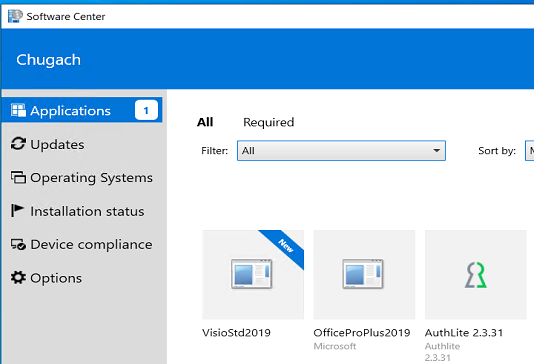
when i click on the icon i only see a greyed out UNINSTALL button. and it says INSTALLED.
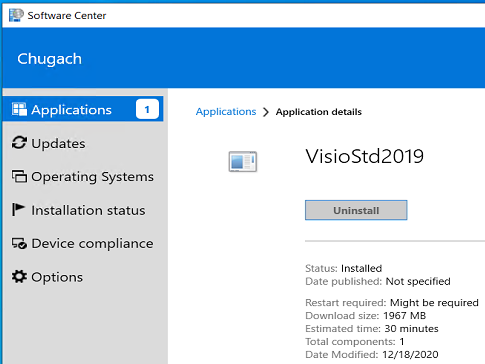
the computer does not have the application installed
is there something i can do to figure out what is happening (or not happening)?
thanks
Other Configuration Manager-related features and issues
Answer accepted by question author

@Jeffrey Tucker
Thank you for posting in Microsoft Q&A forum.
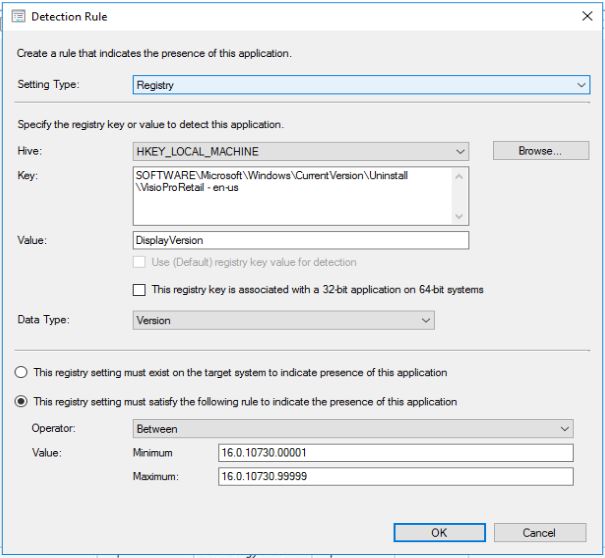
Like Saad said, if your client has met the detection rule you are configured, it will be considered as installed.
So we need to configure a specific detection rule for viso like below, you may try to install it manually in a test machine and check the registry to confirm it:
If the response is helpful, please click "Accept Answer" and upvote it.
Note: Please follow the steps in our documentation to enable e-mail notifications if you want to receive the related email notification for this thread.
@AllenLiu-MSFT thanks so much. this was a great help. now i understand. i have since setup Office, Visio, and Project VL using the following reg hives:
HKEY_LOCAL_MACHINE\SOFTWARE\Microsoft\Windows\CurrentVersion\Uninstall\ProPlus2019Volume - en-us
HKEY_LOCAL_MACHINE\SOFTWARE\Microsoft\Windows\CurrentVersion\Uninstall\VisioStd2019Volume - en-us
HKEY_LOCAL_MACHINE\SOFTWARE\Microsoft\Windows\CurrentVersion\Uninstall\ProjectStd2019Volume - en-us
i see that my issue was the incorrect reg key
i really appreciate the assistance. as a side not i also had an error in the original deployment of Office that making this change corrected it on subsequent deployments.

For application deployment issue, check the AppEnforce.log file located in "%WINDIR%\CCM\Logs" for more details.
Regards,
Youssef Saad - New blog: https://youssef-saad.blogspot.com
thanks for reply. i used your link to create my application. i used same guide for the Office2019 that did work on same test computer. my detection rule is below and matches the Office2019 settings.
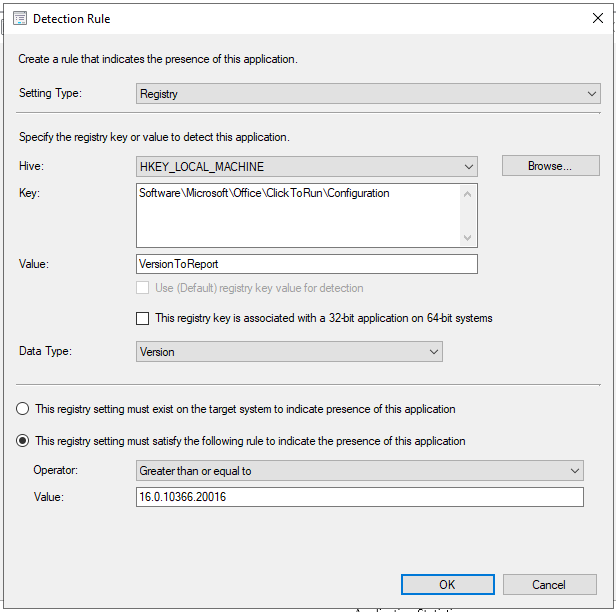
any suggestions on what my issue is or how to troubleshoot?
If you are deploying MS Visio separately, you have to set a dedicated detection method for it. The above one is for Office 2019 and this is the reason why you that the application is already compliant in the Software Center.
Regards,
Youssef Saad | New blog: https://youssef-saad.blogspot.com
Please remember to ** “Accept answer” ** for useful answers, thank you!
Hi @Jeffrey Tucker ,
You have to check the detection method on your application. Otherwise, you can use Office Deployment Tool to deploy MS Visio.
You can refer to the following guide: https://www.prajwaldesai.com/deploy-office-2019-using-sccm/
Regards,
Youssef Saad | New blog: https://youssef-saad.blogspot.com
Please remember to ** “Accept answer” ** for useful answers, thank you!