Developer technologies | Universal Windows Platform (UWP)
A Microsoft platform for building and publishing apps for Windows devices.
This browser is no longer supported.
Upgrade to Microsoft Edge to take advantage of the latest features, security updates, and technical support.
' cx='32' cy='32' r='32' /%3E%3Ctext x='50%25' y='55%25' dominant-baseline='middle' text-anchor='middle' fill='%23FFF' %3EMB%3C/text%3E%3C/svg%3E)
Hello,
Sorry for my wordings, I have expressed my requirement in the way I know.
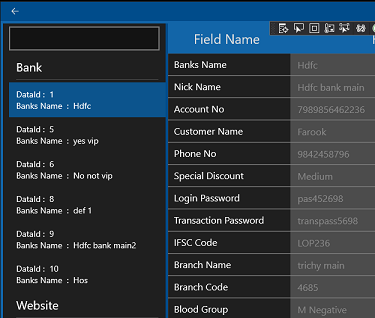
I have a listview on the left side to show the id&names of all records, as shown in the image, and a details pane on the right to show the details of the selected record. When I click on the left side NamesListView, it takes almost 1 second to load and display a record, since it has many fields-bindings in the details pane. That's not an issue I am asking.
What I need is, When I navigate in the NamesListView to view records by press the keyboard's down keys continuously, it takes the same 1 second to go to the next listview item, even if I don't need/view that record.
For example, there are 10 items in the listview, If I go to the (bottom most)10th item from the (topmost)1st item, it takes 10 seconds to reach the bottom. Actually, I don't want to view the 1 to 9 records. I want to view the 10th record only.
Please note, I don't want the user to press an Enter to show a record, as we do in Windows Explorer. In my app, I am using the selection_changed, to view the record details.
A Microsoft platform for building and publishing apps for Windows devices.
' cx='32' cy='32' r='32' /%3E%3Ctext x='50%25' y='55%25' dominant-baseline='middle' text-anchor='middle' fill='%23FFF' %3EYG%3C/text%3E%3C/svg%3E)
@MG Bhadurudeen Could you please tell me whether it takes 10s to go from 1st item to 10th item directly by mouse click? It is the expected behavior that the content of ListView item will be loaded when you press down key to enter a ListView item.
No, it doesn't take 10s to go from 1st item to 10th item directly by mouse click. It takes 1s in this case.
It takes 10s to go from 1st item to 10th item, only when using the keyboard's down key. When we use the keyboard, we can't jump from the 1st item to the 10th item, rather we should press the keyboard down key 9 times to reach the 10th item. (So it actually 9s, not 10s, it is my mistake)
I could understand that this is the default behavior, but it will annoy the user, it is not a specific requirement of mine. It is common for all. I can try with a workaround with a timer that should start processing the Selection_Changed after ~200ms, if the user has not changed his selection within that time, the Selection_Changed should be called, o/w the timer should be restarted. Though it may help, I want a neat solution from Microsoft for this common issue.
Please note, my ViewModel works are executed in just 40ms, only the rendering of the UI takes this much time.
@MG Bhadurudeen We are consulting other engineers, there may be some delays for a reply.
Hello,
Welcome to Microsoft Q&A Case.
You could try to add a flag between the loading process which rendering the detailed pane, and cancel or return the loading process when the selection changed in ListView.
There is a simple code you could refer to:
bool flag = false;

private async void listView_SelectionChanged(object sender, SelectionChangedEventArgs e)
{
    if(flag==false)
    {
        flag = true;
    }
    else if(flag==true)
    {
        flag = false;
        return;
    }
    RenderUi();
}
You could try another more complex flag to do the job, and you could try to put the return code(or other way to cancel the loading process) in the proper location as needed.
If the response is helpful, please click "Accept Answer" and upvote it.
Note: Please follow the steps in our documentation to enable e-mail notifications if you want to receive the related email notification for this thread.