Share via

Scheduling/timeline question

Anonymous
2023-03-27T20:03:41+00:00

I've got a 1500+ line schedule in Project Pro (365 version) that is linked to a PWA (Project Web App aka Project Online) instance with about 18 resources. The project is an ERP implementation. In the schedule there are about 150 or so tasks for one resource that are set to 0 Work and 0 Duration that are set as fixed duration with start and end dates. The project needs to be backward scheduled from a go-live/finish target date (May 6, 2024 in this case). So, has to be waterfall.
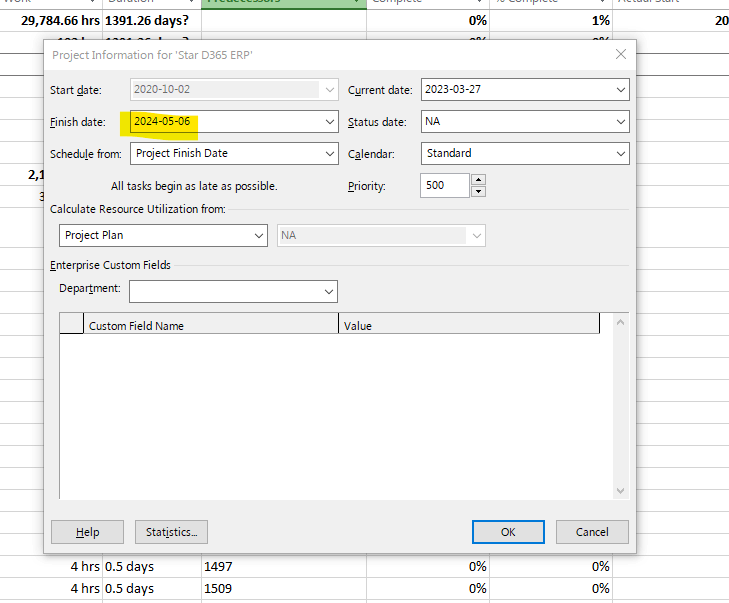
The schedule has started to collect status submissions through PWA from the resources.

The tasks were originally created in manual schedule mode and forward scheduled and set as Fixed Work (obviously except the above noted fixed Duration tasks). Once the schedule had all the records in it and work/duration estimates and resources assigned and calendars with holidays marked as exceptions and such, I then switched all but the fixed duration tasks to auto-scheduled and levelled the whole schedule. Primarily was looking to see how far out Project would calculate the end day to be if we were just chugging forward.

I then switched all tasks except fixed duration back to manual scheduled, wiped out the calculated dates and switched to backward (end date) and then releveled telling Project to only level within slack (of which there is very little).

However, that did NOT cause all tasks to try to fit into the end date as I was expecting.

Sooooo, I marked all the tasks (except fixed Duration) with an "As early as possible" constraint and releveled.

But I'm still getting tasks scheduled wayyyyyyyy past the End Date. Which is most readily noticeable in the timeline since it shows the farthest date. Plus, I'm getting tasks pushed wayyyyy into the past as well for start dates.
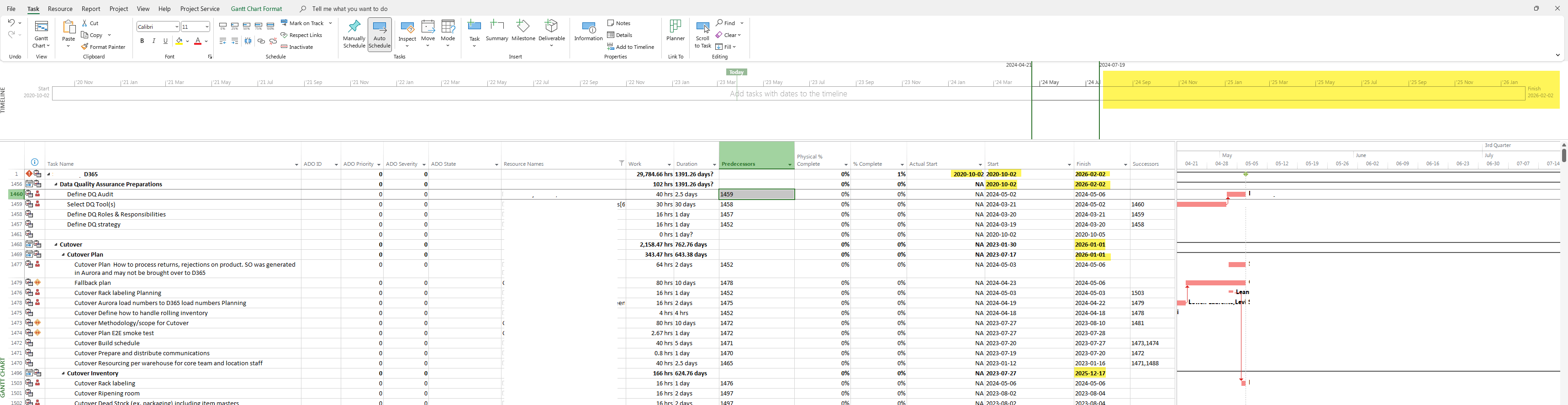
I can't seem to get Project to properly backward schedule from the date set in the Project Information dialogue without moving tasks to start in the past and finish past the end date.

What I'm looking to have happen is to have no task start earlier than March 20, 2023 (so 1 week back) and no task go past the May 6, 2024 end date and then see what resources will be the most overallocated so we can then make human decisions about resequencing some bigger blocks of work as fully or partially concurrent or whatever. But I need to constrain the schedule between those dates first to be able to see that.

Microsoft 365 and Office | Project | For business | Windows

Locked Question. This question was migrated from the Microsoft Support Community. You can vote on whether it's helpful, but you can't add comments or replies or follow the question.

0 comments No comments

5 answers

Sort by: Most helpful
  1. John Project 49,705 Reputation points Volunteer Moderator
    2023-03-28T02:12:01+00:00

    Lroges_aria,

    There are normally two facets to the calendar. One is the holidays that are universal to the whole plan. Those are handled by exceptions to a custom calendar, perhaps based on the Standard, and it is designated as the Project Calendar. The other are resource unique exceptions (i.e. PTO) and those are handled by exceptions to the resource Base Calendar. Task calendars are a separate item unique to a given task. For example, a task that, due to other constraints, can only be performed on Monday and Tuesday of any given week. Your description of the calendar icon on every task doesn't quite fit that definition. But, if you are satisfied with your calendar set up, then go with it.

    Here's another suggestion for the UAT tasks that you want to show but not impact schedule parameters. Put fixed duration tasks wherever appropriate in the plan with a "start-no-earlier" constraint and a duration appropriate for the task to be done. Leave them auto-scheduled. To make them relevant, set their successor as the final milestone in the plan. The tasks will be in the plan but not be on the critical path.

    If you want to set up the whole plan to fit within your start and finish constraints and let leveling help work out overallocations, I'd first remove all intermediate deadlines and just set a deadline on the finish milestone. That will allow you to effectively use leveling within available slack. Once the plan is leveled as much as the leveling algorithm can, you will see the remaining overallocations and can make adjustments in tasking and resources to give a final workable plan. Then if you want to insert intermediate deadlines on certain tasks, add them to the final plan. The whole thing will be a work in process but that's what project management is all about

    Here's a screen shot illustrating the concepts in the last two paragraphs.

    Image

    I won't be surprised is Dale and/or Trevor jump in with their suggestions. They may see something that I missed.

    John

    Was this answer helpful?

    0 comments No comments
  2. Anonymous
    2023-03-27T23:01:11+00:00

    The calendar icon is there because I explicitly set the calendar to the "standard" calendar. However, with enterprise resources in PWA you can set exception periods for each resource in their enterprise calendar for things like holidays and PTO's and such. So, there is really just one calendar with exceptions for the different resources.

    I can't inactivate the fixed duration "bucket" tasks because then they won't appear in PWA for that resource to be able to complete. Hence, my choice to set the duration on those with the deadline and the 'finish no later than' constraint. Couldn't think of another way to have the tasks in there, consume that resource for that period, and yet not have the tasks "artificially" push out the dates. If there's another way to accomplish that, I would certainly be happy to know.

    Your point #4 "Set a Deadline for the project finish date". Could you help me with what specifically do you mean? There's deadlines on tasks, but not at the whole project level as far as I know. Again, happy to be proven wrong there! And I wouldn't want to get into setting individual task deadlines across 1500 tasks because then the software isn't calculating anything. It just becomes a task list at that point. Expensive one 😉.

    Was this answer helpful?

    0 comments No comments
  3. John Project 49,705 Reputation points Volunteer Moderator
    2023-03-27T22:40:50+00:00

    Lrogers_aria

    If the intent is to keep the UAT tasks out of the plan then zero duration is one way to do it but you could also leave them with a fixed duration appropriate for the activity and then inactivate them.

    But, I think part of the issue is all the jumping around (i.e. auto, manual, leveling, re-leveling, schedule from start, schedule from finish) has got things really bollixed up. How about this,

    1. Set all tasks as auto-scheduled. If the special tasks are zero or inactivated they can still be auto
    2. Clear all leveling
    3. Set Project to schedule from the start
    4. Set a Deadline for the project finish date
    5. Set all tasks to, "as-soon-as-possible"

    You indicate you have custom calendars with holidays. Is that why all the tasks in your screen shot show a task calendar? If so, then that's okay but not the best approach. When the custom calendar is for the whole plan, it should be designated as the Project Calendar. The Task Calendar field should then be used if any task has an exception to the Project Calendar. What is the Base Calendar for each resource? Normally it would be the Project Calendar unless a particular resource has unique exceptions. If one or more tasks do indeed need their own task calendar, has the option to ignore resource calendars for those task been appropriately set?

    Once all that is squared away, try leveling within the available slack. It should limit tasks so they don't get scheduled beyond the finish deadline. Let us know how it works for you.

    John

    Was this answer helpful?

    0 comments No comments
  4. Anonymous
    2023-03-27T21:11:23+00:00

    Hi John,

    Thanks for the reply. I zeroed those tasks for that one resource and set those tasks to fixed duration so they wouldn't be calculated by Project. They need to be in the schedule so that resource can mark them complete (they're UAT tasks) in PWA. Essentially that resource has a period of time to get them all done in and it doesn't matter very much in what order.

    Also as mentioned, all the tasks, except the fixed duration ones for that one resource, are set to auto scheduled as can be seen in the screenshot.

    Was this answer helpful?

    0 comments No comments
  5. John Project 49,705 Reputation points Volunteer Moderator
    2023-03-27T20:28:00+00:00

    Lrogers_aria

    I'm a little confused. You say you have several (150) tasks with one resource assigned that have zero duration. A zero duration task is not a task at all, its a milestone and should never have a resource assigned. A milestone is a point in time, the start and finish are identical so fixed duration is redundant.

    It sounds like you've been doing a lot a jumping around with the plan setup. As far as I know there is no way to constrain a plan with both a fixed start and finish date. The best you can do is to set it up with either a start or finish and then tweak tasks and resources until you have what you need. And of course that will only be good until the first blip occurs that throws it off.

    I suggest you re-think your zero duration tasks and also set all tasks as auto-scheduled.

    John

    Was this answer helpful?

    0 comments No comments