Developer technologies | C#
An object-oriented and type-safe programming language that has its roots in the C family of languages and includes support for component-oriented programming.
This browser is no longer supported.
Upgrade to Microsoft Edge to take advantage of the latest features, security updates, and technical support.
' cx='32' cy='32' r='32' /%3E%3Ctext x='50%25' y='55%25' dominant-baseline='middle' text-anchor='middle' fill='%23FFF' %3EJL%3C/text%3E%3C/svg%3E)
I am trying to save multiple lists of objects. The classes of these object is like this:
class Company

{

  string Name;

  List<Person> Employees= new List<Person>()

//...

}

The Person is another class:

class Person

{

int ID;

string Name;

//....

}
I found that even I use "JsonSerializerOptions { IncludeFields = true, ReferenceHandler = ReferenceHandler.Preserve, WriteIndented = true }); " as someone taught me, in the string that save the list of companies, I still have the information of the employees (ID, Name...). I want to save the information of all the companies in one file and all the information of person in another file. Is it possible?

@Junfeng Liang , you could try to use Json.Net to delete the specific element to generate two different json files.
Here is a code example you could refer to.
class Program
    {
        static void Main(string[] args)
        {
            Company company = new Company();
            company.Name = "test1";
            company.Employees = new List<Person>() { new Person() { ID = 1001, Name = "emp1" }, new Person() { ID = 1002, Name = "emp3" }, new Person() { ID = 1003, Name = "emp3" } };
            string jsonString = JsonConvert.SerializeObject(company);
            JObject jo = JObject.Parse(jsonString);
            jo.Property("Employees").Remove();
            string json1 = jo.ToString();
            File.WriteAllText("test1.json", json1);
            jo = JObject.Parse(jsonString);
            jo.Property("Name").Remove();
            string json2 = jo.ToString();
            File.WriteAllText("test2.json", json2);


        }
    }


    class Company

    {

        public string Name { get; set; }

        public List<Person> Employees { get; set; }


    }


    class Person

    {

        public int ID { get; set; }

        public string Name { get; set; }


    }
Result:
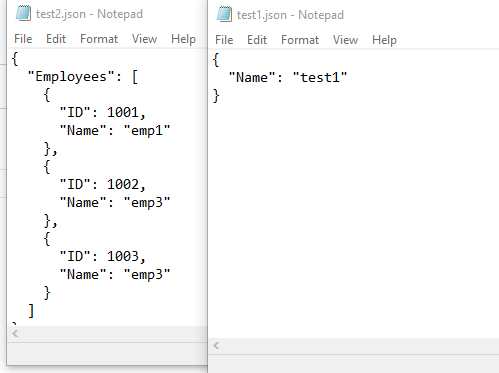
If the answer is the right solution, please click "Accept Answer" and kindly upvote it. If you have extra questions about this answer, please click "Comment".
Note: Please follow the steps in our documentation to enable e-mail notifications if you want to receive the related email notification for this thread.
So you manually edit the serialization string. That is one way.
I actually can save data in one file What I don't want is redudant information. I ended up making another mega class that contained the lists of "companies" and "employees" as properties and then serialized the object of the maga class. But I do learn from your code. Thank you all the same.