Share via

Hyper-v checkpoint

Alain Sorrentini 26 Reputation points
2022-01-27T06:39:53.427+00:00

Hi all,

first of all, sorry for my poor and wrong English!
Two days ago, I applied an update on my Windows 10 virtual machine. I don't know why Hyper-V created a checkpoint that showing the date 25.01.2022 and the time. Below this line, there is only one entry that says Now. My VM is started, but I want to delete the checkpoint. How can I wipe the checkpoint and make sure I don't lose anything and don't break the current VM?

Why do you think Hyper-V has created this checkpoint?

Many thank for your help.
BR
Alain

Windows for business | Windows Client for IT Pros | Storage high availability | Virtualization and Hyper-V
0 comments No comments

2 answers

Sort by: Most helpful
  1. Eric Siron 1,596 Reputation points MVP
    2022-01-31T21:01:01.583+00:00

    Right-click on the checkpoint and delete it. That will merge everything that happened since the checkpoint was taken into the parent. You won't lose or break anything.
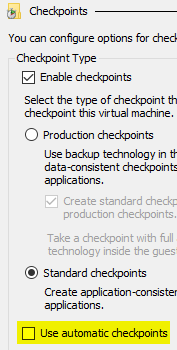
    Client Hyper-V on Windows 10 takes automatic checkpoints by default. You can disable that for the VM on its properties pages. Go to the "Checkpoints" tab and uncheck "Use automatic checkpoints."
    169890-image.png

    Was this answer helpful?

    0 comments No comments

  2. Alain Sorrentini 26 Reputation points
    2022-01-27T14:16:01.467+00:00

    Hi all,

    does anyone have a tip?

    Thanks
    AS

    Was this answer helpful?

    0 comments No comments

Your answer

Answers can be marked as 'Accepted' by the question author and 'Recommended' by moderators, which helps users know the answer solved the author's problem.
