Microsoft 365 and Office | SharePoint | For business | Windows
A group of Microsoft Products and technologies used for sharing and managing content, knowledge, and applications.

This browser is no longer supported.
Upgrade to Microsoft Edge to take advantage of the latest features, security updates, and technical support.
' cx='32' cy='32' r='32' /%3E%3Ctext x='50%25' y='55%25' dominant-baseline='middle' text-anchor='middle' fill='%23FFF' %3ELD%3C/text%3E%3C/svg%3E)
Hi,
Given a layout like this:
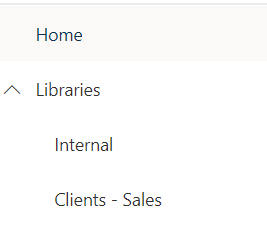
Can we make the Libraries drop down expanded by default, across lots of Team Sites? The current design is generally poor UI/UX anyway since if you expand Libraries, click a Library (which navigates to a new page), Libraries is collapsed again!
Can people 'Pin' favourite document libraries to outside of the Libraries drop down so they don't have to keep expanding the Libraries drop downs
Also is it possible to remove the left vertical nav bar:

Thanks
A group of Microsoft Products and technologies used for sharing and managing content, knowledge, and applications.
' cx='32' cy='32' r='32' /%3E%3Ctext x='50%25' y='55%25' dominant-baseline='middle' text-anchor='middle' fill='%23FFF' %3ECM%3C/text%3E%3C/svg%3E)
Hi @Lanky Doodle ,
According to your description, do they have to access all libraries? If not you could set library unique permission for different users then expand library like resing said.
You could use following powershell command to disable app bar in SharePoint online.
PowerShell command:
Connect-SPOService -Url https://xxx-admin.sharepoint.com -credential ******@xxx.onmicrosoft.com

Set-SPOTemporarilyDisableAppBar $true
If the answer is helpful, please click "Accept Answer" and kindly upvote it. If you have extra questions about this answer, please click "Comment".
Note: Please follow the steps in our documentation to enable e-mail notifications if you want to receive the related email notification for this thread.
Hi @Lanky Doodle ,
Is there any update on this thread? Comment here if you still need any help.

On a SharePoint site, you can edit the navigation menu. For example, you can promote any of the sub-links for the individual libraries. After promoting the links, they will always show by default for all users of the site.
Also, for libraries you visit often as a user, you can add them to your shared libraries in OneDrive so you can navigate back to them.
Thanks for reply.
That example I gave was a "test" library. Our real libraries have 10s of sub-links which would become really messy really quickly if we promoted them all, because of the vertical scrolling required. Each user will have different libraries they visit the most but what you suggested will apply to all users.
Microsoft dropped a massive ball here by the sounds of it!