Microsoft 365 and Office | OneDrive | For business | Windows
A Microsoft file hosting and synchronization service.

This browser is no longer supported.
Upgrade to Microsoft Edge to take advantage of the latest features, security updates, and technical support.
' cx='32' cy='32' r='32' /%3E%3Ctext x='50%25' y='55%25' dominant-baseline='middle' text-anchor='middle' fill='%23FFF' %3EEK%3C/text%3E%3C/svg%3E)
Hi
I have a customer that has 4 x Microsoft 365 E3. They want to increase the Onedrive Storage, but cannot because they don't have 5 users:
Microsoft will provide up to 5 TB of initial OneDrive storage per E3/E5 user based on the default quota for the tenant. Additional storage can be requested by contacting Microsoft support. Subscriptions for fewer than five E3/E5 users receive 1 TB of OneDrive storage that cannot be expanded. F3 plans include 2GB OneDrive storage per user.
Can they combine different subscriptions or do they really have 5 x M365 E3 user? Or is it possible to have 4 x M365 E3 and 1 x Onedrive Plan 1, so in total 5 users.
Thanks
Grtz
Karim
A Microsoft file hosting and synchronization service.
End-to-end process of building, validating, and distributing custom apps and add-ins across Microsoft 365 platforms

Welcome to Q&A forum ~
I want to help you, but tag "office-onedrive-client-itpro" focuses more on general issue of OneDrive, including deployment, installation, and troubleshooting like file synchronization.
According to following screenshot taken from "Set the default storage space for OneDrive users", I would like to sugget you contact Microsoft support to confirm it.
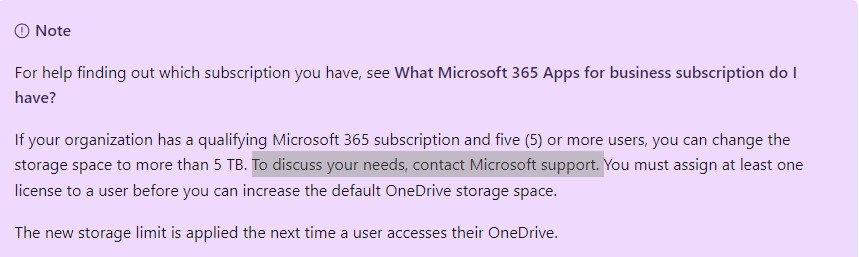
Besides, in my opinion, I do not think "4 x M365 E3 and 1 x Onedrive Plan 1" meet the conditions to increase storage, as OneDrive for Business (Plan 1) has 1 TB per user instead of unlimited individual cloud storage. So OneDrive for Business (Plan 1) is not one of the qualifying plans as the image says.

For more details, please refer to "Compare OneDrive cloud storage pricing and plans", the screenshot above is taken from it.
Hope the information could be helfpul.
If the answer is helpful, please click "Accept Answer" and kindly upvote it. If you have extra questions about this answer, please click "Comment".
Note: Please follow the steps in our documentation to enable e-mail notifications if you want to receive the related email notification for this thread.
I am checking this thread, if there is any update, welcome to post back.