Microsoft 365 and Office | SharePoint | Development
The process of building custom applications and tools that interact with Microsoft SharePoint, including SharePoint Online in Microsoft 365.

This browser is no longer supported.
Upgrade to Microsoft Edge to take advantage of the latest features, security updates, and technical support.
' cx='32' cy='32' r='32' /%3E%3Ctext x='50%25' y='55%25' dominant-baseline='middle' text-anchor='middle' fill='%23FFF' %3EY%3C/text%3E%3C/svg%3E)
Hi everyone,
I formatted my SharePoint list column using JSON.
I created a json code using pow, but it doesn't have exponential notation unless it has more than 21 digits.
{
"$schema": "https://developer.microsoft.com/json-schemas/sp/v2/column-formatting.schema.json",
"elmType": "div",
"txtContent": "=pow('@currentField',1)"
}
For example, if it is "100000000000", I want to display "1E + 11".
How can i do this with json formating?
thank you appreciate your help here.
Note: I want to change the display format of a numeric column directly instead of creating another new column.
thank you.

Hi @Yuki365
Are the values in your list a multiple of 10? If the value is 16,32..., what is the value you want to get?
Hi, @Yi Lu_MSFT
Thank you for your reply.
The numerical values to be handled are as follows. This may not be a multiple of 10.
The value to be processed indicates the concentration of the chemical substance, and the numerical value from the 10th power to the 13th power is handled.
What I want to achieve is the same as formatting an Excel cell in exponential notation, like an attachment file.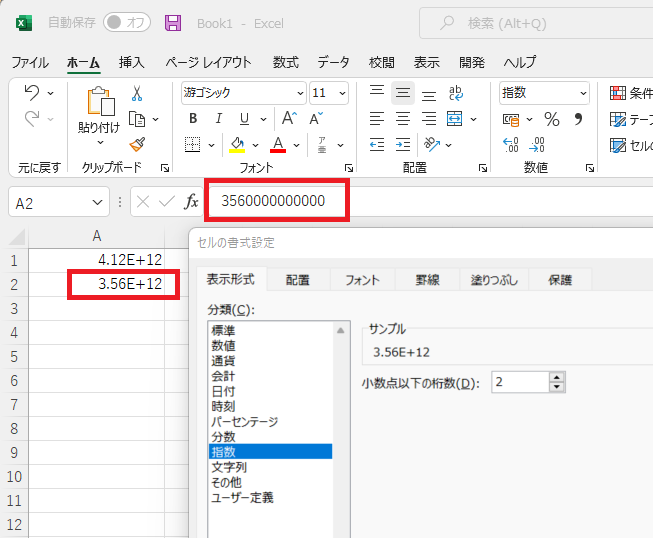
for example:
4120000000000 = 4.12E + 12
3560000000000 = 3.56E + 12
As a side note, I used "POW" for the JSON code because it automatically switches to exponential notation when it reaches the 21st power or higher, so I set the exponent to 1 so that the value does not change. I'm not sure if I can use this function.
In the SharePoint List, it is only necessary to know the approximate number, and it is ideal to be able to write up to two decimal places.
Hi @Yuki365
In column formatting, we could not use pow and round, so we could not get the value you want and write up to two decimal places directly.
As a workaround, you said "The value to be processed indicates the concentration of the chemical substance, and the numerical value from the 10th power to the 13th power is handled", so I suggest you to use the following code to replace pow:
{
  "$schema": "https://developer.microsoft.com/json-schemas/sp/v2/column-formatting.schema.json",
  "elmType": "span",
  "txtContent": "=if(((((@currentField)/10000000000<10,(@currentField)/10000000000 +'E+10',if((@currentField)/100000000000<10,(@currentField)/100000000000 +'E+11',if((@currentField)/1000000000000<10,(@currentField)/1000000000000 +'E+12',(@currentField)/10000000000000 +'E+13')))"
}
The result will be:

If the answer is helpful, please click "Accept Answer" and kindly upvote it. If you have extra questions about this answer, please click "Comment".
Note: Please follow the steps in our documentation to enable e-mail notifications if you want to receive the related email notification for this thread.