

How To Correctly Convert Invoke-Restmethod get objects into a table then parse the table in email body and send using powershell

Benard Mwanza 1,006 Reputation points
2022-05-25T16:53:16.897+00:00

Hello,

Have created a custom PowerShell script that gets unread emails count, unflagged email count and total inbox email count for all users in office 365 tenant. I'm using Microsoft graph API to achieve this. The script is currently able to get that information and save well in a csv file.

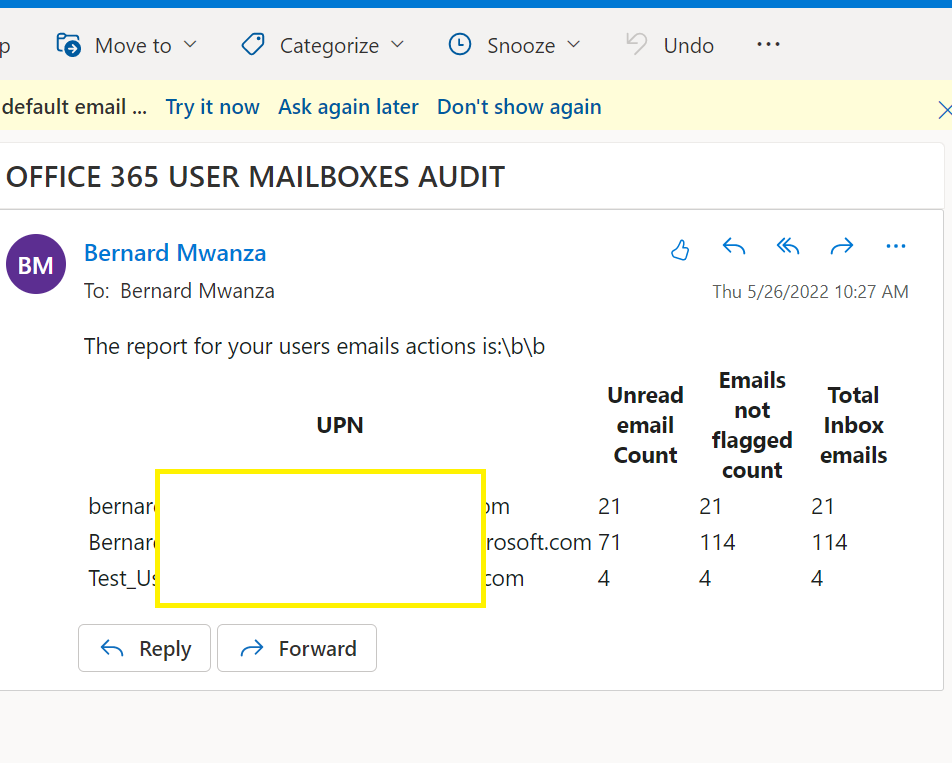
However, i need to do something else, i need to send the response data through email right after i get the itterable response objects from invoke-restmethod. The results should be emailed in format of a table, just like the way the csv output look like.

I need to have the data formatted into a table then emailed in the email body(Just the table to resemble the csv output):
205369-table-results-to-look-like.png

I'm facing two problems so far,
1) I'm unable to format the data into a table then parse in the email body.
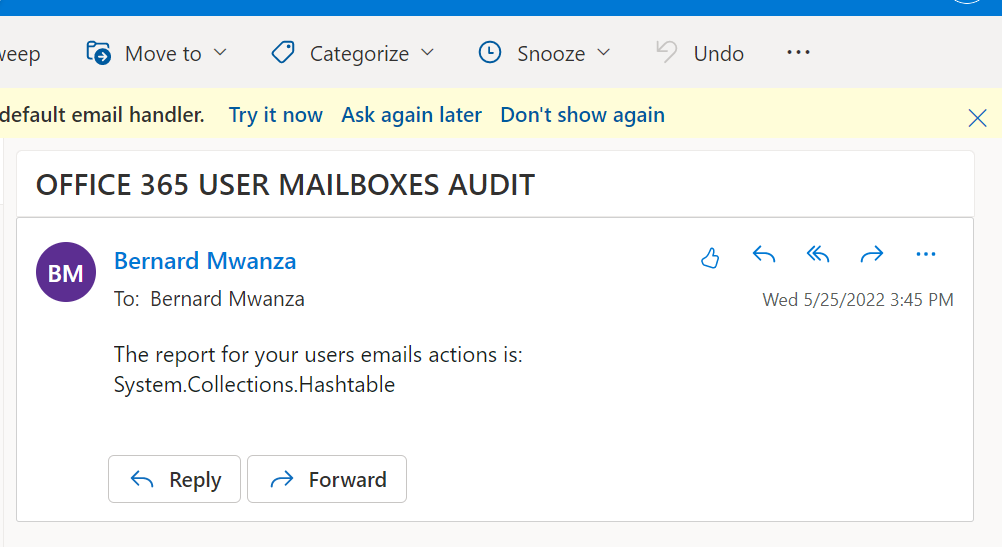
Have tried to create a table using PowerShell, then parse the hashed table in email body, but i get this response in the email.
205591-current-email-response.png

2) Depending on the number of users in the tenant, the script sends email for each user in the loop block.
I understand this behavior is being caused by the email code inside the loop block.
How can i email the results just in a single table, without having the email being sent for each user. Which is the best spot in the script to place the email code.

In summary.
I need assistance on how to format the data i get from invoke-restmethod into a table then parse the table in the email body.

This is my entire script

$connectiondetails = @{  
  
        # This ids and secret are present in the overview and certificate & secret page of our application in azure AD  
      
        # Tenant ID here  
        'tenantid' = "tenantidhere"  
      
        # Application (client) ID here  
        'clientid' = "appclientidhere"  
      
        # Secret id here  
        'ClientSecret' = "appsecrethere" | ConvertTo-SecureString -AsPlainText -Force  
      
    }  
      
  
$token = Get-MsalToken @connectiondetails  
$tokenid_ = $token.AccessToken  
  
# Access token from our azure ad oauth app  
$accessToken = $tokenid_  
  
  
# $mailUsers = get-content "C:\temp\usersfile.txt"  
# Reporting csv file | we can pass the results to an email  
# $reportfile = "C:\temp\new_users.csv"  
# Add your administrator password  
$password = ConvertTo-SecureString "passwordhere" -AsPlainText -Force  
  
# Add your administrator login UPN  
$upn = "UPNaddresshere"  
  
# Automated login to azure AD  
$AppCredential = New-Object System.Management.Automation.PSCredential($upn, $password)  
connect-azuread -Credential $AppCredential  
  
# grab all users in azure AD  
$mailUsers = Get-AzureADUser   
  
foreach($mailUser in $mailUsers){  
  
# grab all users UPNs      
$mail_user = $mailUser.UserPrincipalName  
  
# grab unread emails count  
$graphuri = "https://graph.microsoft.com/v1.0/users/$mail_user/mailfolders/Inbox/messages?filter=isRead ne true&count=true"  
  
# Grab unflagged emails count  
$graphuri_1 = "https://graph.microsoft.com/v1.0/users/$mail_user/mailfolders/Inbox/messages?$filter=flag/flagStatus ne 'flagged' & flag/flagStatus ne 'complete'&count=true"  
  
# grab total inbox emails count  
$graphuri_2 = "https://graph.microsoft.com/v1.0/users/$mail_user/mailfolders/Inbox/messages?$skip=0&count=true"  
  
$resp = Invoke-RestMethod -Method get -Uri $graphuri -ContentType "application/json" -Headers @{Authorization=("bearer {0}" -f $accessToken)}  
  
$resp_1 = Invoke-RestMethod -Method get -Uri $graphuri_1 -ContentType "application/json" -Headers @{Authorization=("bearer {0}" -f $accessToken)}  
  
$resp_2 = Invoke-RestMethod -Method get -Uri $graphuri_2 -ContentType "application/json" -Headers @{Authorization=("bearer {0}" -f $accessToken)}  
  
  
# Creating a new ps object to host our response information to a csv file  
# We can send the response data to an email directly  
# $record=New-Object PSObject  
  
# $record | Add-Member NoteProperty -Name "UPN" -Value $mail_user  
  
# $record | Add-Member NoteProperty -Name "Unread email Count" -Value $resp.'@odata.count'  
  
# $record | Add-Member NoteProperty -Name "Emails not flagged count" -Value $resp_1.'@odata.count'  
# $record | Add-Member NoteProperty -Name "Total Inbox emails" -Value $resp_2.'@odata.count'  
# $record | export-csv $reportfile -NoTypeInformation -Append  
  
# # system pause  
# Start-Sleep -Seconds 1.5  
# Create a powershell table  
$hash = @{UPN = $mail_user; Total_Unread_Email_Count=$resp.'@odata.count'; Total_Unflagged_Emails_Count=$resp_1.'@odata.count'; Total_Inbox_Emails_Count=$resp_2.'@odata.count'}  
  
# $newhash = ConvertFrom-StringData -StringData $hash -Delimiter '|'  


# send email here  
$SMTP = "smtp.office365.com"  
$From = "fromemailhere"  
$To = "toemailhere"  
$Subject = "OFFICE 365 USER MAILBOXES AUDIT"  
$Body = "The report for your users emails actions is: `n$hash"   
$Email = New-Object Net.Mail.SmtpClient($SMTP, 587)  
$Email.EnableSsl = $true  
$Email.UseDefaultCredentials = $false;  
$Email.Credentials = New-Object System.Net.NetworkCredential("emailaddress", "passwordhere");  
$Email.Send($From, $To, $Subject, $Body)  
  
  
}  
Windows for business | Windows Server | User experience | PowerShell
Microsoft Security | Microsoft Graph
0 comments No comments
{count} votes

Answer accepted by question author
  1. Rich Matheisen 48,026 Reputation points
    2022-05-25T19:05:40.69+00:00

    You'd want to build an array of PSCustomObjects, that looks something like this:

    $rows = [PSCustomObject]@{UPN = 'bernard@bernarc'; "Unread email Count" = 21;"Emails not flagged count" = 21;"Total Inbox emails" = 21},  
            [PSCustomObject]@{UPN = 'BernardMwanza@'; "Unread email Count" = 69;"Emails not flagged count" = 99;"Total Inbox emails" = 99},  
            [PSCustomObject]@{UPN = 'Test_Userberna@'; "Unread email Count" = 4;"Emails not flagged count" = 4;"Total Inbox emails" = 4}  
    

    I haven't run this, but add your code to it in the appropriate places:

    $body = '<!DOCTYPE html PUBLIC "-//W3C//DTD XHTML 1.0 Strict//EN"  "http://www.w3.org/TR/xhtml1/DTD/xhtml1-strict.dtd">  
    <html xmlns="http://www.w3.org/1999/xhtml">  
    <head>  
    <title>MY HTML MESSAGE BODY</title>  
    </head><body>  
    The report for your users emails actions is:\b\b  
    '  
      
    $body = "The report for your users emails actions is:\b\b"  
    $props = @{ SMTPServer = "smtp.office365.com"  
                From = "fromemailhere"  
                To = "toemailhere"  
                Subject = "OFFICE 365 USER MAILBOXES AUDIT"  
                EnableSsl = $true  
                Port = 587  
                BodyAsHtml = $true  
                Credentials = New-Object System.Net.NetworkCredential("emailaddress", "passwordhere");  
    }  
    [array]$rows = @()  
      
    # YOUR code to get the list of users, connections, tokens, etc. goes here  
      
    ###### process the users here  
    foreach ($mailUser in $mailUsers) {  
          
        # grab all users UPNs      
        $mail_user = $mailUser.UserPrincipalName  
             
        # grab unread emails count  
        $graphuri = "https://graph.microsoft.com/v1.0/users/$mail_user/mailfolders/Inbox/messages?filter=isRead ne true&count=true"  
             
        # Grab unflagged emails count  
        $graphuri_1 = "https://graph.microsoft.com/v1.0/users/$mail_user/mailfolders/Inbox/messages?$filter=flag/flagStatus ne 'flagged' & flag/flagStatus ne 'complete'&count=true"  
             
        # grab total inbox emails count  
        $graphuri_2 = "https://graph.microsoft.com/v1.0/users/$mail_user/mailfolders/Inbox/messages?$skip=0&count=true"  
             
        $resp = Invoke-RestMethod -Method get -Uri $graphuri -ContentType "application/json" -Headers @{Authorization = ("bearer {0}" -f $accessToken) }  
             
        $resp_1 = Invoke-RestMethod -Method get -Uri $graphuri_1 -ContentType "application/json" -Headers @{Authorization = ("bearer {0}" -f $accessToken) }  
             
        $resp_2 = Invoke-RestMethod -Method get -Uri $graphuri_2 -ContentType "application/json" -Headers @{Authorization = ("bearer {0}" -f $accessToken) }  
             
      
        $rows += [PSCustomObject]@{  
            UPN                        = $mail_user  
            "Unread email Count"       = $resp.'@odata.count'  
            "Emails not flagged count" = $resp_1.'@odata.count'  
            "Total Inbox emails"       = $resp_2.'@odata.count'  
        }  
    }  
      
    $body += $rows | ConvertTo-Html -Fragment  
      
    Send-MailMessage @props -body $body  
      
    # you can export the $rows array to a CSV here (no need to append):  
    $rows | Export-CSV  $reportfile -NoTypeInformation  
    

0 additional answers

Sort by: Most helpful

Your answer

Answers can be marked as 'Accepted' by the question author and 'Recommended' by moderators, which helps users know the answer solved the author's problem.