Microsoft Security | Intune | Configuration Manager | Application
Managing applications through Configuration Manager in Intune

This browser is no longer supported.
Upgrade to Microsoft Edge to take advantage of the latest features, security updates, and technical support.
' cx='32' cy='32' r='32' /%3E%3Ctext x='50%25' y='55%25' dominant-baseline='middle' text-anchor='middle' fill='%23FFF' %3EB%3C/text%3E%3C/svg%3E)
Ok, so I have scoured the web for the answer but nothing I found is helping me find the issue...When deploying Notepad++ or Adobe Creative Cloud I get the following error in Software Center.
The software could not be found on any servers at this time.
AppEnforce log has the following:
+++ Starting Install enforcement for App DT "Adobe Creative Cloud - Acrobat Pro" ApplicationDeliveryType - ScopeId_D9F78E76-3F16-4906-B357-72D88B3184A4/DeploymentType_5d2b2e3d-122b-413c-8163-77f5614fa640, Revision - 4, ContentPath - C:\Windows\ccmcache\2, Execution Context - Any
Performing detection of app deployment type Adobe Creative Cloud - Acrobat Pro(ScopeId_D9F78E76-3F16-4906-B357-72D88B3184A4/DeploymentType_5d2b2e3d-122b-413c-8163-77f5614fa640, revision 4) for system.
+++ Application not discovered. [AppDT Id: ScopeId_D9F78E76-3F16-4906-B357-72D88B3184A4/DeploymentType_5d2b2e3d-122b-413c-8163-77f5614fa640, Revision: 4]
App enforcement environment:
Context: Machine
Command line: msiexe /i "Adobe Acrobat.msi" /qn /l*v "C:\logs\AdobeInstall.txt"
Allow user interaction: No
UI mode: 1
User token: null
Session Id: 2
Content path: C:\Windows\ccmcache\2
Working directory: AppEnforce 6/13/2022 12:57:05 PM 3052 (0x0BEC)
Prepared working directory: C:\Windows\ccmcache\2
Invalid executable file msiexe
CMsiHandler::EnforceApp failed (0x87d01106).
AppProvider::EnforceApp - Failed to invoke EnforceApp on Application handler(0x87d01106).
CommenceEnforcement failed with error 0x87d01106.
Method CommenceEnforcement failed with error code 87D01106
++++++ Failed to enforce app. Error 0x87d01106. ++++++
When I run the installation via commandline it works with no issues. I have deployed Notepad++ several times in different iterations of SCCM and it is very aggravating that I am getting an error for something I have done before. Any insight would greatly be appreciated! I have a feeling it may be the detection method but it doesnt explain the "The software could not be found on any servers at this time." as I have not seen that before since working with SCCM since 2012. I have updated and verified the Client DP SCCM Certificate, Redistrubited the content on the DP, and confirmed my code via the commandline on a test machine. Some applications install just fine but these 2 are the latest failures....
Thanks.
Managing applications through Configuration Manager in Intune
Other Configuration Manager-related features and issues
' cx='32' cy='32' r='32' /%3E%3Ctext x='50%25' y='55%25' dominant-baseline='middle' text-anchor='middle' fill='%23FFF' %3ERH%3C/text%3E%3C/svg%3E)
@Anonymous
Long time no updates. Is there any updates or questions? Perhaps that the issue has been resolved. Would you mind sharing the answer on this forum, please. I believe it will be useful for other guys who have the related situation. Please don't hesitate to inform me if there are any questions.
Also we could review the AppDiscovery.log and AppEnforce.log to get more details.
Best regards,
Rita
@Anonymous
What is the Deployment Types of the application? What is the suffix of the application package? .exe or .msi
Please help to confirm whether the .EXE application has been installed on the affected CM client or not. It will be better if you could provide the AppDiscovery.log and AppEnforce.log for reference in the affected CM client.
As far as I know, the application package with .exe suffix is recommended to use the Script Installer deployment type.
Please refer to the below screenshot to check the Deployment Types of your application.
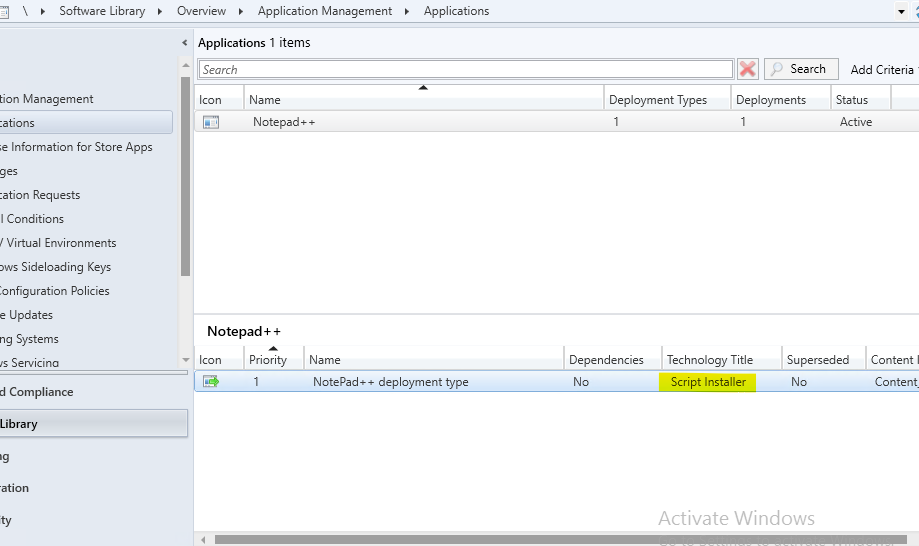
In addition, I tried to deploy the Notepad++ 4.8.2 in my lab and it seems that it worked successfully. I put my reference link for your reference.
https://www.anoopcnair.com/sccm-script-deployment-type-using-powershell/
Note that the link isn't from MS, just for your reference. We could also create a application manually on the MECM console instead of using the PowerShell script. I used the installation script and create the application manually in the MECM console. And It worked successfully.
Hope the above will be helpful.
Best regards,
Rita
If the answer is the right solution, please click "Accept Answer" and kindly upvote it. If you have extra questions about this answer, please click "Comment".
Note: Please follow the steps in our documentation to enable e-mail notifications if you want to receive the related email notification for this thread.
' cx='32' cy='32' r='32' /%3E%3Ctext x='50%25' y='55%25' dominant-baseline='middle' text-anchor='middle' fill='%23FFF' %3ERJ%3C/text%3E%3C/svg%3E)
Well for start, the command line shared above appears be incorrect. It should be msiexec and there shouldn't be space before AdobeInstall. txt
msiexe /i "Adobe Acrobat.msi" /qn /l*v "C:\logs\ AdobeInstall.txt"