Share via

Powershell script. Remove all the local admin users from a CSV

FUENTES Jose 21 Reputation points
2022-08-08T10:02:41.957+00:00

I have a CSV file with all users I want to delete from the administrator local group. So for instance, in one workstation, in the local administrator group has three users (Jose, Mary, Anna) and in the CSV file has Jose and Mary, in the local administrator group after launching the script should be only Anna. I hope I explain properly

I've done this script in PowerShell, but doesn't work.

Import-Csv -path "C:\Temp\Files\Users.csv" | ForEach-Object {Remove-localgroupmember -Identity "Administrators" -Members $_.'Account' -Confirm:$false}

Please anybody helps me??

Windows for business | Windows Server | User experience | PowerShell

Answer accepted by question author

Andreas Baumgarten 132.3K Reputation points MVP Volunteer Moderator
2022-09-28T16:35:51.343+00:00

Hi @FUENTES Jose ,

thanks for the feedback.

Does the answer help to solve the issue?
If you found the answer helpful, it would be great if you please mark it "Accept as answer". This will help others to find answers in Q&A

----------

Regards
Andreas Baumgarten

Was this answer helpful?

0 comments No comments

18 additional answers

Sort by: Most helpful
  1. FUENTES Jose 21 Reputation points
    2022-08-08T11:11:46.297+00:00

    Yes, I'm running the script locally on the computer where the users are in the local admin group?

    Was this answer helpful?

    0 comments No comments

  2. FUENTES Jose 21 Reputation points
    2022-08-08T11:09:30.897+00:00

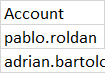
    CSV content

    229171-image.png

    Was this answer helpful?

    0 comments No comments

  3. FUENTES Jose 21 Reputation points
    2022-08-08T11:08:28.857+00:00

    S C:\WINDOWS\system32> Import-Csv -path "C:\Temp\Files\Users.csv" | ForEach-Object {Remove-localgroupmember -Identity "Administrators" -Members $_.'Account' -Confirm:$false}
    Remove-LocalGroupMember : No se encuentra ningún parámetro que coincida con el nombre del parámetro 'Identity'.
    En línea: 1 Carácter: 86

    • ... sers.csv" | ForEach-Object {Remove-localgroupmember -Identity "Admini ...
    • ~~~~~~~~~
    • CategoryInfo : InvalidArgument: (:) [Remove-LocalGroupMember], ParameterBindingException
    • FullyQualifiedErrorId : NamedParameterNotFound,Microsoft.PowerShell.Commands.RemoveLocalGroupMemberCommand

    Remove-LocalGroupMember : No se encuentra ningún parámetro que coincida con el nombre del parámetro 'Identity'.
    En línea: 1 Carácter: 86

    • ... sers.csv" | ForEach-Object {Remove-localgroupmember -Identity "Admini ...
    • ~~~~~~~~~
    • CategoryInfo : InvalidArgument: (:) [Remove-LocalGroupMember], ParameterBindingException
    • FullyQualifiedErrorId : NamedParameterNotFound,Microsoft.PowerShell.Commands.RemoveLocalGroupMemberCommand

    Was this answer helpful?

    0 comments No comments

  4. Andreas Baumgarten 132.3K Reputation points MVP Volunteer Moderator
    2022-08-08T10:38:22.92+00:00

    Hi @FUENTES Jose ,

    what does "but doesn't work" means?

    • Any error messages?
    • The users are still in the "local Admin" group?

    You are running the script locally on the computer where the users are in the local admin group?
    Maybe you could post the content of the CSV file (just an example).

    ----------

    (If the reply was helpful please don't forget to upvote and/or accept as answer, thank you)

    Regards
    Andreas Baumgarten

    Was this answer helpful?

    0 comments No comments

Your answer

Answers can be marked as 'Accepted' by the question author and 'Recommended' by moderators, which helps users know the answer solved the author's problem.