Share via

Live Video Streaming Solution Needed

Mark Weiss 91 Reputation points
2022-08-09T01:33:39.627+00:00

I've been trying to replicate the capabilities I enjoyed in 2005 with Windows Media Encoder back then. The ability to stream live video over the internet direct from my own webserver.

I currently run IIS 10 and host 8 websites there.

I'm testing Doug Johnson's pre packaged streaming setup with nginx set up to run on port 8080 alongside IIS 10.
I have OBS streaming to that server. When I open the stream, I get a couple of frames of video and then it freezes, while the audio continues to play.

I've played with everything from bitrates to resolution. I thought it was my cable connection's 10mbs upstream, so I upgraded to 1gbs fiber, but it did not help at all. The problem is exactly the same as with the cable connection.

Here's a screen recording of what I'm observing. I cannot play the video stream locally, but over the public IP address on a different machine it will play a couple of frames and then stop.

Been trying to get this to work since April 2018. Have asked half a dozen different forums. No one seems to understand the problem.

https://www.youtube.com/watch?v=dnLsK1tm-n4

Windows development | Internet Information Services

3 answers

Sort by: Most helpful
  1. Mark Weiss 91 Reputation points
    2022-08-10T16:36:34.29+00:00

    My application is live streaming from an IIS 10 server, using nginx in parallel to handle the streaming as a sub server.
    It seems that Windows is not letting nginx read files from the /hls folder that are being created by nginx as it listens to the stream from Open Broadcaster Software (OBS).

    Was this answer helpful?


  2. Mark Weiss 91 Reputation points
    2022-08-10T03:26:41.83+00:00

    I wonder how to change the hls path when the C: is not specified in the config file?

    # push rtmp://c:/nginx/srv/hls/Stream1;  
     # push rtmp://a.rtmp.youtube.com/live2/0123-4567-89ab-cdef;  
      
     hls on;  
     hls_path /nginx/srv/hls/;  
    

    I made a copy of the entire nginx folder on D: drive and ran if from there. But I am getting the same results with playback and here's a section of relevant log:

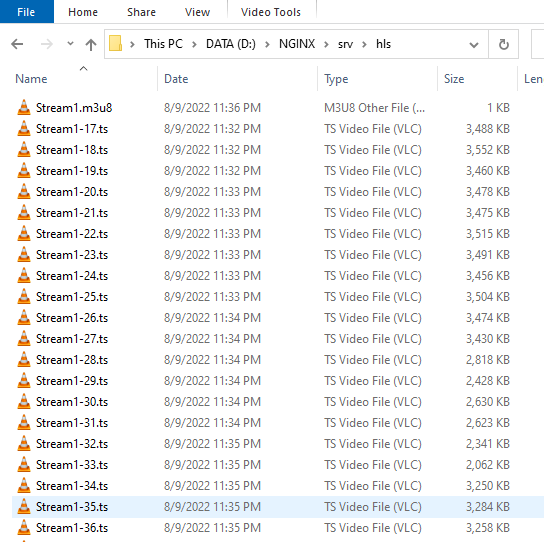
    2022/08/09 23:29:41 [error] 7364#7676: *4 CreateFile() "D:/nginx/srv/hls/stream1.m3u8" failed (2: The system cannot find the file specified), client: 192.168.0.101, server: , request: "GET /hls/stream1.m3u8 HTTP/1.1", host: "192.168.0.102:8080", referrer: "http://192.168.0.102:8080/viewer.html"

    There are the files it's referring to. They exist, but the server can't find them.
    229785-image.png

    Was this answer helpful?


  3. Mark Weiss 91 Reputation points
    2022-08-09T16:47:31.1+00:00

    Below is the configuration for the streamer:

    [code]

    user nobody;

    multiple workers works !

    worker_processes 2;

    error_log logs/error.log;

    error_log logs/error.log notice;

    error_log logs/error.log info;

    pid logs/nginx.pid;

    events {
    worker_connections 8192;

    max value 32768, nginx recycling connections+registry optimization =

    this.value * 20 = max concurrent connections currently tested with one worker

    C1000K should be possible depending there is enough ram/cpu power

    multi_accept on;

    }

    rtmp {
    server {
    listen 1935;
    chunk_size 4096;

    application live365 {

    live on;

    record off;

    record all;

    record_path /recordings;

    push rtmp://c:/xxxxx/xxx/xxx/Stream1;

    push rtmp://a.rtmp.youtube.com/live2/0123-4567-89ab-cdef;

    hls on;
    hls_path /xxxxx/xxx/xxx/;
    hls_fragment 3;
    hls_playlist_length 60;

    uncomment the line below to prevent people from playing using RTMP

    deny play all;

    }
    }
    }

    http {

    include mime.types;

    server {

    listen 8080;

    location / {

    root /nginx/srv/;
    index index.html;

    add_header Cache-Control no-cache; # Disable cache

    }
    }
    }
    [/code]

    This seems to be a Windows file permission problem:

    from the error log for the streamer:

    [code]
    2022/08/09 12:45:10 [error] 6236#5696: *568 CreateFile() "C:/xxxxx/xxx/xxx/stream1.m3u8" failed (2: The system cannot find the file specified), client: 192.168.0.1, server: , request: "GET /xxx/stream1.m3u8 HTTP/1.1", host: "", referrer: ""
    [/code]

    And here's the html for the viewer:

    [code]
    <!DOCTYPE html>
    <html lang="en">
    <head>
    <meta charset="UTF-8">
    <title>HLS Live Streaming</title>
    <link href="/js/video-js.css" rel="stylesheet" />
    </head>
    <body>
    <video
    id="my-video"
    class="video-js"
    controls
    preload="auto"
    width="1280"
    height="720"
    data-setup="{}">
    <source src="/xxx/stream1.m3u8" type="application/vnd.apple.mpegurl" />
    </video>
    <script src="/js/video.js"></script>
    </body>
    </html>
    [/code]

    Was this answer helpful?


Your answer

Answers can be marked as 'Accepted' by the question author and 'Recommended' by moderators, which helps users know the answer solved the author's problem.