Note
Access to this page requires authorization. You can try signing in or changing directories.
Access to this page requires authorization. You can try changing directories.
Azure Firewall offers three SKUs to meet various customer needs:
- Azure Firewall Premium: Secure highly sensitive applications, such as payment processing. It includes advanced threat protection features like malware and TLS inspection.
- Azure Firewall Standard: Get Layer 3–Layer 7 firewall capabilities with autoscaling to manage peak traffic up to 30 Gbps. It includes enterprise features like threat intelligence, DNS proxy, custom DNS, and web categories.
- Azure Firewall Basic: Throughput up to 250 Mbps.
For detailed information about all Azure Firewall features, see Azure Firewall features by SKU.
Feature comparison
Compare the features of the three Azure Firewall versions:
| Category | Feature | Firewall Basic | Firewall Standard | Firewall Premium |
|---|---|---|---|---|
| L3-L7 filtering | Application level FQDN filtering (SNI based) for HTTPS/SQL | ✓ | ✓ | ✓ |
| Network level FQDN filtering – all ports and protocols | ✓ | ✓ | ||
| Stateful firewall (5 tuple rules) | ✓ | ✓ | ✓ | |
| Network address translation (SNAT+DNAT) | ✓ | ✓ | ✓ | |
| Reliability & performance | Availability zones | ✓ | ✓ | ✓ |
| Built-in HA | ✓ | ✓ | ✓ | |
| Cloud scalability (auto-scale as traffic grows) | Up to 250 Mbps | Up to 30 Gbps | Up to 100 Gbps | |
| Fat flow support | N/A | 1 Gbps | 10 Gbps | |
| Ease of management | Central management via firewall manager | ✓ | ✓ | ✓ |
| Policy analytics (rule management over time) | ✓ | ✓ | ✓ | |
| Enterprise integration | Full logging including SIEM integration | ✓ | ✓ | ✓ |
| Service tags and FQDN tags for easy policy management | ✓ | ✓ | ✓ | |
| Easy DevOps integration using REST/PowerShell/CLI/templates/Terraform | ✓ | ✓ | ✓ | |
| Web content filtering (web categories) | ✓ | ✓ | ||
| DNS proxy + custom DNS | ✓ | ✓ | ||
| Advanced threat protection | Threat intelligence-based filtering (known malicious IP address/domains) | Alert | ✓ | ✓ |
| Inbound TLS termination (TLS reverse proxy) | Using Azure Application Gateway | |||
| Outbound TLS termination (TLS forward proxy) | ✓ | |||
| Fully managed IDPS | ✓ | |||
| URL filtering (full path - including SSL termination) | ✓ |
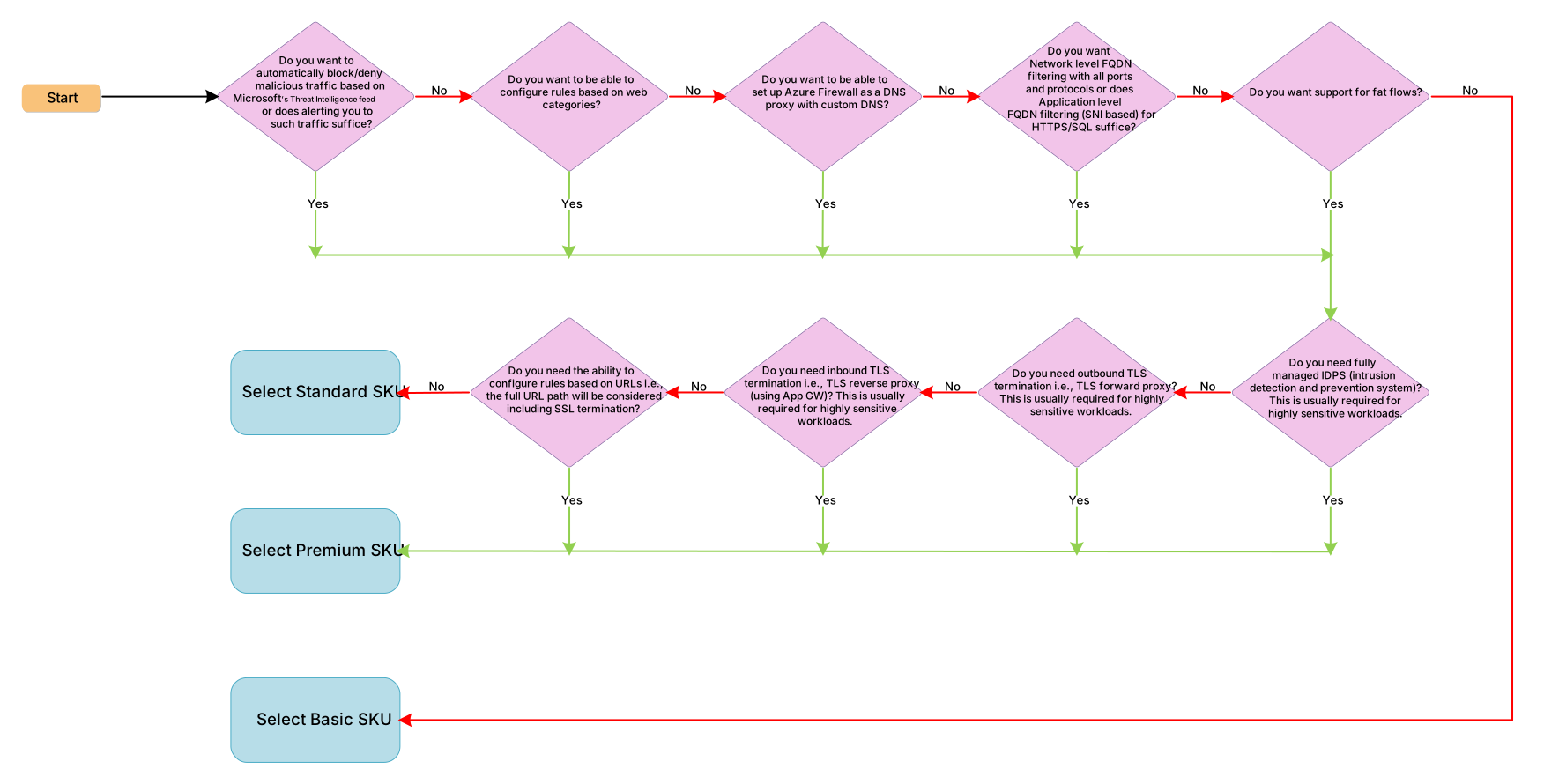
Flow chart
Use the following flow chart to determine the best Azure Firewall version for your needs.
Pricing
When you choose a SKU, weigh its features against your budget. Azure Firewall has two cost components for each SKU: a fixed deployment charge billed per firewall per hour, and a variable data processing charge billed per gigabyte of traffic processed. Overall cost increases from Basic to Standard to Premium. Rates also vary by region, so check the pricing page for the exact charges that apply to you.
To keep costs aligned with your budget, choose the lowest SKU that meets your security and throughput requirements:
- Basic is the lowest-cost option and suits small or medium-sized environments with throughput up to 250 Mbps.
- Standard costs more and supports higher throughput (up to 30 Gbps) with enterprise security features.
- Premium is the highest-cost option and adds advanced threat protection for sensitive workloads.
For detailed pricing, including deployment charges, data processing rates, and availability zone considerations, see Azure Firewall pricing. To estimate the cost for your specific throughput and traffic volume, use the Azure pricing calculator.