Note
Access to this page requires authorization. You can try signing in or changing directories.
Access to this page requires authorization. You can try changing directories.
Important
This feature is in Beta. Account admins can control access to this feature from the account console Previews page. See Manage Azure Databricks previews.
This page describes how to configure traffic splitting and fallbacks for Unity AI Gateway model services. Traffic splitting distributes requests across multiple model backends behind a single model service. Use it to gradually roll out new models, run A/B tests, and spread load across providers.
Fallbacks add resiliency to agents and model services through redundant failovers, increasing overall availability and model independence.
Session affinity keeps requests from the same session on the same destination.
Requirements
- Unity AI Gateway preview enabled for your account. See Manage Azure Databricks previews.
- A Azure Databricks workspace in an Unity AI Gateway supported region.
Configure traffic splitting in the UI
- In your Azure Databricks workspace, click AI Gateway in the sidebar and select the model service you want to edit.
- In the Destinations section, click Add another model to add a destination entry for each model backend you want to include in the split.
- For each destination, set Traffic percentage to the share of traffic you want that model to receive.
- Percentages must sum to 100%.
- The system saves changes automatically when all allocations sum to 100%.
Unity AI Gateway randomly routes each request across the configured destinations according to the traffic percentages you specify. Over time, the observed share of traffic for each destination converges to the configured percentages.
Session affinity
When traffic splitting is configured, Azure Databricks automatically enables session affinity, which routes requests from the same session to the same destination. Whether a given request is pinned depends on the client: requests that include a session-identifying header are routed by session, while requests without one follow the weighted traffic split.
Rather than applying the weighted traffic split to every request, Unity AI Gateway pins each session to a single destination, taking advantage of prefix caching and producing predictable results. Sessions are identified by headers standard to most LLM clients and coding agents — a client groups its requests into a session by sending the same header value on each, and those requests route to the same destination.
Interaction with fallbacks
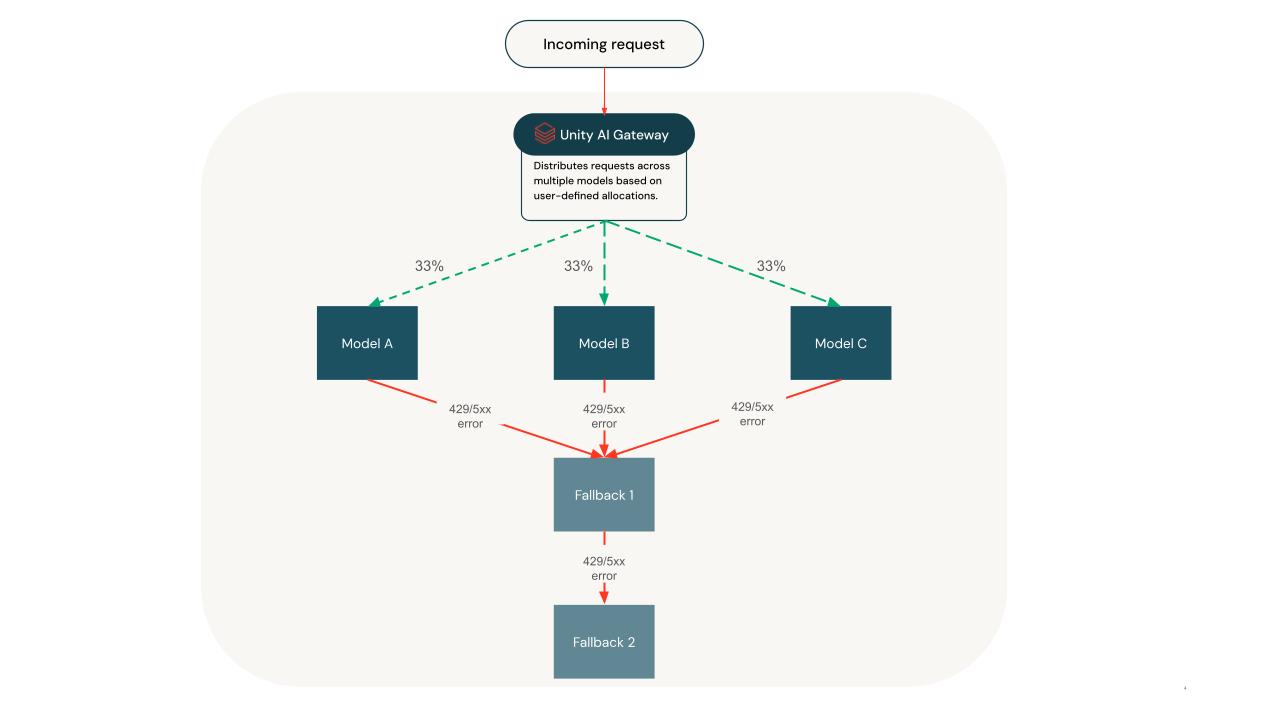
You can use traffic splitting and fallbacks together, but they apply at different stages of request handling:
- Traffic splitting determines the initial (primary) destination for a request.
- Fallbacks define how the system retries the request if the primary attempt fails.
When you configure both traffic splitting and fallbacks:
- For each incoming request, traffic splitting selects one destination from the configured set, based on weights. This selection becomes the primary destination for that request.
- The system sends the request to the primary destination.
- If the request fails (for example, due to a 429 or 5xx error), the system retries the request against the configured fallback destinations. It tries them in the exact order specified.
- The system attempts fallbacks sequentially until one succeeds or it exhausts all fallback options.
Note
Fallbacks are independent of traffic splitting. After the system selects a primary destination, it does not re-apply traffic splitting during retries.
Observability
Routing decisions for traffic splits and fallbacks are logged to the routing_information field in the system.ai_gateway.usage system table. Query this table to verify that requests are being routed according to your configured percentages and fallback order.
SELECT
  destination_name AS destination,
  COUNT(*) AS request_count,
  ROUND(COUNT(*) * 100.0 / SUM(COUNT(*)) OVER (), 1) AS actual_pct
FROM system.ai_gateway.usage
WHERE
  endpoint_name = 'your-endpoint-name'
  AND event_time >= CURRENT_TIMESTAMP - INTERVAL 7 DAY
GROUP BY destination_name
ORDER BY actual_pct DESC;
Limitations
- You can configure traffic splitting across a maximum of 5 destinations.
- You cannot configure traffic splitting on fallback destinations.