Note
Access to this page requires authorization. You can try signing in or changing directories.
Access to this page requires authorization. You can try changing directories.
Important
AKS preview features are available on a self-service, opt-in basis. Previews are provided "as is" and "as available," and they're excluded from the service-level agreements and limited warranty. AKS previews are partially covered by customer support on a best-effort basis. As such, these features aren't meant for production use. For more information, see the following support articles:
Azure Kubernetes Application Network can connect its managed control plane to a private AKS member cluster's Kubernetes API server through private connectivity. This article describes the additional availability requirements and the subnet configuration for that connection.
Important
Private connectivity requires service enablement and the Microsoft.AppLink/PrivatePath feature in the Registered state. Registering PublicPreview alone doesn't enable it.
Public AKS clusters can't use the Application Network private-connect path, even if PrivatePath is registered. Ordinary public-cluster onboarding without private connectivity is unchanged.
Prerequisites
- An Application Network resource and an existing private AKS cluster in the same tenant.
- The standard Application Network cluster prerequisites, including Microsoft Entra integration, OIDC issuer, the managed Gateway API, and no enabled Istio-based service mesh add-on.
- A supported Application Network version compatible with your AKS version and available in the member cluster's region.
- Private-connectivity service availability for your subscription and region. Complete the additional PrivatePath registration before joining the member.
- Azure CLI version 2.84.0 or later and the
appnet-previewextension. The--private-connect-subnetargument requires extension version 1.0.0b2 or later. - Permission to create the Application Network member. For a customer-provided subnet, also arrange the required subnet configuration with the virtual network owner.
- For Kubernetes verification, access to the private cluster from a network that can reach its private API server. Application Network's private connection doesn't give your workstation network access.
- The common data-plane outbound access requirements. The cluster must resolve and reach its assigned MCP FQDN over TLS on TCP 443, even when its Kubernetes API server is private.
Private AKS clusters with API Server VNet Integration still require enablePrivateCluster=true. A private cluster with a public API-server FQDN remains a private cluster for these requirements; don't infer eligibility from its FQDN alone.
Understand the connectivity scope
The private-connect subnet lets the Application Network control plane reach the member's Kubernetes API server. It doesn't create application connectivity between member clusters.
The following diagram separates the private API-server connection from the data-plane control channel and application traffic:
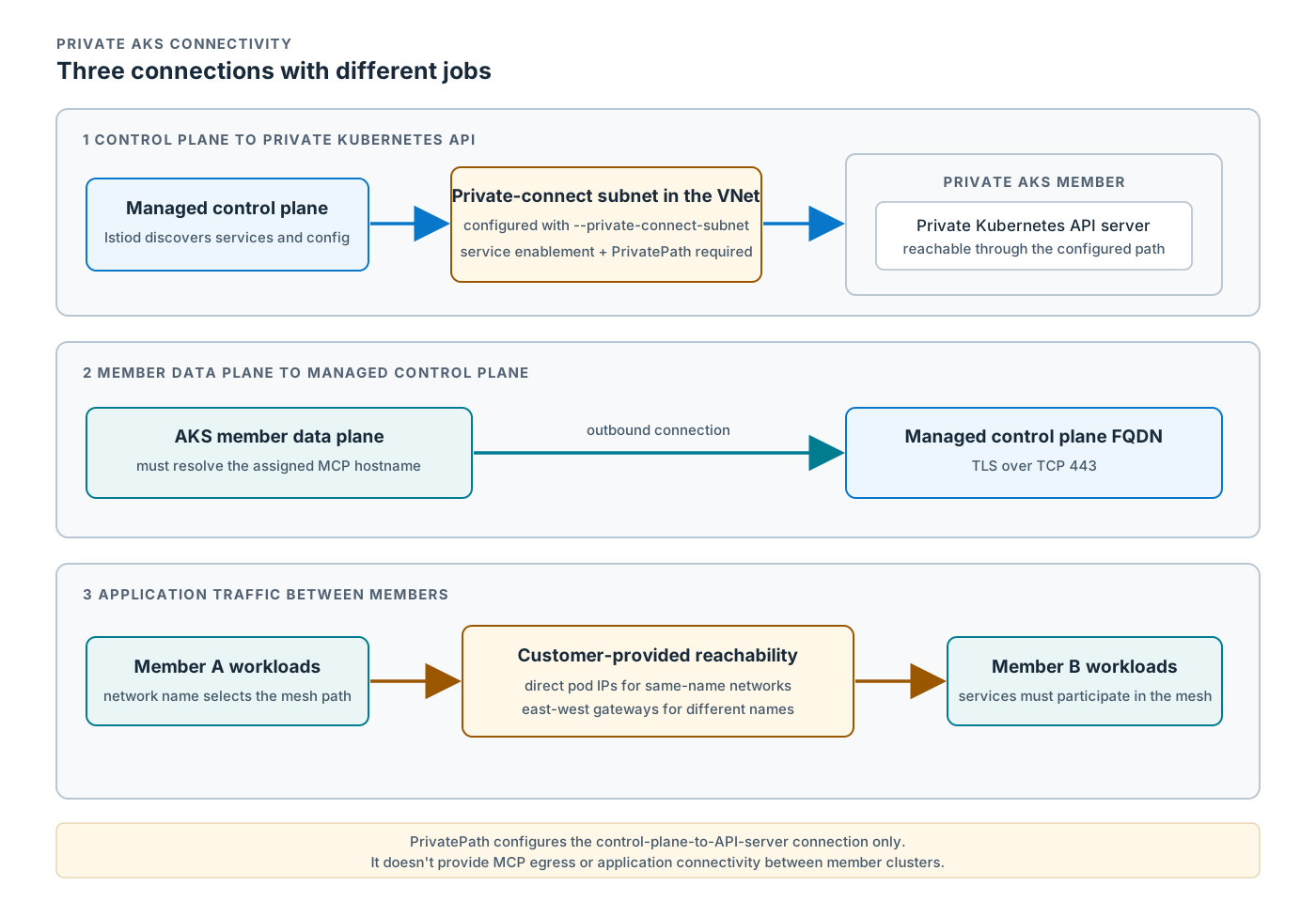
In particular:
--private-connect-subnetconfigures the control-plane private-connect path.- East-west gateway visibility controls cross-cluster application traffic, not Kubernetes API-server access.
PrivatePathregistration doesn't configure virtual network peering, enroll application workloads, or export services.
Private connectivity provides the managed-control-plane-to-private-API-server path. It doesn't replace the data-plane-to-MCP connection. Public API-server authorized IP range rules and the CloudAppLink source tag are a separate public-cluster scenario, not an alternative to the private path.
For application traffic configuration, see the traffic management walkthrough.
Set environment variables
The following examples use Bash syntax and values without whitespace. Replace the placeholders before running the commands.
Set the Application Network and private cluster values:
export SUBSCRIPTION=<appnet-member-subscription-id> export APPNET_RG=<appnet-resource-group> export APPNET_NAME=<appnet-name> export APPNET_MEMBER_NAME=<member-name> export AKS_SUBSCRIPTION=<aks-cluster-subscription-id> export AKS_RG=<aks-cluster-resource-group> export CLUSTER_NAME=<private-aks-cluster-name> export LOCATION=<aks-cluster-region> export APPNET_VERSION=<compatible-appnet-version> export CLUSTER_RESOURCE_ID=/subscriptions/$AKS_SUBSCRIPTION/resourceGroups/$AKS_RG/providers/Microsoft.ContainerService/managedClusters/$CLUSTER_NAMESUBSCRIPTIONis the subscription containing the Application Network resource and its member resource.AKS_SUBSCRIPTIONidentifies the cluster's subscription; it can be the same subscription.Set the active subscription for the member operations by using the
az account setcommand:az account set --subscription $SUBSCRIPTIONInstall or update the CLI extension by using the
az extension addcommand:az extension add --name appnet-preview --upgrade--upgradeupdates the local CLI extension if it's installed, or installs it if it's missing. It doesn't upgrade Application Network members.Check the installed extension version by using the
az extension showcommand:az extension show --name appnet-preview --query version -o tsvConfirm that the version is
1.0.0b2or later before using--private-connect-subnet.
Check the private cluster
Verify the private-cluster setting and region by using the
az aks showcommand:az aks show \ --resource-group $AKS_RG \ --name $CLUSTER_NAME \ --subscription $AKS_SUBSCRIPTION \ --query apiServerAccessProfile.enablePrivateCluster \ -o tsv az aks show \ --resource-group $AKS_RG \ --name $CLUSTER_NAME \ --subscription $AKS_SUBSCRIPTION \ --query location \ -o tsvThe private-cluster query must return
true. If it returnsfalseor no value, don't supply a private-connect subnet: public clusters aren't supported for this path. Confirm thatLOCATIONmatches the returned cluster region.Check compatible versions in that region by using the
az appnet list-versionscommand:az appnet list-versions --location $LOCATION -o table
Register PrivatePath
Register the feature on the subscription that contains the Application Network member resource, not just on the cluster's subscription. PublicPreview and PrivatePath are separate registrations.
Register
PrivatePathby using theaz feature registercommand:az feature register --namespace Microsoft.AppLink --name PrivatePath --subscription $SUBSCRIPTIONCheck its state by using the
az feature showcommand:az feature show --namespace Microsoft.AppLink --name PrivatePath --subscription $SUBSCRIPTION --query properties.state -o tsvWait for
Registeredbefore joining.Registeringisn't sufficient. If the feature isn't available or registration doesn't complete, contact the Application Network team to confirm eligibility.After registration completes, refresh the resource provider by using the
az provider registercommand:az provider register --namespace Microsoft.AppLink --subscription $SUBSCRIPTION --waitFeature registration doesn't override service availability. If the service still reports that private clusters aren't supported for your member, confirm service enablement rather than changing the cluster's private setting.
Choose the subnet option
Choose the option that matches the cluster's virtual network configuration:
| Cluster virtual network | Private-connect subnet | Member join argument |
|---|---|---|
| AKS-managed virtual network | AKS provisions or ensures the managed aks-applink subnet during onboarding. |
Omit --private-connect-subnet to use the managed subnet. |
| BYO virtual network | Provide a dedicated subnet in the same virtual network as the cluster. | Supply --private-connect-subnet with its resource ID. |
A private cluster in an AKS-managed virtual network can also use an explicitly supplied subnet that meets the same requirements as the BYO virtual network option.
Subnet requirements
A supplied subnet must meet these requirements:
- Be in the same virtual network as the AKS cluster. A subnet in a peered virtual network isn't sufficient.
- Be dedicated to Application Network private connectivity, not an AKS node-pool subnet or the API-server subnet.
- Have exactly one IPv4 address prefix of
/28or larger, such as/27. An IPv6-only subnet or a smaller/29IPv4 prefix doesn't meet this requirement. - Be delegated to
Microsoft.AppLink/appLinks.
AKS verifies or adds the delegation during onboarding. The subnet-creation example in this article configures it explicitly.
For the managed-subnet option, allow AKS to manage aks-applink and ensure that the virtual network has the address space required for its provisioning. Don't repurpose the subnet for cluster nodes or other workloads.
Join the private cluster
Choose one of the following options for a new member. Both require the private-cluster and availability checks described earlier.
Option 1: Use the AKS-managed subnet
For a cluster in an AKS-managed virtual network, join by using the
az appnet member joincommand without a private-connect subnet argument:az appnet member join \ --resource-group $APPNET_RG \ --appnet-name $APPNET_NAME \ --member-name $APPNET_MEMBER_NAME \ --member-resource-id $CLUSTER_RESOURCE_ID \ --member-location $LOCATION \ --upgrade-mode SelfManaged \ --version $APPNET_VERSION
Omitting the argument lets onboarding obtain the managed subnet. Don't pass an empty connectivityProfile.privateConnect object: the public API requires subnetResourceId when that object is supplied.
Option 2: Supply a dedicated subnet
For a BYO virtual network, prepare a dedicated subnet in the cluster's virtual network. If a suitable subnet already exists, skip creation and use its resource ID.
Set the subnet values:
export VNET_RG=<cluster-vnet-resource-group>
export VNET_NAME=<cluster-vnet-name>
export SUBNET_NAME=<private-connect-subnet-name>
export SUBNET_PREFIX=<unused-ipv4-cidr>
export SUBNET_RESOURCE_ID=/subscriptions/$AKS_SUBSCRIPTION/resourceGroups/$VNET_RG/providers/Microsoft.Network/virtualNetworks/$VNET_NAME/subnets/$SUBNET_NAME
Select an unused IPv4 range within the virtual network, with a prefix length of 28 or less. Don't reuse the node or API-server subnet.
If you need a new subnet, create it with the delegation by using the
az network vnet subnet createcommand:az network vnet subnet create \ --resource-group $VNET_RG \ --vnet-name $VNET_NAME \ --name $SUBNET_NAME \ --address-prefixes $SUBNET_PREFIX \ --delegations Microsoft.AppLink/appLinks \ --subscription $AKS_SUBSCRIPTIONJoin the private cluster by using the
az appnet member joincommand with the subnet ID:az appnet member join \ --resource-group $APPNET_RG \ --appnet-name $APPNET_NAME \ --member-name $APPNET_MEMBER_NAME \ --member-resource-id $CLUSTER_RESOURCE_ID \ --member-location $LOCATION \ --upgrade-mode SelfManaged \ --version $APPNET_VERSION \ --private-connect-subnet $SUBNET_RESOURCE_ID
The CLI maps the subnet argument to properties.connectivityProfile.privateConnect.subnetResourceId. Supplying this argument doesn't make a public AKS cluster eligible for private connectivity.
Verify the member
Check the provisioning state by using the
az appnet member showcommand:az appnet member show \ --resource-group $APPNET_RG \ --appnet-name $APPNET_NAME \ --member-name $APPNET_MEMBER_NAME \ --query properties.provisioningState \ -o tsvA completed member join reports
Succeeded. ARM provisioning state alone isn't a test of application traffic.For an explicitly supplied subnet, inspect the member's connectivity profile and subnet delegation by using the
az appnet member showandaz network vnet subnet showcommands:az appnet member show \ --resource-group $APPNET_RG \ --appnet-name $APPNET_NAME \ --member-name $APPNET_MEMBER_NAME \ --query properties.connectivityProfile az network vnet subnet show \ --ids $SUBNET_RESOURCE_ID \ --query delegations[].serviceName \ -o tsvThe profile should contain the supplied subnet ID, and the delegation should include
Microsoft.AppLink/appLinks. For the managed-subnet option, inspectaks-applinkin the cluster's AKS-managed virtual network rather than expecting a customer-supplied subnet ID in the request profile.
Verify in-cluster components and application traffic from a client that can access the private cluster. Use the traffic management walkthrough to enroll workloads and test the application data path.
Troubleshoot onboarding
| Symptom | Check or action |
|---|---|
FeatureNotRegistered for PrivatePath |
Confirm Microsoft.AppLink/PrivatePath is Registered in the subscription containing the AppNet member resource. PublicPreview registration doesn't substitute for it. |
| Private AKS clusters aren't supported for this member | Confirm private-connectivity service availability with the Application Network team, even if the feature is registered. |
| Private connectivity isn't supported for public AKS clusters | Public members must omit connectivityProfile.privateConnect. Registration doesn't remove the restriction. An existing public member with a bound subnet requires removal and recreation without private connectivity; follow the member removal guidance first. |
privateConnect.subnetResourceId is required |
Supply the subnet ID for a BYO virtual network. For an AKS-managed subnet, omit the private-connect profile instead of submitting an empty object. |
| Supplied subnet is rejected | Check that it's in the cluster's virtual network, differs from node and API-server subnets, has one IPv4 prefix of /28 or larger, and can be delegated to Microsoft.AppLink/appLinks. |
| Your client can't reach the private Kubernetes API server | Verify your client's private network and DNS access. AppNet onboarding doesn't configure workstation access. |
| Data plane can't connect to the MCP or obtain configuration/certificates | Check DNS resolution and egress rules for the member's actual MCP hostname on TCP 443. Use the endpoint discovery guidance; the private API-server connection doesn't supply this outbound path. |
Manage the subnet lifecycle
Select the private-connect subnet when joining the member. The public member-update contract doesn't expose a private-connect subnet change; don't try to retarget it by omitting the field from an update.
Keep the subnet, delegation, and service association links intact while the member uses them. Follow the member removal guidance before changing or deleting the associated network resources, and wait for removal to complete. Don't manually remove service-managed association links to bypass an active member binding.
Related content
To learn more about Azure Kubernetes Application Network, see the following articles: