Note
Access to this page requires authorization. You can try signing in or changing directories.
Access to this page requires authorization. You can try changing directories.
Azure Event Hubs Dedicated supports confidential computing to protect your event data in use. Confidential computing uses hardware-based trusted execution environments (TEEs) to provide enhanced data protection, preventing unauthorized access to your events while they're being processed.
When you enable confidential computing on an Event Hubs Dedicated namespace, your data benefits from hardware-level isolation in addition to existing encryption at rest and in transit. This capability helps organizations that handle sensitive or regulated data meet strict security and compliance requirements.
Benefits
Confidential computing for Azure Event Hubs provides the following advantages:
- No code changes required: Enable confidential computing at the namespace level without modifying your applications or event processing patterns.
- Defense in depth: Combines with existing Event Hubs security features like customer-managed keys, private endpoints, and managed identities.
- Event streaming protection: Your event hubs benefit from hardware-level isolation during event processing.
Regional availability
Confidential computing for Azure Event Hubs is available in select regions.
| Region |
|---|
| Korea Central |
| UAE North |
Limitations
The following limitations apply to confidential computing for Azure Event Hubs:
- Confidential computing is available only on the Dedicated tier.
- You must enable confidential computing during namespace creation. You can't enable it on existing namespaces.
Enable confidential computing by using the Azure portal
Go to the Azure portal and open the Event Hubs namespace creation page.
Select Dedicated for the pricing tier.
Select a supported region as the location.
For Confidential compute, select Enabled.
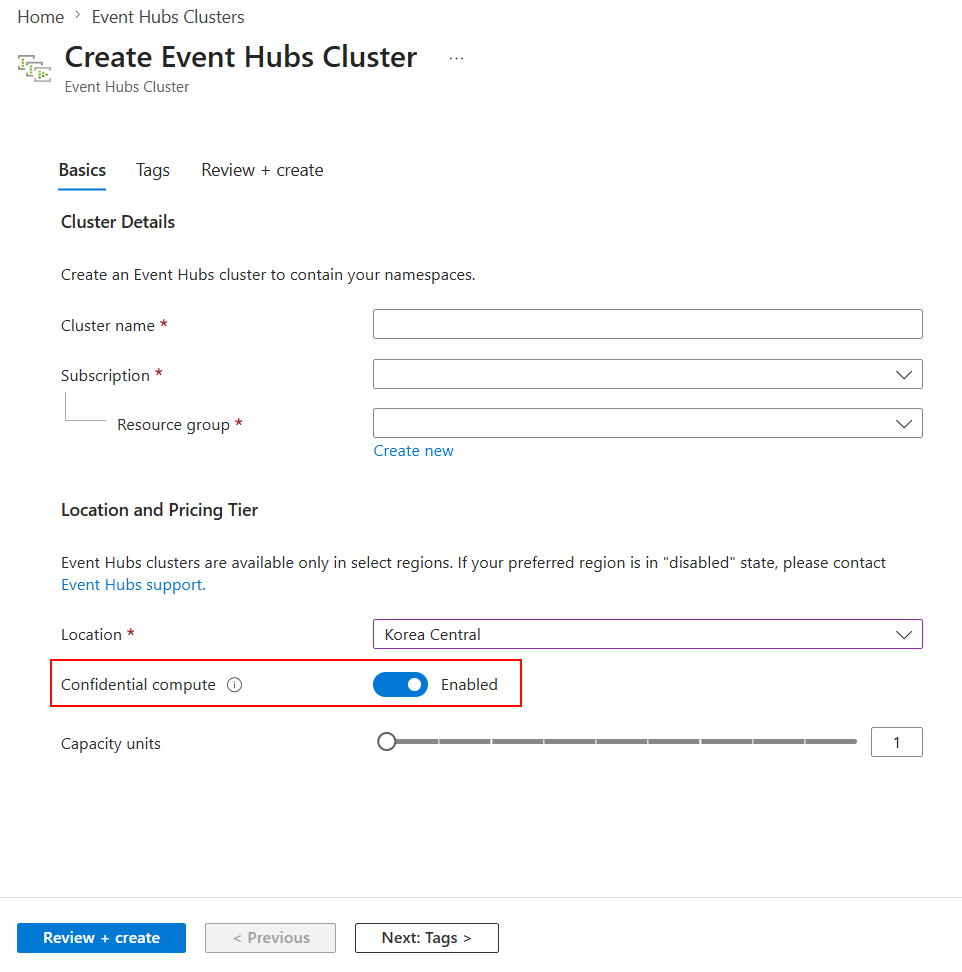
Fill in the remaining required fields for your namespace configuration.
Select Review + create, and then select Create to deploy the namespace with confidential computing enabled.
Enable confidential computing by using a template
You can enable confidential computing programmatically by including the platformCapabilities property in your deployment template.
Step 1: Create a Dedicated cluster with confidential computing
The following Bicep file creates an Event Hubs Dedicated cluster with confidential computing enabled:
@description('Name of the Event Hubs Dedicated cluster')
param clusterName string

@description('Location for the cluster. Must be a region that supports confidential computing.')
@allowed([
  'koreacentral'
  'uaenorth'
])
param location string = 'uaenorth'

@description('Capacity units for the Dedicated cluster')
@minValue(1)
param capacity int = 1

resource eventHubCluster 'Microsoft.EventHub/clusters@2025-05-01-preview' = {
  name: clusterName
  location: location
  sku: {
    name: 'Dedicated'
    capacity: capacity
  }
  properties: {
    supportsScaling: true
    platformCapabilities: {
      confidentialCompute: {
        mode: 'Enabled'
      }
    }
  }
}

output clusterArmId string = eventHubCluster.id
Step 2: Create a namespace in the Dedicated cluster
After the cluster is created, create an Event Hubs namespace inside it by referencing the cluster's resource ID.
@description('Name of the Event Hubs namespace')
param namespaceName string

@description('Location for the namespace. Must match the cluster location.')
param location string

@description('Resource ID of the Dedicated cluster')
param clusterArmId string

resource eventHubNamespace 'Microsoft.EventHub/namespaces@2025-05-01-preview' = {
  name: namespaceName
  location: location
  sku: {
    name: 'Standard'
    tier: 'Standard'
    capacity: 1
  }
  properties: {
    clusterArmId: clusterArmId
  }
}
Combine confidential computing with customer-managed keys
For maximum data protection, combine confidential computing with customer-managed keys backed by Azure Key Vault Managed HSM. This combination ensures that:
- Your data is protected in use by confidential computing.
- Your encryption keys are stored in validated hardware security modules.
- You maintain full control over your encryption keys.
Use Azure Policy to enforce confidential computing
Create an Azure Policy definition to enforce that all Event Hubs Dedicated clusters in your organization have confidential computing enabled. This approach ensures consistent security configuration across your Azure environment.
The following policy definition denies or audits the creation of Dedicated clusters that don't have confidential computing enabled:
{
    "mode": "All",
    "parameters": {
        "effect": {
            "type": "String",
            "metadata": {
                "displayName": "Effect",
                "description": "Deny or Audit"
            },
            "allowedValues": [
                "Deny",
                "Audit"
            ],
            "defaultValue": "Deny"
        }
    },
    "policyRule": {
        "if": {
            "allOf": [
                {
                    "field": "type",
                    "equals": "Microsoft.EventHub/clusters"
                },
                {
                    "not": {
                        "field": "Microsoft.EventHub/clusters/platformCapabilities.confidentialCompute.mode",
                        "equals": "Enabled"
                    }
                }
            ]
        },
        "then": {
            "effect": "[parameters('effect')]"
        }
    }
}
To use this policy, create a custom policy definition in Azure Policy and assign it to the appropriate scope, such as a management group, subscription, or resource group.
Note
When combining confidential computing with customer-managed keys, use a user-assigned managed identity. This requirement exists because the identity must be granted access to the Managed HSM before creating the namespace. A system-assigned identity only exists after the namespace is created.