Note
Access to this page requires authorization. You can try signing in or changing directories.
Access to this page requires authorization. You can try changing directories.
Microsoft Discovery uses storage containers and storage assets to organize data for workspaces. A storage container creates a logical reference to an Azure Blob Storage account (or Azure NetApp Files volume), while storage assets point to specific blob paths within that account. Together, they provide the data layer that agents, tools, and investigations use to read input and write output.
Key concepts
| Concept | What it's | Azure resource type |
|---|---|---|
| Storage container | A workspace child resource that references an Azure Blob Storage account. | Microsoft.Discovery/storageContainers |
| Storage asset | A child resource of a storage container that references a specific blob path. | Microsoft.Discovery/storageContainers/storageAssets |
| Storage account | The underlying Azure Blob Storage account that holds the actual data. | Microsoft.Storage/storageAccounts |
Resource hierarchy
Storage containers and storage assets exist in a two-level hierarchy at the resource group level, referenced by workspaces through projects:
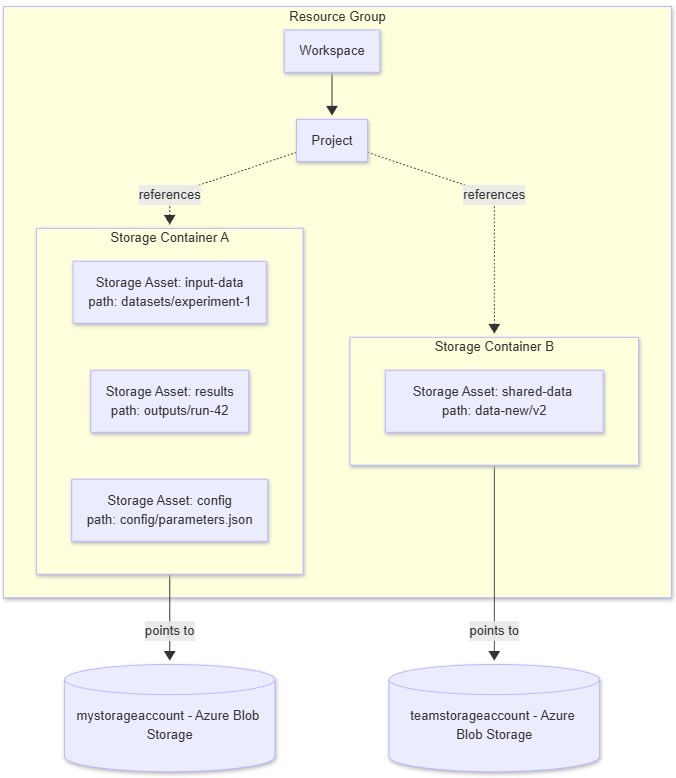
A workspace can have multiple storage containers, each pointing to a different storage account. A storage container can have multiple storage assets, each pointing to a different blob path within the same storage account.
How storage containers work
Registration, not data movement
Creating a storage container registers an existing Azure Blob Storage account with your workspace - it doesn't move or copy data. The actual blobs remain in your storage account under your control. Discovery simply creates a reference so that workspace resources (projects, agents, tools) can find and access the data.
Supported storage kinds
Discovery supports the following storage kinds:
| Kind | Value | Description |
|---|---|---|
| Azure Blob Storage | AzureStorageBlob |
Standard Azure Blob Storage account. Hierarchical namespace (Data Lake Storage Gen2) isn't required. |
| Azure NetApp Files | AzureNetAppFiles |
Azure NetApp Files volume for high-performance file storage. Specify the netAppVolumeId instead of storageAccountId. |
Azure Blob Storage is the most common choice for general-purpose data ingestion and output. Azure NetApp Files is available for workloads that require high-throughput NFS-based file access.
Authentication
The storage container uses the workspace's user-assigned managed identity (UAMI) to authenticate against the storage account. The UAMI must have the Storage Blob Data Contributor role on the storage account before you create the storage container. For more information, see Managed identities in Microsoft Discovery.
How storage assets work
A storage asset represents a specific blob path within the storage account referenced by its parent storage container. Storage assets are the primary way data enters and exits Discovery investigations.
Input data
When you create a storage asset with a path pointing to an existing blob or blob prefix, tools and agents running on the supercomputer can read that data. For example, you might create a storage asset pointing to a blob prefix containing CSV files for an experiment.
Output data
When agents and tools produce output (research reports, datasets, analysis results), the platform creates storage assets automatically in the investigation's storage container. Each output file gets a storage asset with a unique path. See Files and storage assets for details on how agents write files.
Addressing
Storage assets are addressed using discovery:// URIs within the platform:
discovery://resources/{storageContainerName}/paths/{blobPath}
Agents use built-in tools like GetResourceContext and PreviewResource to discover and read files through these URIs. The platform translates discovery:// URIs to the physical blob storage location at runtime.
How Discovery resources use storage
| Resource | How it uses storage |
|---|---|
| Project | References one or more storage containers as its data sources. Tools and investigations within the project read from and write to these containers. |
| Tool runs | Mount storage containers as input and output data volumes. Input mounts provide read access; output mounts collect results. |
| Agents | Use built-in file tools (WriteResource, PreviewResource) to create and read storage assets during investigations. |
| Investigations | Accumulate storage assets as tasks complete. The root task collects all output file references through upward propagation. |
| Bookshelf | Uses storage to ingest documents for knowledge-base indexing. Source data for indexing comes from storage assets. |
Storage container lifecycle
| Phase | What happens |
|---|---|
| Create | You register a storage account by creating a storage container (PUT). Discovery validates the storage account exists and the UAMI has access. |
| Use | Projects, tools, and agents read from and write to the storage account through the registered container. |
| Update | Storage container properties (like the storage account reference) are immutable after creation. To change the backing storage account, delete and recreate the container. |
| Delete | Deleting a storage container removes the Discovery reference. The underlying Azure Blob Storage account and its data are not deleted. Delete child storage assets before deleting the parent container. |
Important
Deleting a storage container doesn't delete your data. The actual blobs remain in your Azure Storage account. Only the Discovery resource reference is removed.
Networking considerations
The storage account backing a storage container must be network-accessible to the Discovery platform:
- The storage account must allow access from the virtual network subnets used by the supercomputer, workspace, and agents.
- If you restrict public access on the storage account, configure virtual network rules or private endpoints so the platform can reach it.
- For CORS requirements (needed for Discovery Studio file browsing), see Azure Blob Storage in Microsoft Discovery.
Limitations
- Storage container properties (storage store reference, kind) are immutable after creation.
- A storage container can reference only one storage backend (storage account or NetApp volume). To access multiple backends, create multiple storage containers.
- Storage assets reference blob paths, not individual blobs. A single path can contain multiple blobs (prefix-based access).
- The workspace UAMI must have the appropriate role (Storage Blob Data Contributor for Azure Blob, or the equivalent for NetApp Files) on the storage backend before the storage container is created.
Related content
- Manage storage containers and storage assets - Step-by-step guide for creating, listing, and deleting storage containers and assets.
- Azure Blob Storage in Microsoft Discovery - Storage account prerequisites including networking, CORS, and identity access.
- Files and storage assets — How agents produce and consume files during investigations.
- Managed identities in Microsoft Discovery - Identity requirements for storage access.