Note
Access to this page requires authorization. You can try signing in or changing directories.
Access to this page requires authorization. You can try changing directories.
This article describes the steps required to create a new provider solution package in Microsoft Dynamics 365 Intelligent Order Management.
It's recommended to have one provider per solution, but you can include multiple providers in the same solution. This solution is the one you share and install on Intelligent Order Management environments.
Create a new provider solution
To create a new provider solution, follow these steps:
Go to the Power App Maker Portal and sign in with your Intelligent Order Management credentials.
Go to Solutions.
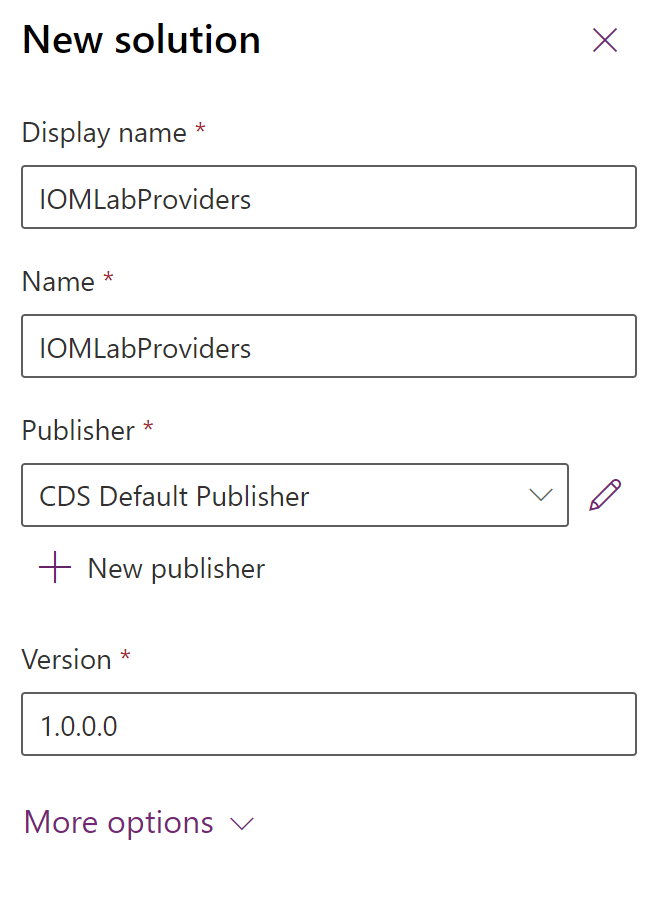
Select New solution.
For Display name, enter "IOM LabProviders".
For Name, enter "IOM LabProviders".
For Publisher, select CDS Default Publisher.
For Version, enter "1.0.0.0".
Next quick start lab step: Create RequestBin custom connector.