Note
Access to this page requires authorization. You can try signing in or changing directories.
Access to this page requires authorization. You can try changing directories.
Fabric Apps (preview) is built on the Rayfin SDK and enables developers to create data-driven applications on Fabric using a unified development workflow. Developers define data models in TypeScript, and Fabric Apps automatically generates APIs, handles authentication, provides hosting, and integrates with Fabric services. Fabric Apps supports TypeScript for data models, client code, and application logic. Learn more in the Rayfin SDK overview.
Important
This feature is in preview.
Key features
Fabric Apps provides these capabilities:
- Data models to APIs – Decorate TypeScript classes with
@entity(),@text(),@uuid(), and other decorators. Fabric Apps generates database schemas and GraphQL endpoints automatically. - Fabric data connectors – Add typed access to a lakehouse, warehouse, SQL database in Fabric, or semantic model.
- Type-safe clients – The client SDK validates queries and mutations before they reach the backend, catching errors during development.
- Built-in authentication – Session management, token handling, and authentication flows are included. Configure Fabric SSO for deployed applications or use email and password during local development.
- Static hosting – Build and serve your frontend application alongside your backend APIs. Require Fabric item access or allow anonymous access to hosted assets.
- Local development – Run the full stack locally with Docker for rapid iteration, then deploy to Fabric when ready for production. Scaffold projects, develop with GitHub Copilot, and deploy to Fabric using Rayfin CLI.
Regions supported
Fabric Apps are not avaiable in all regions yet. See supported regions for Fabric App to learn more.
Prerequisites
Fabric capacity
Your workspace must have Fabric capacity assigned. When creating a new workspace, select a Fabric capacity to associate with it. Fabric Apps services consume capacity units from the assigned capacity.
Tenant admin settings
A Fabric tenant administrator must enable the Fabric Apps workload before users can create items.
- Sign in to the Fabric admin portal.
- Navigate to Tenant settings.
- Under Fabric Apps (preview), toggle the setting to Enabled.
- Choose whether to enable for the entire organization or specific security groups.
- Select Apply.
Changes might take a few minutes to propagate.
How it works
A Fabric app runs as a managed service in Fabric with a suite of services that define the backend such as app hosting, database, GraphQL APIs, and authentication. Fabric manages the hosting, networking, and scaling. Authentication uses Fabric SSO (Microsoft Entra ID single sign-on) exclusively - no other authentication providers are available after deployment.
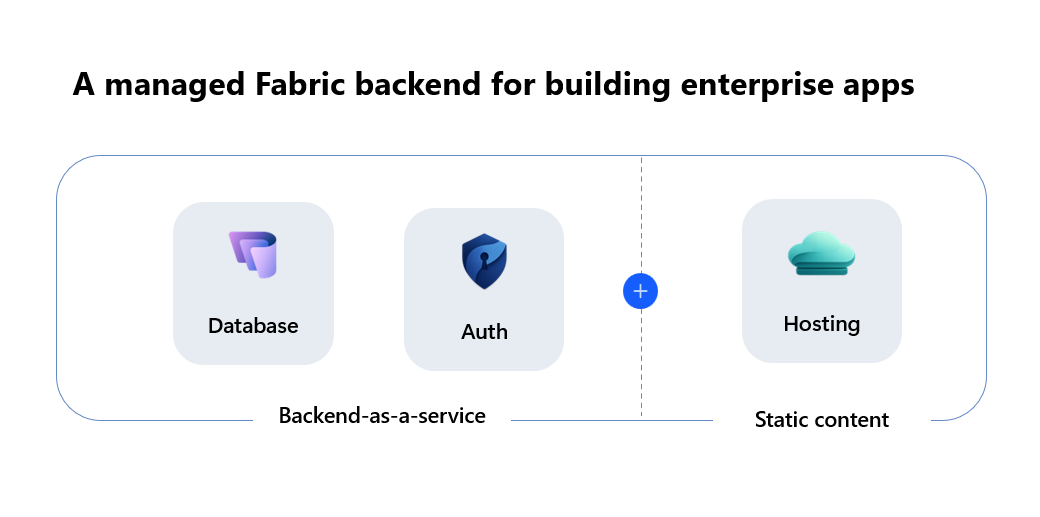
When you deploy your application with rayfin up, Fabric creates child services based on your rayfin.yml configuration. These child services appear as child items under the Fabric app in the Fabric portal.
| Child service | What it provides | Portal capabilities |
|---|---|---|
| SQL database in Fabric | A managed SQL database with your schema applied from TypeScript data model decorators. | View database, run queries with the query editor, copy connection string. The database is read-only in the portal—schema changes must come from your code via rayfin up. |
| Authentication | Fabric brokered authentication using Microsoft Entra ID (SSO). Users sign in through their existing Fabric identity. | View authenticated users in the SQL database. |
| Static Content | Your built frontend assets (HTML, CSS, JS) served from a Fabric Apps hosting URL. Configure protected access or allow anonymous access to the assets. | View hosting URL. Assets are updated on each deploy. |
App backend URL
Each Fabric app has a single endpoint that provides access to all services:
https://<your-app>-app.rayfin.windows.net/
The endpoint exposes a path for each service:
| Path | Service |
|---|---|
/api/graphql |
Data API (GraphQL) — used by RayfinClient for read and write operations |
/auth |
Authentication service |
/storage |
File storage |
Management in the Fabric portal
After deployment, you can manage your Fabric app directly in the Fabric portal.
View item properties
Open the Fabric app in the portal to see:
- App Backend URL — This endpoint is used for all the backend services used by the application.
- App URL — The URL where your static content is hosted. Access depends on the
assetAccesssetting inrayfin.yml.
Manage child items
Select the Fabric app to see its child services:
- SQL database in Fabric — Opens the Fabric SQL Database item to view the object explorer. You can run read queries against your data. Schema changes should always be made in the code under
rayfin/datafolder. Schema conflicts can occur if schema is changed in the SQL Database directly and can break the app.
Item permissions
Workspace roles don't supersede item-level permissions. To share an app with someone in your organization, they need Run and interact permission (Read and execute) to run the app and invoke the backend APIs.
| Permission | What it allows |
|---|---|
| Run and interact (default) | Open and use the deployed application. All workspace members receive this level by default. |
| Edit (Write) | Modify the Fabric app—deploy code with rayfin up, apply schema changes, update settings, and manage child services. |
| Reshare | Grant other users access to the Fabric app. Requires admin role on the workspace. |
Learn more about Workspace roles.
Development with Rayfin CLI
The CLI scaffolds new projects, launches local infrastructure, syncs schema changes, and deploys to Fabric. Install it with npm create @microsoft/rayfin@latest.
Key commands:
| Command | Purpose |
|---|---|
npm create @microsoft/rayfin@latest |
Create a new project from a template. |
npx rayfin up |
Deploy your project to Fabric. |
npx rayfin up db apply |
Apply database schema changes. |
For a complete command reference, see CLI reference.
Data model decorators
Define data models using TypeScript decorators:
import {
  entity,
  role,
  text,
  boolean,
  date,
  uuid,
} from '@microsoft/rayfin-core';

@entity()
@role('authenticated', '*', {
  policy: (claims, item) => claims.sub.eq(item.user_id),
})
export class Todo {
  @uuid() id!: string;
  @text({ min: 1, max: 100 }) title!: string;
  @boolean() isCompleted!: boolean;
  @date() createdAt!: Date;
  @date({ optional: true }) dueDate?: Date;
  @text() user_id!: string;
}
Fabric Apps analyzes these decorators and generates:
- Database table definitions
- GraphQL API endpoints
- Row-level authorization rules
- Type-safe client methods
When to use Fabric Apps
Fabric Apps is ideal for:
- Rapid prototyping – Go from idea to live URL in minutes with preconfigured infrastructure.
- Internal tools and dashboards – Build authenticated admin interfaces without writing backend boilerplate.
- Data exploration and visualization – Use connectors to query supported Fabric data items and display the results in custom frontends.
- AI and agent applications – Provide structured backend services for AI agents that need persistent state.
Fabric Apps might not be suitable for:
- Applications requiring complex multi-step transactions or stored procedures.
- Apps requiring custom authentication providers beyond Fabric SSO and email/password.
Security responsibilities
Fabric provides: Fabric Single Sign on (Microsoft Entra ID), row-level security via @role decorators, HTTPS, PKCE, and workspace and item-level permissions.
You're responsible for:
- Keeping secrets, API keys, and sensitive data out of your code, frontend assets, and repository. Don't store secrets in frontend assets, regardless of the configured hosting access.
- What your app exposes through Fabric SSO controls sign-in since your code controls what authenticated users see and do.
- Granting only the permissions contributors need to deploy or manage the app.
- Legal and compliance accountability for the data your app collects, processes, and stores.