Note
Access to this page requires authorization. You can try signing in or changing directories.
Access to this page requires authorization. You can try changing directories.
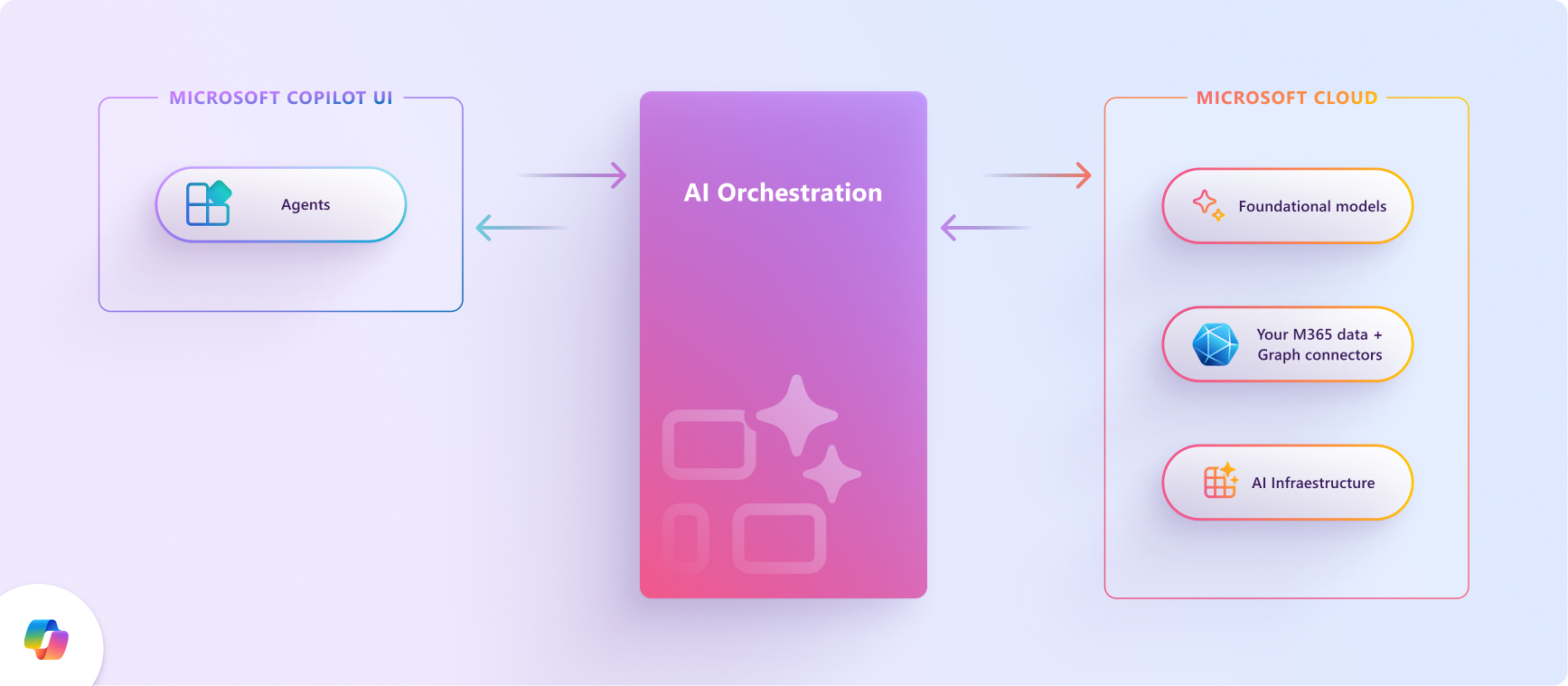
The Microsoft 365 Copilot orchestrator coordinates the language model, available context, and capabilities it uses to respond to a user request. For declarative agents, those capabilities can include knowledge retrieval, built-in capabilities, and actions provided by MCP or API plugins.
This article focuses on how your agent's configuration influences action selection and invocation. You provide instructions, tool definitions, and external services; Microsoft manages the conversational runtime. For the broader division of responsibilities, see Declarative agent architecture.
Copilot orchestrator
The orchestrator uses the agent's configuration and the available context to determine whether to respond directly, retrieve knowledge, or invoke a tool. Not every request requires an external action.
For example, a user might ask, "What tickets are assigned to me right now?" An agent with an appropriate ticketing action can retrieve current information from the ticketing service rather than relying on model knowledge.
The following diagram illustrates an API-action interaction. It's a conceptual view, not a fixed execution sequence or a guarantee that every request uses Microsoft Graph or an external API.
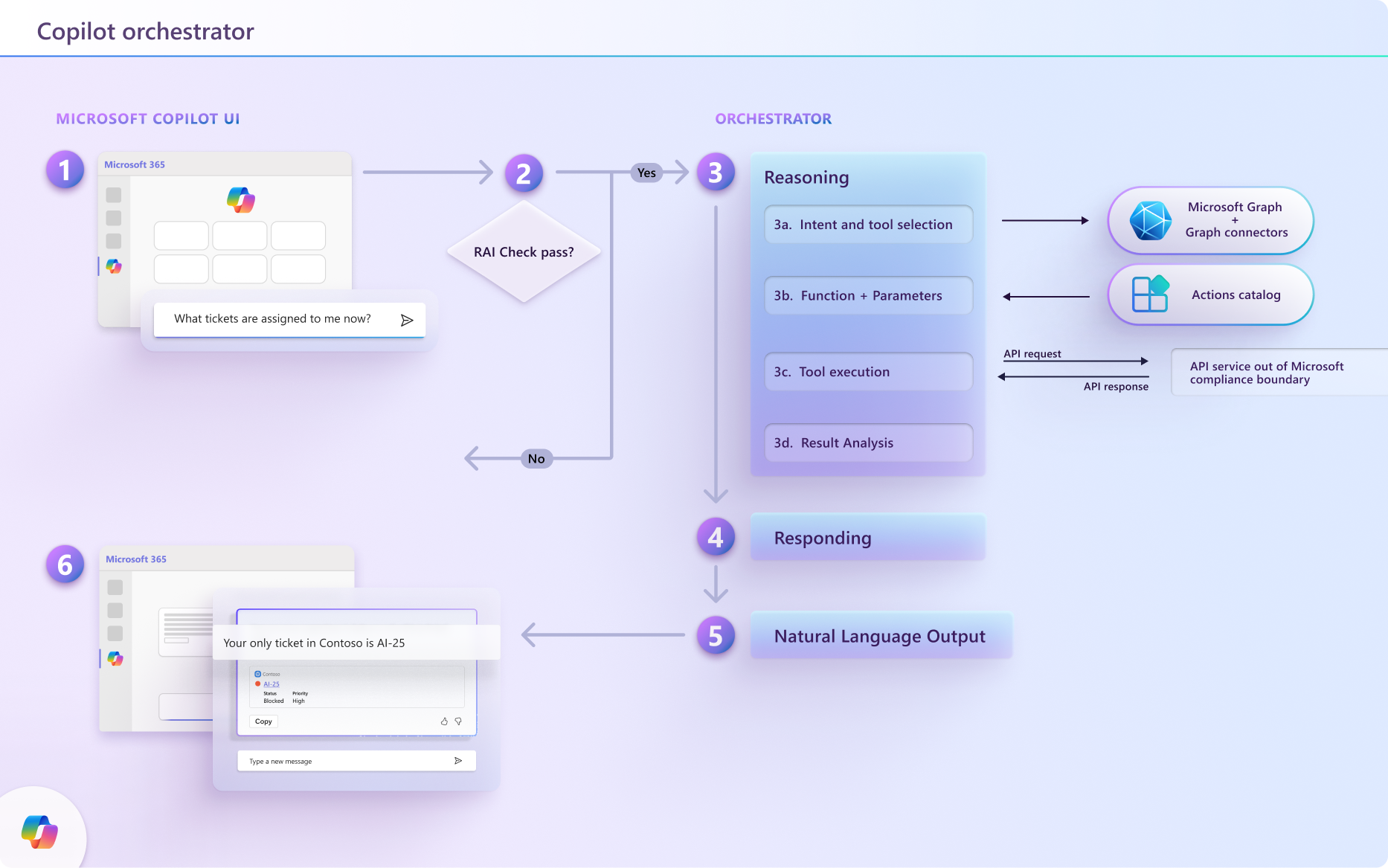
- Interpret the request. Copilot uses the prompt, agent instructions, conversation history, and available app context to identify the user's task. Platform safety and policy checks can affect whether and how the request proceeds.
- Select relevant capabilities. Copilot determines whether configured knowledge or tools can help. For an external action, plugin and tool descriptions help identify an appropriate operation.
- Determine inputs and invoke the tool. Copilot maps available information to the tool's parameters. Instructions should guide it to ask for missing required information rather than invent values. External calls use the configured authentication and confirmation behavior.
- Interpret the result. Copilot uses the returned data or error to determine the next step. The interaction can include another call, a request for clarification, or a response to the user.
- Respond to the user. Copilot generates a response using the available context and results. The response should reflect what the service actually returned or changed.
Declarative agents support chaining function calls, including passing one API call's output to another and combining API actions with SharePoint knowledge or code interpreter. Design and test the required interactions rather than assuming a fixed number of calls always complete in a turn. Follow the current plugin limitations and the limits of your external services.
Platform protections and user confirmations don't replace authorization or business-rule checks in your external service. If the workflow requires exact execution order, transactions, or recovery, implement those requirements in the service rather than relying on model instructions.
How Copilot's orchestrator matches actions to user queries
Plugin selection and individual tool invocation are different decisions. A plugin's description helps Copilot identify the relevant service or domain. The tools available from that plugin then describe the operations Copilot can invoke and the inputs they require.
When plugin selection uses semantic matching, the match is based on the plugin's description, not the descriptions of individual functions. A matched plugin makes its functions or tools available; it isn't a fixed shortlist of five functions. For the current selection behavior and context constraints, see MCP and API plugin limitations.
Provide useful descriptions at each level:
| Configuration | What to describe |
|---|---|
| Plugin description | The service's purpose, supported user tasks, and domain. Make the description specific enough to distinguish it from other plugins. |
| Function or tool definition | The operation's purpose, when to use it, and whether it retrieves or changes data. For API plugins, map the function name to the OpenAPI operationId. |
| Parameters | Required inputs, types, formats, and meaningful examples. Distinguish identifiers from display names and make optional behavior clear. |
| Results and errors | The data returned, what a successful operation means, and how failures are represented. Keep payloads relevant to the task. |
For API plugins, follow Create effective OpenAPI descriptions. For MCP plugins, check whether tool definitions are discovered dynamically or pinned in the plugin manifest. With dynamic discovery, changes to the server's tool definitions can affect selection without republishing the agent.
Improve and evaluate action selection
Descriptions and instructions influence selection. They don't guarantee that a particular tool is invoked for every phrasing of a request.
- Clarify overlapping operations. If multiple tools appear suitable, explain their different purposes and required inputs. Distinguish read operations from operations that change data.
- Connect tasks to tools in the instructions. Explain when to use the configured tools, how to collect missing information, and how to use earlier results in follow-up requests. See Instructions for agents with API plugins.
- Keep the available tools focused. Expose the operations needed for the agent's tasks. More tool definitions and larger payloads consume context and can reduce response quality.
- Test the actual selections and results. Include paraphrased prompts, ambiguous requests, missing inputs, multistep tasks, canceled confirmations, and service failures. Check the operations and parameters the service received, not just the final wording.
- Repeat tests when definitions change. Rerun representative cases after changes to plugin descriptions, tool definitions, instructions, or the platform. Include MCP server updates when using dynamic discovery.
Important
A missing or incomplete conversational response doesn't establish whether an external operation completed. Check the service's outcome before retrying an operation that changes data, and design the service to handle repeated requests safely.
For broader design recommendations, see Declarative agent best practices. For repeatable test cases and assertions, see Agent evaluation overview.