Note
Access to this page requires authorization. You can try signing in or changing directories.
Access to this page requires authorization. You can try changing directories.
Appropriate roles: Admin agent | Sales agent
Important
The growth margin discovery and eligibility APIs and the Growth Margins offers experience in the Partner Center Pricing workspace are now available in production. Other growth margin capabilities remain available in the Sandbox environment ahead of the October 1, 2026 launch. The PriceBenefits reconciliation attribute is available in both Sandbox and production environments.
Microsoft supports growth margins in new commerce. Growth margins are incremental partner margins that reward partners for driving high-value growth into strategic products. When a growth margin applies, you receive a new partner price for the transaction in addition to your standard base margin. Growth margins are partner-earned economics (a partner margin), not a customer-facing discount.
Growth margins are applicable only to Direct Bill partners and Distributors.
Refer the Growth Margin Guide for latest information on the Growth Margins. You need to sign-in to access the guide.
Availability
Production availability
Partners can now use the following capabilities in production for readiness and operational preparation ahead of the October 1, 2026 launch:
- Partner Center Pricing Benefits experience: Download and review growth margin offers to see which offers are available ahead of launch.
- Discovery API: Discover available growth margin offers through the growth margins API.
- Eligibility API: Validate whether a customer purchase qualifies for a growth margin before attempting to purchase the base product or SKU.
Sandbox availability
The following capabilities remain available in Sandbox so partners can prepare to operationalize and adopt the growth margin model:
- Discovery: View available growth margins through catalog APIs or export growth margin details by market from the Pricing workspace.
- Transact: View growth margins available for a base product or SKU and transact for eligible customers.
- Eligibility checks: Verify growth margin eligibility before attempting to purchase the base product or SKU.
- Schedule change: Schedule supported changes that include a growth margin for the next term.
- Price breakdown: View the base margin, growth margin, and promotion components of a price.
- Growth Margin Guide: Access the Growth Margin Guide through the Pricing workspace.
- Billing: Identify growth margin data and properties in reconciliation and invoice data according to the standard billing cadence and billing-close service-level agreements.
- Renewal evaluation: Evaluate growth margin eligibility before renewal when the renewal schedule is configured to indicate growth, and update the scheduled next-term benefit based on the result.
Download and view growth margins list
Partners can download or view growth margin details directly in the Partner Center UX.
To download or view growth margins:
- Go to Partner Center and navigate to the Pricing workspace.
- Select Benefits from the left navigation.
- Select Growth margins from the Benefit type dropdown.
- Browse the growth margins table showing Product ID, Name, Sku Id, and Description.
- Select a growth margin row to open the details panel with full growth margin information including offer dates, discount type and value, term, billing cycle, and constraints.
- Partners can download list of active commercial growth margins for a given market (country/region) and segment. For example, if a partner wants to get growth margins for products sold to a German (DE) Commercial customer, then select the German (DE) market and Commercial segment to download the growth margins list.
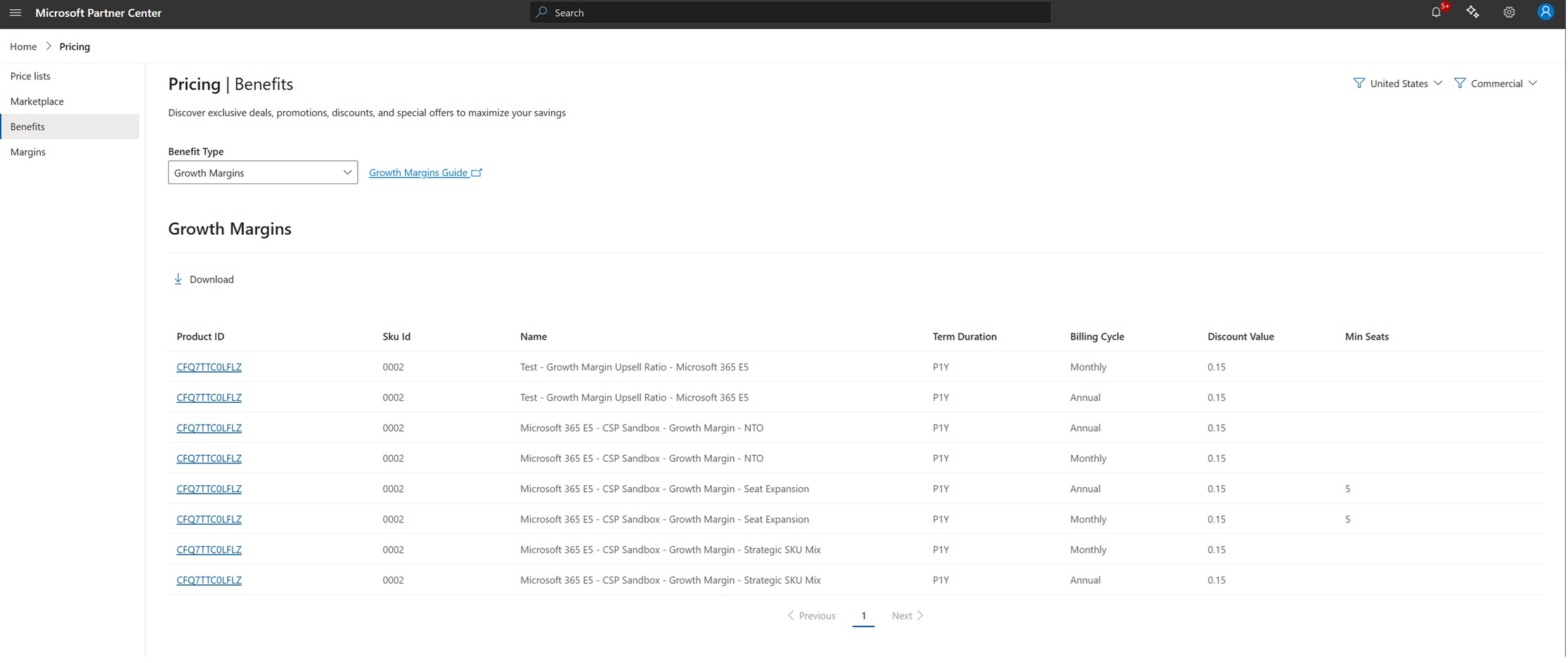
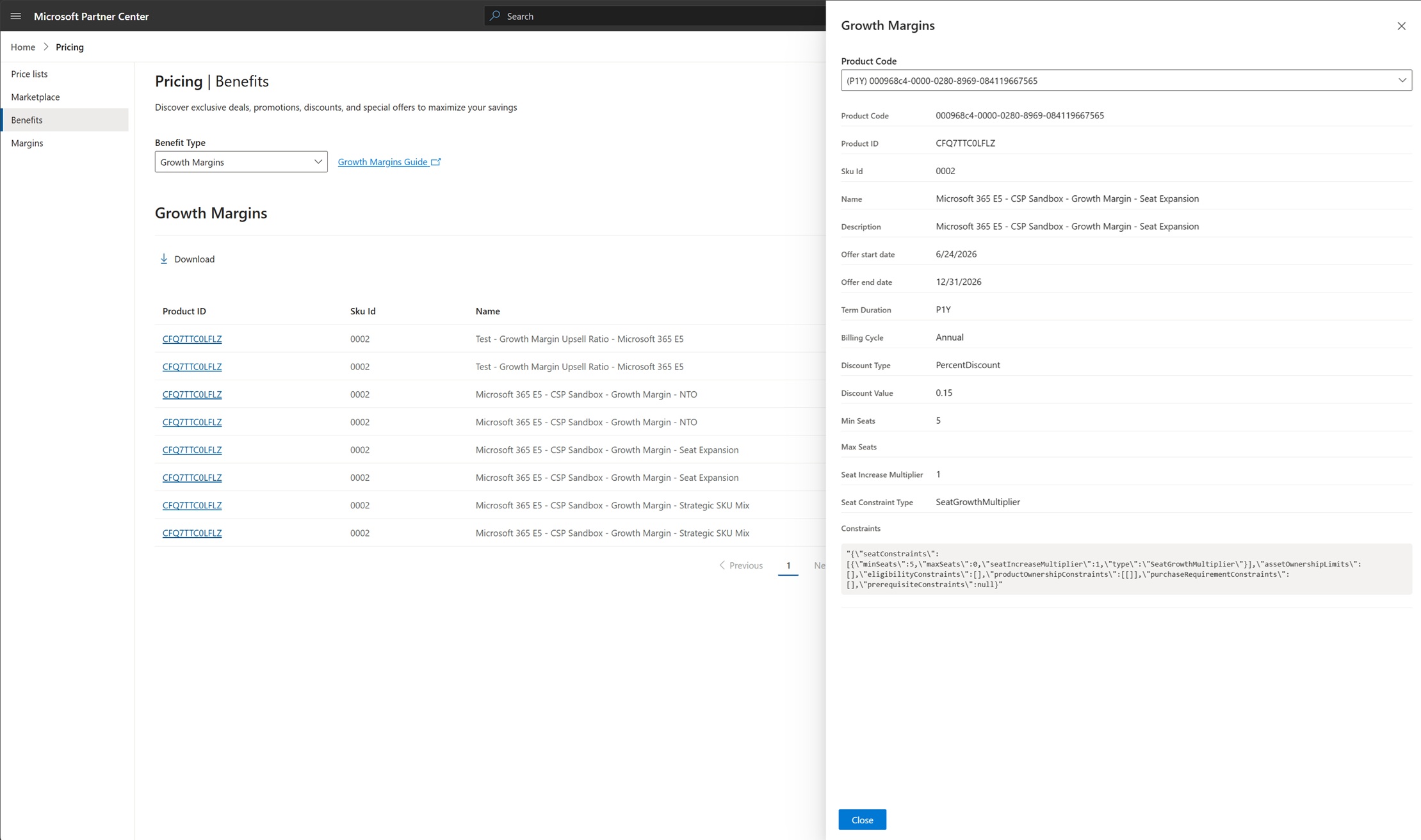
The growth margins download list contains the following data:
| Field | Example | Description |
|---|---|---|
| productCode | 00093c37-0000-0280-8969-084119667565 | Growth margin Product Code identifier. |
| productId | CFQ7TTC0ZSXK | Identifier of the product. |
| skuId | 0005 | Identifier of the SKU. |
| name | Growth Margin – New to offer | Title of the growth margin. |
| description | You will receive a new partner price for this transaction. New-to-offer margins are available when acquiring select SKUs for new customers. | Growth margin short description. |
| startDate | 2026-05-12T11:16:17Z | Start date for the growth margin. |
| endDate | 2026-08-12T11:17:02Z | End date for the growth margin. Always refer to the latest start and end dates to identify the active growth margin. |
| termDuration | P1Y, P1M, P3Y | Length of the term. |
| billingCycle | Monthly, Annual | How frequently billing occurs. |
| discountType | PercentDiscount | Type of discount applied (percentage or flat). |
| discountValue | 0.08 | Value of the discount. |
| minSeats | 3 | Minimum seats required for the growth margin. |
| maxSeats | 0 | Maximum seats for the growth margin. A value of 0 indicates no maximum. |
| seatIncreaseMultiplier | 5 | The minimum growth factor required for a seat expansion transaction to qualify for a Growth Margin. The number of new seats added must meet or exceed the specified multiplier relative to the customer's existing qualifying seat count, in addition to any minimum seat threshold requirements. Growth Margin eligibility is determined at the time of purchase based on these criteria. |
| seatConstraintType | SeatGrowthMultiplier | Type of seat constraint applied. |
| constraints | (JSON object) | Full eligibility constraints in JSON format. See the constraint definitions below for details on each constraint type. |
The constraints field contains the following constraint types:
| Constraint | Definition |
|---|---|
| seatConstraints | Defines the minimum or maximum seat requirements that must be met for a transaction to qualify for Growth Margin. Examples include minimum net-new seats or required seat expansion thresholds. |
| assetOwnershipLimits | Defines limits based on the customer's existing ownership of qualifying subscriptions or assets. Growth Margin eligibility may depend on whether the customer already owns, previously owned, or currently holds qualifying subscriptions. |
| eligibilityConstraints | Defines the set of business rules that determine whether a transaction qualifies for Growth Margin. These rules can include customer history, seat growth requirements, product eligibility, purchase timing, and other qualifying criteria. |
| productOwnershipConstraints | Defines product ownership conditions that must be met before Growth Margin can be applied. For example, eligibility may depend on whether the customer currently owns, previously owned, or does not own a specific product or SKU. |
| purchaseRequirementConstraints | Defines purchase-specific requirements that must be satisfied for Growth Margin eligibility, such as purchasing a qualifying product, meeting a minimum seat threshold, selecting an eligible term, or creating a new subscription when required. |
| prerequisiteConstraints | Defines prerequisite product ownership conditions evaluated within a configurable lookback window. Uses MustHaveAll, MustHaveAny, and MustHaveNone rules to specify products the customer must own, may own any of, or must not own to qualify. Each rule can include seat constraints and a lookback period over which ownership is evaluated. |
Get growth margins list via API
You can get a list of active growth margins for a given market (country/region) and segment.
The API returns this list of growth margins and important information to help you understand which growth margins are available for customers in different countries/regions.
The API includes the following data for a given growth margin:
- Product Code identifier for the growth margin.
- Duration of the growth margin.
- The percentage discount for the growth margin.
- The Product and SKU the growth margin is available for.
Partner Center applies growth margins when you purchase the product SKU for which the growth margin is available. Growth margins are available in the Partner Center catalog in product SKU details. You can select view details to get more information about the growth margin.
You can view the growth margin details from the catalog page view SKU details, the review page before submitting the purchase, the confirmation after the order is submitted and the order history page.
Discovering growth margins
You can discover growth margins in the Partner Center catalog purchase experience or by calling the growthMargin API. The growth margins list is editorially maintained and updated monthly.
As a partner, you can access the list of all CSP growth margins in the Growth Margin Guide. You need to sign-in to access the guide.
When you view a product SKU that has a growth margin available, the catalog surfaces a Price benefits panel indicating "This purchase qualifies for pricing discounts."
The Price benefits panel separates Growth margins from Promotions:
- Growth margins shows "This purchase enables a new partner margin price," along with the growth margin name (for example, Growth Margin – New to offer), its ID (for example,
39NFJQT25FLR:000C:084R5MQ9QF2R), its Product Code, and a short description. - Promotions shows available customer-facing promotions.
If only one type of benefit is available and you look for the other, Partner Center indicates that no discounts of that type exist for the selection.
A new priceBenefits array is added to each cart line item (cartLineItem.priceBenefits).
- On request (create/update cart): the field is server-authoritative. Any value the partner sends is ignored and replaced by the auto-applied result. Partners should treat it as read-only.
- On response:
priceBenefitsreflects the single auto-applied, validated Growth Margin for that line item, or is omitted when none applies.
Calculation logic for growth margins
The following table shows how margins and discounts are applied to calculate the partner price:
| Scenario | ERP Price | Margin / Discount Applied | Calculation | Partner Price |
|---|---|---|---|---|
| No margin | $100.00 | 0% margin | $100 × (1 - 0%) | $100.00 |
| Base margin only | $100.00 | 20% base margin | $100 × (1 - 20%) | $80.00 |
| Base margin + growth margin | $100.00 | 20% base margin + 15% growth margin | $100 × (1 - 20% - 15%) | $65.00 |
| Base margin + promo discount | $100.00 | 20% base margin + 10% promotion discount | ($100 × (1 - 20%)) × (1 - 10%) | $72.00 |
| Base margin + growth margin + promo discount | $100.00 | 20% base margin + 15% growth margin + 10% promotion discount | ($100 × (1 - 20% - 15%)) × (1 - 10%) | $58.50 |
Verify eligibility
You can view whether a customer purchase is eligible for a growth margin by seeing the information in the review page in Partner Center before purchasing the product. You can also call the growth margin eligibility API, passing the customer tenant ID and the product/SKU. The call returns whether the customer is eligible for a growth margin.
Important
To check growth margin eligibility, the partner must have an established reseller relationship with the customer in Partner Center, as required for promotion eligibility checks. For more information, see Connect with your customers.
Growth margins require a new subscription for mid-term purchases. The only partner-initiated scenario in which an existing subscription can be evaluated for a growth margin is a mid-term upgrade, including an immediate, partial, or scheduled upgrade. Seat quantity updates on an existing subscription aren't evaluated for a growth margin, including seat expansion and Strategic SKU Mix scenarios.
A transaction might be eligible for multiple growth margins if it meets all applicable criteria. In such cases, the system automatically applies the most beneficial eligible growth margin at the time of purchase.
If the customer isn't eligible, the API returns the conditions that weren't met for the growth margin to be applied.
Important
As a partner, you should:
- Verify growth margins before you submit a transaction. In the Partner Center review page if you don't see a growth margin, it isn't applied on the transaction and you receive the standard (nonmargin) price.
- Look at the cart line item to see if the growth margin is present before submitting a transaction.
- Call the growth margin eligibility API before submitting transactions to verify your customer product SKU combination is eligible and, if not, the reasons for ineligibility.
Important
Growth margin ineligibility is non-blocking. If a transaction isn't eligible, you can still proceed at the standard (nonmargin) price. The review experience and the eligibility API surface the reason the growth margin wasn't applied.
There are various reasons a customer isn't eligible for a growth margin. These ineligibility reasons are returned in the growth margin eligibility API in cases where the customer isn't eligible.
| Reason | Description |
|---|---|
| Not new-to-offer | The customer already has the product (or a SKU in the configured set) on the tenant within the lookback period. By default, the lookback period is the past three years unless a different window is specified in the Growth Margin Guide. |
| Below minimum seats | The transaction is below the configured minimum seat threshold for the growth scenario. |
| Expansion multiple not met | The new seats don't meet the configured seat-expansion multiple of existing seats. |
| Seats updated on existing subscription | Growth margin requires a new subscription unless the transaction is a supported mid-term upgrade. Seat quantity updates on an existing subscription aren't evaluated, including seat expansion and Strategic SKU Mix scenarios. |
| Strategic SKU Mix not met | The tenant's strategic SKU mix is below the configured threshold, or the customer is already above the threshold. |
| Channel-shift excluded | The seats originate from a channel shift (for example, EA to CSP) and don't qualify as growth. |
| Specialized Offer precedence | A Specialized Offer applies to the SKU and takes precedence over growth margin. |
Verify growth margin eligibility
The Growth Margin Guide defines the specific eligibility criteria, such as lookback periods, seat-expansion multiples, minimum seat thresholds, and strategic SKU mix thresholds. Use the price benefit eligibilities API to verify whether a customer is eligible for a specific growth margin and base product.
You should always rely on the growth margin eligibility API to understand whether a purchase qualifies for a growth margin before purchasing. The API returns the eligibility status and the reason if not eligible.
POST /v1/customers/{customer_id}/priceBenefitEligibilities
The request contains an items array with one to 100 items. Each item must have a unique id. The response returns a corresponding result for each item in items, ordered by id.
Request fields
| Field | Type | Required | Description |
|---|---|---|---|
id |
integer | Yes | Identifier for the request item. The value must be unique within the request. |
type |
string | Yes | The price benefit type. Use GrowthMargin. |
baseCatalogItemId |
string | Conditional | Identifier for the base product, in productId:skuId:availabilityId format. Provide either baseCatalogItemId or targetProduct, but not both. |
quantity |
integer | Conditional | Number of seats to evaluate. Required at the request-item level when using baseCatalogItemId and must be greater than zero. |
termDuration |
string | Conditional | Term duration in ISO 8601 format. Required at the request-item level when using baseCatalogItemId. |
billingCycle |
string | Conditional | Billing cycle. Required at the request-item level when using baseCatalogItemId; request values are case-insensitive. |
targetProduct |
object | Conditional | The base product and purchase configuration to evaluate. Provide either targetProduct or baseCatalogItemId, but not both. |
targetProduct.productId |
string | Conditional | Product ID of the base product. Required when using targetProduct. |
targetProduct.skuId |
string | Conditional | SKU ID of the base product. Required when using targetProduct. |
targetProduct.quantity |
integer | Conditional | Number of seats to evaluate. Required when using targetProduct and must be greater than zero. |
targetProduct.termDuration |
string | Conditional | Term duration in ISO 8601 format, such as P1Y or P1M. Required when using targetProduct. |
targetProduct.billingCycle |
string | Conditional | Billing cycle, such as Annual or Monthly. Required when using targetProduct; request values are case-insensitive. |
evaluationType |
string | No | Evaluation timing. Use Immediate for a current transaction or Scheduled for a scheduled next-term evaluation. |
subscriptionId |
GUID | Conditional | Subscription to evaluate. Required when evaluationType is Scheduled, Immediate, or Partial. |
priceBenefit |
object | Conditional | Specific growth margin to evaluate. Required when verifying eligibility for a specific growth margin. |
priceBenefit.productCode |
string | Conditional | Product Code of the growth margin. Provide this field, or provide both productId and skuId. |
priceBenefit.productId |
string | Conditional | Product ID of the growth margin discount product. Must be provided with skuId when productCode isn't provided. |
priceBenefit.skuId |
string | Conditional | SKU ID of the growth margin discount product. Must be provided with productId when productCode isn't provided. |
priceBenefit.availabilityId |
string | No | Availability ID of the Growth Margin discount product. Partner Center resolves it when omitted. |
Choose the base-product request shape that matches the information available to your integration:
- Use
baseCatalogItemIdwhen you have the availability ID for the base product. Existing integrations can continue to use the fullproductId:skuId:availabilityIdvalue, withquantity,termDuration, andbillingCycleat the request-item level. - Use
targetProductwhen the availability ID isn't available. This request shape was introduced so partners can validate eligibility by providing the base product ID, SKU ID, quantity, term duration, and billing cycle without first resolving an availability ID.
Don't send targetProduct and baseCatalogItemId in the same request item. When baseCatalogItemId includes an availability ID, Partner Center still resolves the applicable availability from the requested term and billing cycle. The response echoes the supplied baseCatalogItemId and also returns the normalized purchase configuration in targetProduct.
Identify priceBenefit by either productCode or the combination of productId and skuId. You can obtain these values from the Get growth margins API. baseCatalogItemId or targetProduct identifies the base product being purchased; priceBenefit identifies the growth margin discount product.
For an immediate transaction, set evaluationType to Immediate. For a scheduled evaluation, set it to Scheduled and provide the subscriptionId. A scheduled evaluation is a point-in-time preview for the subscription's next term and doesn't schedule or persist a margin.
Eligibility request using baseCatalogItemId
The following request includes purchase details at the request-item level.
{
  "items": [
    {
      "id": 1,
      "type": "GrowthMargin",
      "evaluationType": "Immediate",
      "baseCatalogItemId": "CFQ7TTC0LH1G:0001:CFQ7TTC0K5X8",
      "quantity": 25,
      "termDuration": "P1Y",
      "billingCycle": "Annual",
      "priceBenefit": {
        "productCode": "00093c37-0000-0280-8969-084119667565",
        "productId": "39NFJQT10HVS",
        "skuId": "0002",
        "availabilityId": "084R5MQ9QF37"
      }
    }
  ]
}
Eligibility request using targetProduct
The following request evaluates the same base product and growth margin.
{
  "items": [
    {
      "id": 1,
      "type": "GrowthMargin",
      "evaluationType": "Immediate",
      "targetProduct": {
        "productId": "CFQ7TTC0LH1G",
        "skuId": "0001",
        "quantity": 25,
        "termDuration": "P1Y",
        "billingCycle": "Annual"
      },
      "priceBenefit": {
        "productCode": "00093c37-0000-0280-8969-084119667565",
        "productId": "39NFJQT10HVS",
        "skuId": "0002",
        "availabilityId": "084R5MQ9QF37"
      }
    }
  ]
}
Response collection and request-item fields
The response is a collection of request-item results. All response fields are read-only, and properties with null values are omitted. Don't interpret an omitted numeric field as 0 or as an unlimited value.
| Field | Type | Returned | Description |
|---|---|---|---|
totalCount |
integer | Always | Number of request-item results in items. This value isn't the number of growth margins evaluated. |
items |
array of objects | Always | Request-item results, ordered by the request id. The array can be empty. |
attributes |
object | Always | Metadata for the response collection. |
attributes.objectType |
string | Always | Resource type. The value is Collection. |
items[].id |
integer | Always | Request-item identifier, echoed from the request. |
items[].type |
string | Always | Benefit type, echoed from the request. The value is GrowthMargin. |
items[].baseCatalogItemId |
string | Conditional | Exact value echoed from a request that used baseCatalogItemId. |
items[].evaluationType |
string | Conditional | Immediate or Scheduled, echoed when supplied in the request. If omitted, the service evaluates the request as Immediate but doesn't return this field. |
items[].subscriptionId |
GUID | Conditional | Partner Center subscription ID echoed from a scheduled-evaluation request. This value isn't an Azure subscription ID. |
items[].eligibilities |
array of objects | Always | Growth margin evaluation results. The array can contain multiple eligible and ineligible benefits or be empty. |
Normalized target product response
The service returns targetProduct for a request that uses targetProduct. It also returns targetProduct for a request that uses baseCatalogItemId when the identifier can be resolved. This object is the normalized base product and purchase configuration that the service evaluated.
| Field | Type | Returned | Description |
|---|---|---|---|
items[].targetProduct |
object | Conditional | Base product and purchase configuration normalized by the service. Returned for a targetProduct request and for a baseCatalogItemId request when normalization succeeds. |
items[].targetProduct.productId |
string | With targetProduct |
Product ID of the normalized base product. |
items[].targetProduct.skuId |
string | With targetProduct |
SKU ID of the normalized base product. Leading zeros are preserved. |
items[].targetProduct.quantity |
integer | With targetProduct |
Quantity evaluated. For a scheduled evaluation, this value is the proposed next-term quantity. |
items[].targetProduct.termDuration |
string | With targetProduct |
Evaluated term duration in ISO 8601 format. |
items[].targetProduct.billingCycle |
string | With targetProduct |
Normalized lowercase billing cycle, such as monthly, annual, or triennial. |
The service resolves availability from the requested term and billing cycle. The normalized targetProduct response therefore doesn't contain an availabilityId, including when the request uses a three-part baseCatalogItemId. For a baseCatalogItemId request, the response returns both the exact baseCatalogItemId supplied by the caller and the normalized targetProduct when the identifier can be resolved.
Growth margin result fields
Each object in eligibilities represents one evaluated growth margin. A discovery request can return multiple eligible and ineligible benefits. Validation of a specific benefit commonly returns one result.
| Field | Type | Returned | Description |
|---|---|---|---|
items[].eligibilities[].priceBenefit |
object | Conditional | Identity of the growth margin discount product. It can be omitted if a specific benefit can't be identified. |
items[].eligibilities[].priceBenefit.productCode |
string | Conditional | Product code, also called the Universal Product Name (UPN), supplied by the caller or resolved by the service. |
items[].eligibilities[].priceBenefit.productId |
string | Conditional | Product ID of the growth margin discount product, not the base product. |
items[].eligibilities[].priceBenefit.skuId |
string | Conditional | SKU ID of the growth margin discount product. Leading zeros are preserved. |
items[].eligibilities[].priceBenefit.availabilityId |
string | Conditional | Availability ID for the growth margin discount product pricing point. It isn't guaranteed on every result. |
items[].eligibilities[].isEligible |
boolean | Always | true when the customer qualifies. false when the customer doesn't qualify or eligibility couldn't be determined. |
items[].eligibilities[].errors |
array of objects | Conditional | Details about an ineligible or undetermined result. The property can be omitted or returned as an empty array. |
items[].eligibilities[].errors[].type |
string | With an error | Machine-readable error identifier. Use this field for application logic and tolerate unknown future values. |
items[].eligibilities[].errors[].description |
string | With an error | Human-readable explanation of the failed rule or configuration. |
Fields in priceBenefit are conditional. For example, a lookup that uses only productCode might return only productCode; clients shouldn't require productId, skuId, and availabilityId on every result.
Eligible response for targetProduct request
The response is a collection. Each request item contains an eligibilities array with the evaluated priceBenefit, an isEligible value, and, when applicable, an errors array. Billing cycles are returned in normalized lowercase wire format.
{
  "totalCount": 1,
  "items": [
    {
      "id": 1,
      "type": "GrowthMargin",
      "targetProduct": {
        "productId": "CFQ7TTC0LH1G",
        "skuId": "0001",
        "quantity": 25,
        "billingCycle": "annual",
        "termDuration": "P1Y"
      },
      "eligibilities": [
        {
          "priceBenefit": {
            "productCode": "00093c37-0000-0280-8969-084119667565",
            "productId": "39NFJQT10HVS",
            "skuId": "0002",
            "availabilityId": "084R5MQ9QF37"
          },
          "isEligible": true
        }
      ]
    }
  ],
  "attributes": {
    "objectType": "Collection"
  }
}
Eligible response for baseCatalogItemId request
For a baseCatalogItemId request, the response echoes that field and includes the normalized targetProduct. Purchase details aren't duplicated at the result-item level.
{
  "totalCount": 1,
  "items": [
    {
      "id": 1,
      "type": "GrowthMargin",
      "targetProduct": {
        "productId": "CFQ7TTC0LH1G",
        "skuId": "0001",
        "quantity": 25,
        "billingCycle": "annual",
        "termDuration": "P1Y"
      },
      "baseCatalogItemId": "CFQ7TTC0LH1G:0001:CFQ7TTC0K5X8",
      "eligibilities": [
        {
          "priceBenefit": {
            "productCode": "00093c37-0000-0280-8969-084119667565",
            "productId": "39NFJQT10HVS",
            "skuId": "0002",
            "availabilityId": "084R5MQ9QF37"
          },
          "isEligible": true
        }
      ]
    }
  ],
  "attributes": {
    "objectType": "Collection"
  }
}
Ineligible response example
{
  "totalCount": 1,
  "items": [
    {
      "id": 1,
      "type": "GrowthMargin",
      "targetProduct": {
        "productId": "CFQ7TTC0LH1G",
        "skuId": "0001",
        "quantity": 25,
        "billingCycle": "annual",
        "termDuration": "P1Y"
      },
      "eligibilities": [
        {
          "priceBenefit": {
            "productCode": "00093c37-0000-0280-8969-084119667565",
            "productId": "39NFJQT10HVS",
            "skuId": "0002",
            "availabilityId": "084R5MQ9QF37"
          },
          "isEligible": false,
          "errors": [
            {
              "type": "NewToOfferGrowthMarginConstraintNotMet",
              "description": "The purchase quantity does not fall within the seat range required to qualify for the CSP growth-margin discount on a new-to-offer purchase.",
              "minNewToOfferConstraint": 50,
              "maxNewToOfferConstraint": 300,
              "currentNewToOfferPurchased": 0,
              "minNewToOfferRequiredToBePurchased": 50,
              "maxNewToOfferWhichCanBePurchased": 300
            }
          ]
        }
      ]
    }
  ],
  "attributes": {
    "objectType": "Collection"
  }
}
Scheduled evaluation example
{
  "items": [
    {
      "id": 1,
      "type": "GrowthMargin",
      "evaluationType": "Scheduled",
      "subscriptionId": "5f0c2b1a-7d3e-4a9b-8c6d-1e2f3a4b5c6d",
      "targetProduct": {
        "productId": "CFQ7TTC0LH1G",
        "skuId": "0001",
        "quantity": 40,
        "termDuration": "P1Y",
        "billingCycle": "Annual"
      }
    }
  ]
}
Types of ineligibilities
The API generally returns HTTP 200 for eligible, ineligible, and per-item validation results. An ineligible result sets isEligible to false and includes an errors array with a type, a human-readable description, and any fields specific to that eligibility rule. Invalid request payloads return HTTP 400.
The following table lists common caller-actionable errors and isn't exhaustive. Clients should tolerate unknown type values. If eligibility can't be conclusively determined, retry the evaluation rather than treating the result as durable business ineligibility.
| Error type | Meaning | Additional fields |
|---|---|---|
NewToOfferGrowthMarginConstraintNotMet |
The purchase doesn't meet the new-to-offer seat range. | minNewToOfferConstraint, maxNewToOfferConstraint, currentNewToOfferPurchased, minNewToOfferRequiredToBePurchased, maxNewToOfferWhichCanBePurchased |
SeatExpansionGrowthMarginConstraintsNotMet |
The post-purchase seat total doesn't meet the seat-expansion threshold. | seatIncreaseMultiplier, minSeatExpansionConstraint, maxSeatExpansionConstraint, currentSeatExpansionPurchased, minSeatExpansionRequiredToBePurchased, maxSeatExpansionWhichCanBePurchased |
UpsellGrowthMarginConstraintsNotMet |
The purchase doesn't meet the Strategic SKU Mix quantity or ratio threshold. | minRequiredRatioThreshold, currentRatio, currentUpsellQuantity, requiredUpsellQuantity, minUpsellQuantityRequired |
PrerequisiteConstraintsNotMet |
The customer doesn't meet the prerequisite product ownership or seat requirements for the growth margin, including any applicable lookback rules. | failedPrerequisites, cumulativeSeatConstraint |
SeatCount |
The requested quantity doesn't meet the minimum or maximum seat requirements for the growth margin. | minimumRequiredSeats, maximumRequiredSeats, availableSeats |
EligibilityNotDetermined |
Eligibility for the growth margin couldn't be determined. Retry the eligibility check; this result doesn't confirm that the customer is ineligible. | None |
InvalidSubscriptionId |
The subscription provided for a scheduled evaluation isn't found or active. | None |
InvalidCatalogItemId |
The target product doesn't resolve to a valid catalog item. | None |
InvalidDiscountConfiguration |
The specified growth margin discount configuration is invalid or unknown. | None |
The error object can include additional fields that explain the failed constraint. These fields are conditional unless otherwise noted.
Prerequisite constraint response
When type is PrerequisiteConstraintsNotMet, the response can identify the prerequisite products, ownership lookback, and aggregate seat requirement that the customer didn't meet.
| Field | Type | Description |
|---|---|---|
failedPrerequisites |
array of objects | Prerequisite failures. The array is always returned for this error type but can be empty. |
failedPrerequisites[].failedConstraintGroup |
string | Failed prerequisite category. Values are MustHaveAll, MustHaveAny, or MustHaveNone. |
failedPrerequisites[].productId |
string | Product associated with the prerequisite failure. It can differ from the evaluated base product and the discount product. |
failedPrerequisites[].skuId |
string | SKU associated with the prerequisite failure, when the rule is defined at the SKU level. |
failedPrerequisites[].minimumRequiredSeats |
integer | Minimum qualifying seats for the prerequisite. |
failedPrerequisites[].maximumRequiredSeats |
integer | Maximum qualifying seats for the prerequisite. |
failedPrerequisites[].actualSeats |
integer | Seat count calculated during evaluation. Always returned for each prerequisite failure. |
failedPrerequisites[].lookbackWindow |
object | Ownership lookback configuration used during evaluation. |
failedPrerequisites[].lookbackWindow.type |
string | Lookback type. Values are Period or None. |
failedPrerequisites[].lookbackWindow.period |
string | ISO 8601 duration returned when a lookback period is configured. |
cumulativeSeatConstraint |
object | Combined-seat evaluation across multiple products. |
cumulativeSeatConstraint.requiredMinSeats |
integer | Required minimum aggregate seats. |
cumulativeSeatConstraint.requiredMaxSeats |
integer | Required maximum aggregate seats. |
cumulativeSeatConstraint.actualCumulativeSeats |
integer | Aggregate seat count calculated by the service. Always returned when cumulativeSeatConstraint is present. |
Seat count response
When type is SeatCount, the response can show the requested quantity limits and how many seats remain available under the maximum-seat restriction.
| Field | Type | Description |
|---|---|---|
minimumRequiredSeats |
integer | Minimum quantity required. |
maximumRequiredSeats |
integer | Maximum quantity allowed. |
availableSeats |
integer | Remaining seats that can be purchased without exceeding the maximum-seat restriction. |
Seat expansion response
When type is SeatExpansionGrowthMarginConstraintsNotMet, the response can show the configured expansion range, current qualifying quantity, and quantity needed to meet the rule.
| Field | Type | Description |
|---|---|---|
seatIncreaseMultiplier |
integer | Configured multiplier used in the seat-expansion calculation. |
minSeatExpansionConstraint |
integer | Configured minimum expansion threshold. |
maxSeatExpansionConstraint |
integer | Configured maximum expansion threshold. |
currentSeatExpansionPurchased |
integer | Current qualifying seats used in the evaluation. |
minSeatExpansionRequiredToBePurchased |
integer | Additional seats required to meet the expansion rule. |
maxSeatExpansionWhichCanBePurchased |
integer | Maximum additional seats allowed by the expansion rule. |
Strategic SKU Mix response
When type is UpsellGrowthMarginConstraintsNotMet, the response shows the required Strategic SKU Mix ratio and the quantities used in the calculation.
| Field | Type | Description |
|---|---|---|
minRequiredRatioThreshold |
number | Minimum ratio required by the policy. |
currentRatio |
number | Customer ratio calculated by the service. |
currentUpsellQuantity |
integer | Qualifying upsell seats counted during evaluation. |
requiredUpsellQuantity |
integer | Upsell quantity required by the ratio calculation. |
minUpsellQuantityRequired |
integer | Configured minimum upsell quantity. |
New-to-offer response
When type is NewToOfferGrowthMarginConstraintNotMet, the response shows the configured seat range, seats already counted, and the additional quantity allowed or required.
| Field | Type | Description |
|---|---|---|
minNewToOfferConstraint |
integer | Configured minimum new-to-offer threshold. |
maxNewToOfferConstraint |
integer | Configured maximum new-to-offer threshold. |
currentNewToOfferPurchased |
integer | Seats already counted for the offer. |
minNewToOfferRequiredToBePurchased |
integer | Additional seats required to satisfy the rule. |
maxNewToOfferWhichCanBePurchased |
integer | Maximum additional seats allowed by the rule. |
Request-level error response
Invalid request payloads return HTTP 400 with a root-level error response instead of the eligibility collection. This response is different from an ineligible or undetermined result returned within items[].eligibilities[].
| Field | Type | Returned | Description |
|---|---|---|---|
code |
integer | Always | Request-level error identifier. This value is different from the HTTP status code and an eligibility error type. |
description |
string | Always | Human-readable request-level error explanation. |
data |
array | Conditional | Additional diagnostic details. The array can be empty. |
source |
string | Conditional | Diagnostic source that reported the error. |
The examples use illustrative product, SKU, subscription, and benefit identifiers. They don't guarantee that a particular product combination qualifies.
Seat expansion
For midterm seat expansion, you must place the incremental seats on a new subscription. Only those new seats earn growth margin while the existing seats remain at base margin. The new seats must also meet the configured multiple of existing seats.
For seat expansion at renewal, no separate subscription is needed — all seats, both existing and new, earn growth margin if the customer qualifies under the then-current criteria.
Seat reductions for Seat Expansion Growth Margin
After a Seat Expansion Growth Margin is applied, the subscription must continue to meet the original eligibility requirements. The maximum number of seats that can be reduced depends on whichever requirement is higher:
- Seat Expansion requirement
- Minimum net-new seat requirement
Use the following formulas:
Required minimum seats = max(Seat Expansion requirement, Minimum net-new seat requirement)
Maximum seat reduction = Purchased seats - Required minimum seats
Example 1: Minimum net-new seat requirement governs
| Requirement | Value |
|---|---|
| Existing subscription seats | 155 |
| Expansion multiplier | 2x |
| Minimum net-new seat requirement | 300 |
Seat Expansion requirement
155 × 2 = 310 total seats
310 - 155 = 155 net-new seats
Required minimum seats
| Requirement | Seats |
|---|---|
| Seat Expansion requirement | 155 |
| Minimum net-new seat requirement | 300 |
| Required minimum seats | 300 |
| Purchased seats | Maximum seats that can be reduced |
|---|---|
| 300 | 0 |
| 310 | 10 |
| 325 | 25 |
| 350 | 50 |
For example, if 350 seats are purchased:
Maximum seat reduction = 350 - 300 = 50 seats
The subscription can be reduced to 300 seats and remain eligible.
Example 2: Seat Expansion requirement governs
| Requirement | Value |
|---|---|
| Existing subscription seats | 200 |
| Expansion multiplier | 1.5x |
| Minimum net-new seat requirement | 75 |
Seat Expansion requirement
200 × 1.5 = 300 total seats
300 - 200 = 100 net-new seats
Required minimum seats
| Requirement | Seats |
|---|---|
| Seat Expansion requirement | 100 |
| Minimum net-new seat requirement | 75 |
| Required minimum seats | 100 |
| Purchased net-new seats | Maximum seats that can be reduced |
|---|---|
| 100 | 0 |
| 120 | 20 |
| 150 | 50 |
For example, if you purchase 120 net-new seats:
Maximum seat reduction = 120 - 100 = 20 seats
You can reduce the subscription by up to 20 seats and still satisfy the Seat Expansion requirement.
Note
A subscription can only be reduced to the minimum quantity required to satisfy both the Seat Expansion requirement and the Minimum net-new seat requirement. Any reduction below that threshold might result in loss of eligibility for the Growth Margin.
Stacking and precedence
- Customer promotions stack with growth margin. An eligible customer-facing promotion is applied after the partner price (margin first, promotion second).
- Specialized Offers take precedence. When a Specialized Offer exists for the SKU, SO pricing takes precedence and growth margin isn't applied. Growth margin and SO pricing don't stack.
Growth margins and renewals
Growth margins are valid for the term of the purchase. For renewals, Growth Margin eligibility is evaluated only when a renewal schedule is configured to indicate growth. If the eligibility criteria are met, the applicable Growth Margin will be applied at renewal.
Note
A growth margin shown more than seven days before renewal can change and might not apply at renewal. Always confirm the scheduled margin within seven days of the renewal date. Whether a subscription requalifies at renewal is governed by the criteria in the Growth Margin Guide.
Monitor scheduled growth margin changes with webhooks
Partner Center provides webhook events when renewal re-evaluation adds, replaces, or removes the growth margin scheduled for a subscription's next term. These events don't change the growth margin or pricing for the current term. The scheduled change becomes effective when the current term ends.
| Event | Trigger |
|---|---|
growth-margin-added |
A growth margin is scheduled to apply to the subscription at its next term. A change in available growth margin offers or the customer's eligibility state can make the subscription newly eligible. |
growth-margin-updated |
The growth margin currently scheduled for the subscription's next term is replaced by a different eligible growth margin. The replacement affects only the next term; current-term pricing is unchanged. |
growth-margin-removed |
The growth margin scheduled for the subscription's next term is removed and no longer applies at the next term. A change in available growth margin offers or the customer's eligibility state can cause the subscription to lose eligibility. |
Each event uses the standard Partner Center webhook envelope:
| Property | Type | Description |
|---|---|---|
EventName |
string | The event name: growth-margin-added, growth-margin-updated, or growth-margin-removed. |
ResourceUri |
URI | The URI used to retrieve the affected subscription. |
ResourceName |
string | The resource that triggered the event. The value is subscription. |
AuditUri |
URI | The URI used to retrieve the associated audit record. |
ResourceChangeUtcDate |
UTC date-time string | The date and time when the scheduled growth margin changed. |
The following example shows a growth-margin-added event:
{
  "EventName": "growth-margin-added",
  "ResourceUri": "https://api.partnercenter.microsoft.com/v1/customers/{{CustomerId}}/subscriptions/{{SubscriptionId}}",
  "ResourceName": "subscription",
  "AuditUri": "https://api.partnercenter.microsoft.com/auditactivity/v1/auditrecords/{{AuditId}}",
  "ResourceChangeUtcDate": "2026-09-15T17:35:14.2710000+00:00"
}
Use ResourceUri to retrieve the subscription and review its scheduled next-term growth margin. For information about registering a callback, validating notifications, and managing webhook registrations, see Partner Center webhooks. For complete definitions of the three events, see Partner Center webhook events.
View growth margins in Partner Center
During checkout, Partner Center displays the growth margin price points directly in the cart so you can see the partner economics before submitting the order. The cart displays:
- Unit price (list/base price), and Margin price (partner price) columns alongside Quantity and Total price.
- A Partner margin value indicating the qualifying growth margin (for example, New to offer) or No margin when none applies, along with Term, Promotions, and Segment.
- A view details link that opens the growth margin details (the same information shown in the catalog Price benefits panel), and a Find out why link that explains the margin or why it doesn't apply.
You can view growth margin details from the catalog page view SKU details, the review page before submitting the purchase, the confirmation after the order is submitted, and the order history page.
Select Price breakdown on a line item to see the price points for the purchase:
| Price point | Description | Example |
|---|---|---|
| List price (after base margin) | The price after applying the base margin to the ERP. Calculated as ERP × (1 - base margin %). | $80.00 |
| Unit price (partner/margin price) | The partner's price per unit after applying both the base margin and growth margin. Calculated as ERP × (1 - base margin % - growth margin %). | $65.00 |
| Growth margin | The growth margin discount percentage and scenario name applied to the transaction. | 15% discount, New to offer |
| Promotions | Any customer-facing promotional discount applied after the partner price is calculated. | 10% discount, Microsoft 365 E3-targeted 10% Offer |
| Quantity | The number of units in the line item. | 10 |
| Total price | The final price charged. Calculated as Unit price × Quantity, with any promotion discount applied. | $585.00 |
When both a growth margin and a customer promotion apply, the breakdown lists each on its own line so you can see the partner economics (growth margin) and the customer economics (promotion) separately. A Pricing and discounts view also summarizes the applied benefits (for example, Promotion: 10% discount and Growth margin: 15% discount) with a Get More Info option.
Growth margins in the cart
A new priceBenefits collection is available in the cart that shows whether growth margins apply to the cart line item. The priceBenefits collection is read-only and returns after adding a new line item or retrieving the cart.
Example
{
  "id": 0,
  "catalogItemId": "CFQ7TTC0ZSXK:0005:CFQ7TTC13ABC",
  "quantity": 5,
  "termDuration": "P3Y",
  "billingCycle": "Annual",
  "priceBenefits": [
    {
      "type": "GrowthMargin",
      "productCode": "00093c37-0000-0280-8969-084119667565",
      "productId": "39NFJQT10HVS",
      "skuId": "0001",
      "availabilityId": "084R5MQ9QF37"
    }
  ],
  "pricing": {
    "listPrice": 100.00,
    "discountedPrice": 90.00
  }
}
Growth margins in purchase and manage API responses
Partner Center purchase and manage APIs return an optional priceBenefits array to identify a growth margin that the service applied. The array is server-authoritative: including benefit information in a request doesn't select, force, or guarantee a growth margin. Always use the benefit returned in the processed response.
The priceBenefits array identifies the growth margin discount product, not the purchased base product or offer. It doesn't contain the margin percentage or amount, an eligibility result, or the reason a margin wasn't applied. Currently, a response contains at most one applied growth margin at the relevant order line, cart line, subscription, scheduled instruction, or transition scope.
When no applied growth margin is represented, the priceBenefits property is typically omitted rather than returned as null. Don't infer an eligibility reason from an omitted property. Use the growth margin eligibility API when you need to validate eligibility or understand ineligibility.
Price benefit fields
The following fields identify the applied growth margin:
| Field | Type | Description |
|---|---|---|
type |
string | The type of price benefit. The documented value for these responses is GrowthMargin. |
productCode |
string | The product code, also referred to as the UPN, of the growth margin discount product. This value isn't the product code of the purchased product. |
productId |
string | The catalog product ID of the growth margin discount product. This field can be omitted when identity enrichment isn't available. |
skuId |
string | The catalog SKU ID of the growth margin discount product. This field can be omitted when identity enrichment isn't available. Preserve leading zeroes. |
availabilityId |
string | The availability that identifies the growth margin discount product price point. |
In subscription and scheduled-instruction responses, productId and skuId are best-effort fields and can be omitted when Catalog enrichment isn't available. Cart, order, and Create Transition responses include them. Retain productCode and availabilityId as the stable identity.
The following illustrative response excerpt shows a growth margin with partial identity:
{
  "id": "33333333-3333-4333-8333-333333333333",
  "priceBenefits": [
    {
      "type": "GrowthMargin",
      "productCode": "00093c37-0000-0280-8969-084119667565",
      "availabilityId": "084R5MQ9QF37"
    }
  ]
}
Response locations
Inspect priceBenefits at the scope shown for each operation. In collection responses, evaluate each item or line independently because some entries might omit the property.
| Scenario | Method and endpoint | priceBenefits location |
|---|---|---|
| Create an order | POST /v1/customers/{customerId}/orders |
lineItems[].priceBenefits |
| Create a cart | POST /v1/customers/{customerId}/carts |
lineItems[].priceBenefits |
| Check out a cart | POST /v1/customers/{customerId}/carts/{cartId}/checkout |
orders[].lineItems[].priceBenefits |
| Get an order | GET /v1/customers/{customerId}/orders/{orderId} |
lineItems[].priceBenefits |
| Get orders | GET /v1/customers/{customerId}/orders |
items[].lineItems[].priceBenefits |
| Update a cart | PUT /v1/customers/{customerId}/carts/{cartId} |
lineItems[].priceBenefits |
| Get a cart | GET /v1/customers/{customerId}/carts/{cartId} |
lineItems[].priceBenefits |
| Update a subscription with an existing margin | PATCH /v1/customers/{customerId}/subscriptions/{subscriptionId} |
priceBenefits |
| Complete an immediate term change | PATCH /v1/customers/{customerId}/subscriptions/{subscriptionId} |
priceBenefits |
| Schedule a next-term change | PATCH /v1/customers/{customerId}/subscriptions/{subscriptionId} |
scheduledNextTermInstructions.priceBenefits |
| Get a scheduled action | GET /v1/customers/{customerId}/subscriptions/{subscriptionId} |
scheduledActions[].instructions.priceBenefits |
| Create a transition | POST /v1/customers/{customerId}/subscriptions/{subscriptionId}/transitions |
priceBenefits |
| Get a subscription | GET /v1/customers/{customerId}/subscriptions/{subscriptionId} |
priceBenefits |
| Get subscriptions | GET /v1/customers/{customerId}/subscriptions |
items[].priceBenefits |
Feature behavior is subject to rollout and applicable product support.
Current and scheduled benefits
For a subscription, the top-level priceBenefits property describes the benefit applied to the current term. When an immediate term change completes synchronously, the resulting term appears in the top-level termDuration property, and the applied benefit appears in the top-level priceBenefits property. An asynchronous 202 response indicates that the request was accepted, not that the change completed or the margin applied.
For a scheduled next-term change, scheduledNextTermInstructions.priceBenefits describes the benefit currently recorded for the next-term instruction. It's a sibling of product and quantity, not a child of product. The subscription's top-level termDuration continues to describe the current term, while scheduledNextTermInstructions.product.termDuration describes the requested next term.
The following illustrative response excerpt shows the correct nesting:
{
  "id": "33333333-3333-4333-8333-333333333333",
  "termDuration": "P1Y",
  "scheduledNextTermInstructions": {
    "product": {
      "productId": "CFQ7TTC0LFLX",
      "skuId": "0001",
      "availabilityId": "CFQ7TTC13MKH",
      "termDuration": "P3Y"
    },
    "quantity": 25,
    "priceBenefits": [
      {
        "type": "GrowthMargin",
        "productCode": "00093c37-0000-0280-8969-084119667565",
        "productId": "39NFJQT10HVS",
        "skuId": "0001",
        "availabilityId": "084R5MQ9QF37"
      }
    ]
  }
}
In a scheduled action, the equivalent location is scheduledActions[].instructions.priceBenefits, alongside scheduledActions[].instructions.product. A TermEnd scheduled action and scheduledNextTermInstructions can represent the same scheduled benefit; their presence doesn't mean that two growth margins are stacked. A scheduled benefit is the currently recorded instruction and isn't an unconditional guarantee that the margin applies when the instruction executes. Confirm the applied margin near the renewal date.
Response workflow considerations
- A growth margin on a processed cart line isn't proof of a completed purchase. Updating a cart can retain, replace, or omit the margin, and a stored cart response doesn't guarantee that the same margin applies at order submission.
- Cart checkout returns a
CartCheckoutResult. Inspectorders[].lineItems[].priceBenefits. A line'ssubscriptionIdmight be absent while provisioning is in progress; retrieve the order after provisioning to get the subscription ID. - A growth margin in a create-transition response doesn't mean that provisioning completed. Transition history responses don't project the applied growth margin.
- Generic subscription updates don't select a new growth margin. Only a mid-term upgrade can be evaluated for a growth margin on an existing subscription. An existing current-term benefit can still be present in the returned subscription.
- Promotions remain separate from growth margins. A promotion uses
promotionId; it isn't returned as aPromotionentry inpriceBenefits. When both apply,promotionIdandpriceBenefitsappear at their respective resource scope. - Quantities, terms, catalog items, and identifiers in the examples are illustrative and don't represent qualification rules or eligibility promises.
Growth margins and manage scenarios
Growth margins apply to new subscription purchases. For an existing subscription, only a mid-term upgrade can qualify for a growth margin if eligible. Supported mid-term upgrade paths include immediate, partial, and scheduled upgrades.
- Upgrades. When you perform an immediate, partial, or scheduled upgrade mid-term, Partner Center evaluates whether a growth margin applies and shows a Discount for this upgrade in the Pricing and discounts view. Confirm the margin in the review experience before submitting.
- Seat additions. Seat quantity updates on an existing subscription don't qualify for a growth margin, including seat expansion and Strategic SKU Mix scenarios. For mid-term seat expansion, you must place incremental seats on a new subscription. Only those new seats earn a growth margin while the existing seats remain at base margin. At renewal, you don't need a separate subscription and all seats can earn a growth margin if eligible.
- Partner-to-partner transfer. Growth margin eligibility persists when a subscription is transferred between partners during the term. The receiving partner inherits the growth margin pricing for the remainder of the term.
- Cancellations. Standard new commerce cancellation behavior applies: you can cancel a subscription with a prorated refund within the first seven days of any term, except where otherwise required by law. Seat reductions are only allowed above the growth margin seat requirement. If seats drop below the minimum required, the entire subscription must be canceled within the cancellation window.
Growth margin IDs can also be found in the unbilled line items in the new commerce reconciliation file. Growth margins are reflected in the subscription details page.
Growth margin details for manage scenarios
Applied growth margins are available if applied to various post purchase objects:
- Order line items
- Subscriptions
- scheduledNextTermInstructions and scheduledActions
Example — order line item
{
  "lineItemNumber": 0,
  "offerId": "CFQ7TTC0ZSXK:0005:CFQ7TTC13ABC",
  "quantity": 5,
  "promotionId": null,
  "priceBenefits": [
    {
      "type": "GrowthMargin",
      "productCode": "00093c37-0000-0280-8969-084119667565",
      "productId": "39NFJQT10HVS",
      "skuId": "0001",
      "availabilityId": "084R5MQ9QF37"
    }
  ]
}
Pricing and reconciliation for growth margins
Note
Recon and invoice data are available for billing in early August, aligning with the typical monthly billing cadence. Invoice and billing follow the long-standing SLAs for the month following the billing close.
Price list files don't include growth margin pricing or information. You should use the growth margins API or view/download growth margins in the Partner Center Pricing benefits experience or discover growth margins in the Partner Center catalog purchase experience. The API and Partner Center include details about the growth margins, such as the growth margin Product Code identifier and growth margin percentage value.
You can verify growth margins were applied by going to the Partner Center billing page or by calling the Partner Center APIs to see if growth margins were applied to a transaction.
You can also verify the growth margin was applied in the Partner Center order history and activity logs.
You can find the growth margins you purchased in the new commerce reconciliation files. The reconciliation line item has information in the following fields:
- A new attribute
PriceBenefitsincludes the growth margin product code (in theupnfield) with type asproduct, along with theavailabilityId. For more information about this field, see Reconciliation file fields for CSP new commerce invoice. UnitPriceis the price per unit for the purchase after applying Base margin on ERP.EffectiveUnitPricerepresents the final price charged to the partner. It is calculated by applying the applicable base margin and growth margin to the ERP price, and then applying any eligible promotional discounts to the resulting partner price.
For example, when a growth margin is applied, the PriceBenefits attribute contains:
"PriceBenefits": [
  {
    "type": "product",
    "availabilityId": "084R5MQ9QF1K",
    "upn": "00093c3a-0000-0280-8969-084119667565"
  }
]
Efficiently correlate growth margins with reconciliation data
Partners should periodically use the Get growth margins API to retrieve the complete set of active growth margin definitions and maintain the results in a local cache or database. Because reconciliation files can contain significantly more invoice line items than the growth margins reference dataset, calling the Growth Margin by ID API for each line item isn't a scalable pattern.
To enrich invoice reconciliation data with growth margin details:
- Retrieve the complete growth margins dataset on a scheduled basis.
- Store the dataset in a local cache or database and refresh it regularly.
- Process the new commerce invoice reconciliation file and extract the Product Code from the
upnfield of thePriceBenefitsattribute. - Join the extracted Product Code to the product codes in the cached growth margins dataset.
Benefits of this approach include:
- Better scalability for high-volume reconciliation workloads.
- Reduced API consumption and throttling risk.
- Faster processing through local lookups instead of remote calls.
- Improved resiliency by decoupling reconciliation processing from individual Growth Margin by ID lookups.