Intelligent PDF Summarizer
The purpose of this sample application is to demonstrate how Durable Functions can be leveraged to create intelligent applications, particularly in a document processing scenario. Order and durability are key here because the results from one activity are passed to the next. Also, calls to services like Cognitive Service or Azure Open AI can be costly and should not be repeated in the event of failures.
This sample integrates various Azure services, including Azure Durable Functions (with the Azure Durable Task Scheduler (DTS) backend), Azure Storage (for PDF input/output blobs), Azure AI Document Intelligence, and Azure OpenAI.
The application showcases how PDFs can be ingested and intelligently scanned to determine their content. Orchestration state is managed by Azure Durable Task Scheduler — no Azure Storage queues or tables are used for Durable Functions state.
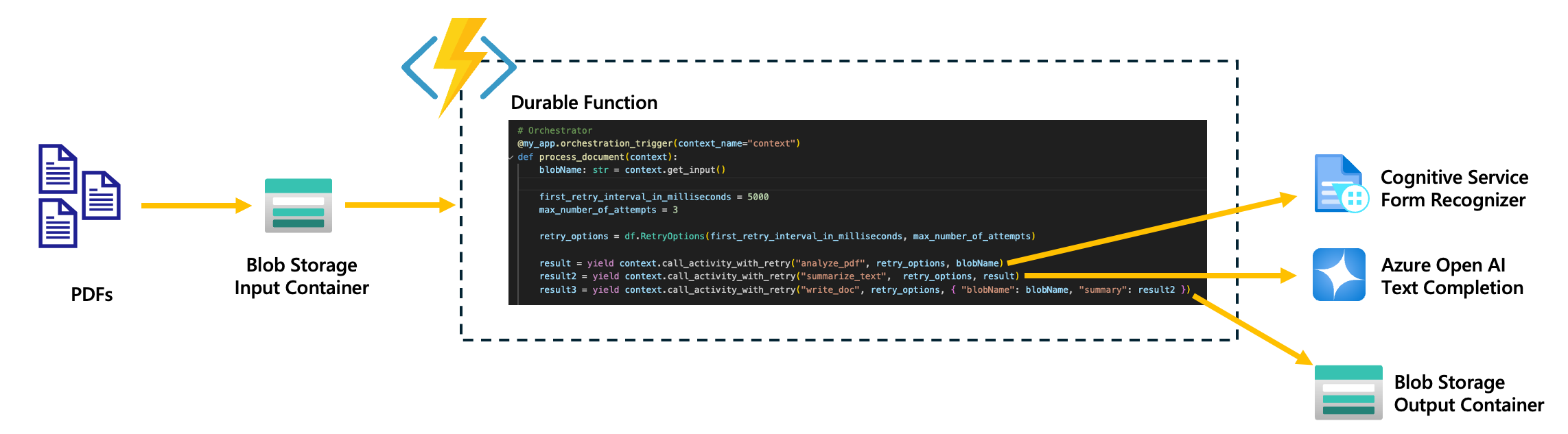
The application's workflow is as follows:
- PDFs are uploaded to a blob storage input container.
- A durable function is triggered upon blob upload. Orchestration progress and history are persisted in the Durable Task Scheduler.
-
- Downloads the blob (PDF).
-
- Utilizes the Azure AI Document Intelligence (Form Recognizer) endpoint to extract the text from the PDF.
-
- Sends the extracted text to Azure OpenAI to analyze and determine the content of the PDF.
-
- Saves the summary results from Azure OpenAI to a new file and uploads it to the output blob container.
Below, you will find the instructions to set up and run this app locally.
Prerequisites
- Create an active Azure subscription.
- Install the latest Azure Functions Core Tools v4
- Python 3.9 or greater
- Docker (used to run the Durable Task Scheduler emulator locally).
- Azure Developer CLI (
azd). - Access permissions to create Azure OpenAI resources and to deploy models.
- Start and configure an Azurite storage emulator for the PDF input/output blob storage.
local.settings.json
Copy local.settings.json.sample to local.settings.json at the root of the repo and replace the placeholders with your specific values. The sample already points DURABLE_TASK_SCHEDULER_CONNECTION_STRING at the local DTS emulator.
{
  "IsEncrypted": false,
  "Values": {
    "AzureWebJobsStorage": "UseDevelopmentStorage=true",
    "AzureWebJobsFeatureFlags": "EnableWorkerIndexing",
    "FUNCTIONS_WORKER_RUNTIME": "python",
    "DURABLE_TASK_SCHEDULER_CONNECTION_STRING": "Endpoint=http://localhost:8080;Authentication=None",
    "TASKHUB_NAME": "default",
    "BLOB_STORAGE_ENDPOINT": "<BLOB-STORAGE-ENDPOINT>",
    "COGNITIVE_SERVICES_ENDPOINT": "<COGNITIVE-SERVICE-ENDPOINT>",
    "AZURE_OPENAI_ENDPOINT": "<AZURE-OPEN-AI-ENDPOINT>",
    "AZURE_OPENAI_KEY": "<AZURE-OPEN-AI-KEY>",
    "CHAT_MODEL_DEPLOYMENT_NAME": "<AZURE-OPEN-AI-MODEL>"
  }
}
Running the app locally
Start Azurite, the local Azure Storage emulator (used only for the PDF input/output blob containers).
Start the Durable Task Scheduler emulator in Docker:
docker run --rm -it -p 8080:8080 -p 8082:8082 mcr.microsoft.com/dts/dts-emulator:latestPort 8080 serves the gRPC endpoint referenced by
DURABLE_TASK_SCHEDULER_CONNECTION_STRING; port 8082 serves the local DTS dashboard athttp://localhost:8082.Install the requirements:
python3 -m pip install -r requirements.txtCreate two containers in your storage account. One called
inputand the other calledoutput.Start the Function App:
func start --verboseUpload PDFs to the
inputcontainer. That will execute the blob storage trigger in your Durable Function. You can watch the orchestration run to completion in the DTS emulator dashboard athttp://localhost:8082.After several seconds, your application should have finished the orchestrations. Switch to the
outputcontainer and notice that the PDFs have been summarized as new files.
Note: The summaries may be truncated based on token limit from Azure OpenAI. This is intentional as a way to reduce costs.
Inspect the code
This app leverages Durable Functions — backed by the Azure Durable Task Scheduler — to orchestrate the application workflow. By using Durable Functions on DTS, there's no need for additional infrastructure like queues and state stores to manage task coordination and durability, which significantly reduces the complexity for developers.
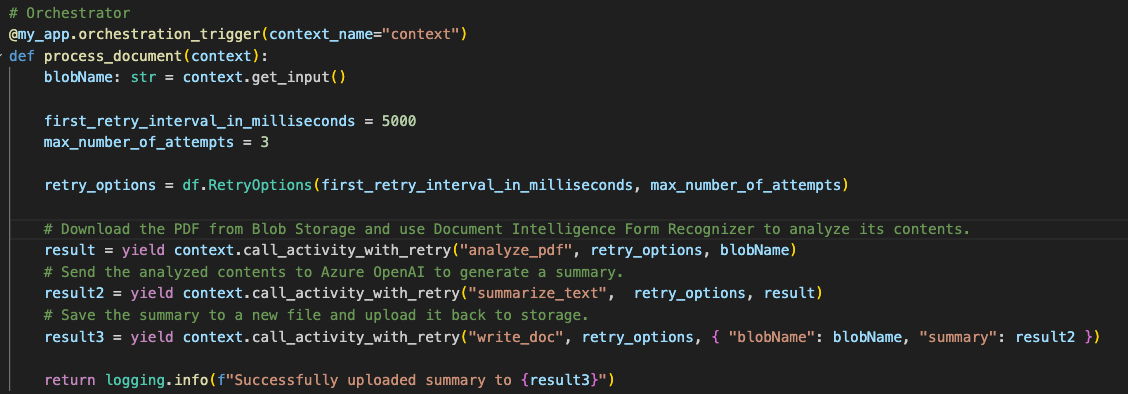
Take a look at the code snippet below, the process_document defines the entire workflow, which consists of a series of steps (activities) that need to be scheduled in sequence. Coordination is key, as the output of one activity is passed as an input to the next. Additionally, Durable Functions handle durability and retries, which ensure that if a failure occurs, such as a transient error or an issue with a dependent service, the workflow can recover gracefully.
Deploy the app to Azure
Use the Azure Developer CLI (azd) to easily deploy the app. The provided Bicep provisions a Durable Task Scheduler, a task hub, the input/output blob storage account, Azure AI Document Intelligence, Azure OpenAI, and grants the function app's user-assigned managed identity the Durable Task Data Contributor role on the scheduler.
In the root of the project, run the following command to provision and deploy the app:
azd auth login
azd up
When prompted, provide:
- A name for your Azure Developer CLI environment.
- The Azure subscription you'd like to use.
- The Azure location to use.
Once the azd up command finishes, the app will have successfully provisioned and deployed.
Monitor orchestrations
Each task hub has a hosted DTS dashboard. After azd up, get the scheduler name and task hub from the outputs (azd show) and open the dashboard at:
https://dashboard.durabletask.io
Sign in with the same identity used for deployment (it has been granted the Durable Task Data Contributor role on the scheduler).
Using the app
To use the app, simply upload a PDF to the Blob Storage input container. Once the PDF is transferred, it will be processed using document intelligence and Azure OpenAI. The resulting summary will be saved to a new file and uploaded to the output container.