Extend Copilot's knowledge with Copilot connectors
Microsoft 365 Copilot is powerful out of the box, but its effectiveness depends on the data it can access. If your organization’s most valuable content lives outside Microsoft 365, you may need to bring that data into the Microsoft Graph to make it discoverable and usable by Copilot. That’s where Microsoft 365 Copilot connectors come in.
Copilot connectors
Microsoft 365 Copilot connectors (formerly Graph connectors) allow you to index external content and make it searchable across Microsoft 365 experiences, including Copilot, Microsoft Search, and Microsoft 365 apps. This enables Copilot to retrieve and reason over your organization’s full knowledge base—not just what’s stored in SharePoint or OneDrive.
Copilot connectors also serve as knowledge sources that developers and makers can add to their declarative agents using Microsoft 365 Agents Toolkit or Copilot Studio, providing a customized experience for interacting with and using the data for a particular scenario.
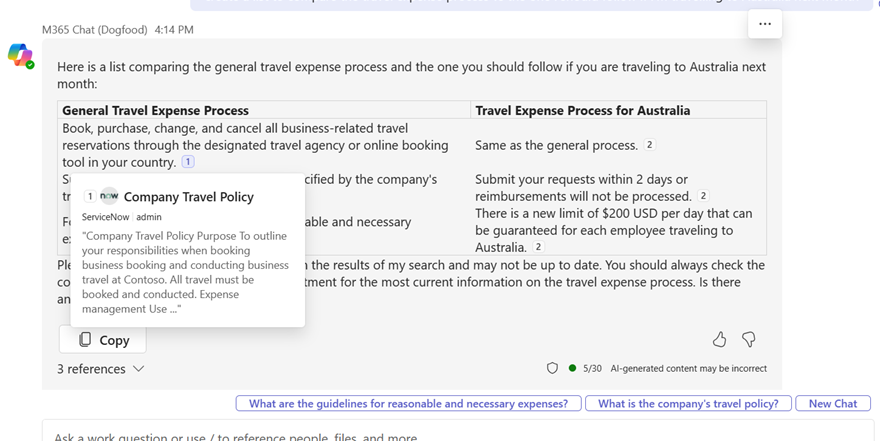
When Copilot uses a Copilot connector to provide a response, users can hover over citations to get a preview of the external item referenced by Copilot.
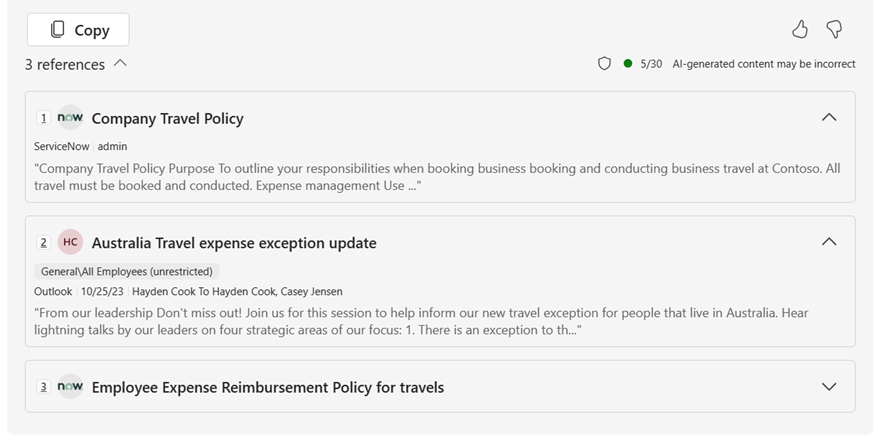
Users can also select one of the reference links at the bottom of Copilot’s response to dive deeper into referenced content.
Benefits and limitations
Consider Copilot connectors if:
- You want to enhance Copilot’s ability to retrieve and summarize content from external systems.
- You need to unify search across multiple repositories without building a new interface.
- You want to improve Copilot’s performance or relevance without writing code or building a conversational agent.
- You need a scalable, security-aware solution that respects Microsoft 365 access controls.
- Your declarative agent will use data available through the Copilot connector to provide relevant information or capabilities for the scenario.
Consider the following limitations of Copilot connectors as well:
- No control over the conversational interface or behavior, unless you also build a declarative agent.
- Limited to structured or semi-structured content that can be indexed.
- Require developer setup using the Microsoft Copilot connectors REST API and/or admin configuration.
- Don't support real-time data access or dynamic workflows.
Use prebuilt connectors
Microsoft provides prebuilt connectors that facilitate integration between third-party services and Microsoft products, enabling data integration and functionality within the Microsoft ecosystem. Over 100 connectors developed by Microsoft and its partners are available.
These connectors enable integration with widely used services, including Azure, Box, ServiceNow, Salesforce, Google services, and MediaWiki. The Copilot connectors gallery includes a brief description of each of the connectors created by Microsoft and our partners, and a link to each partner's website: Microsoft 365 Copilot connectors gallery
Build custom Copilot connectors
If there isn’t a prebuilt Copilot connector for your data source, you can build a custom connector using the Copilot connector APIs. The Microsoft 365 Agents Toolkit can help you scaffold your project and configure your connection efficiently.
To build a custom Copilot connector, you’ll need:
- A Microsoft Entra ID app registration.
- Develop a connector using the Microsoft Copilot connectors REST API.
- Define a schema for your external content.
- Ingest and maintain indexed content.
- Licensing that supports your item quota for indexed data.
Additionally, an admin will need to configure the connector in the Microsoft 365 admin center and define access permissions. Items ingested through connections built with the APIs consume your item quota. For more information about how to determine how much item quota you have and purchasing additional quota, see licensing requirements and pricing.
Learn more about Copilot connectors: Copilot connectors overview
Scenario spotlight: Travel policy search assistant
Let’s revisit our scenario. Your organization wants to improve the employee experience around travel and expense management. One common challenge is that employees can’t easily find the latest travel policy documents, which are stored in a third-party document management system.
To solve this, the IT team builds a Copilot connector that indexes the external content and makes it searchable by Microsoft 365 Copilot. Now, when an employee asks Copilot, “What’s the per diem for international travel?” Copilot can retrieve and summarize the relevant policy—even though it lives outside Microsoft 365.
Analysis
Copilot connectors are the best fit because the solution needs to be:
- Searchable and accessible from within Microsoft 365 apps.
- Integrated with existing content systems without duplicating data.
- Easy to maintain and scalable across departments.
- Focused on enhancing retrieval, not building a new user experience.
Why are other options are suboptimal?
- Copilot Studio declarative agents: Useful for guiding users through tasks, but unnecessary for simple document retrieval.
- Microsoft 365 Agents Toolkit declarative agents: Designed for interactive workflows or a managed development process—not needed for passive search scenarios.
- Custom agents: Offer full control and advanced capabilities, but are too complex for a straightforward content indexing use case.