What is the Microsoft Defender for Office 365 protection stack?
The Microsoft Defender for Office 365 protection stack provides multiple layers of security protection to all incoming messages. The stack comprises four parts: edge protection, sender intelligence, content filtering, and post-delivery protection, with each layer checking for a different type of threat. Typically, a message will pass through each of the layers. However, the actual route through each part depends on how you've chosen to configure Defender for Office 365.
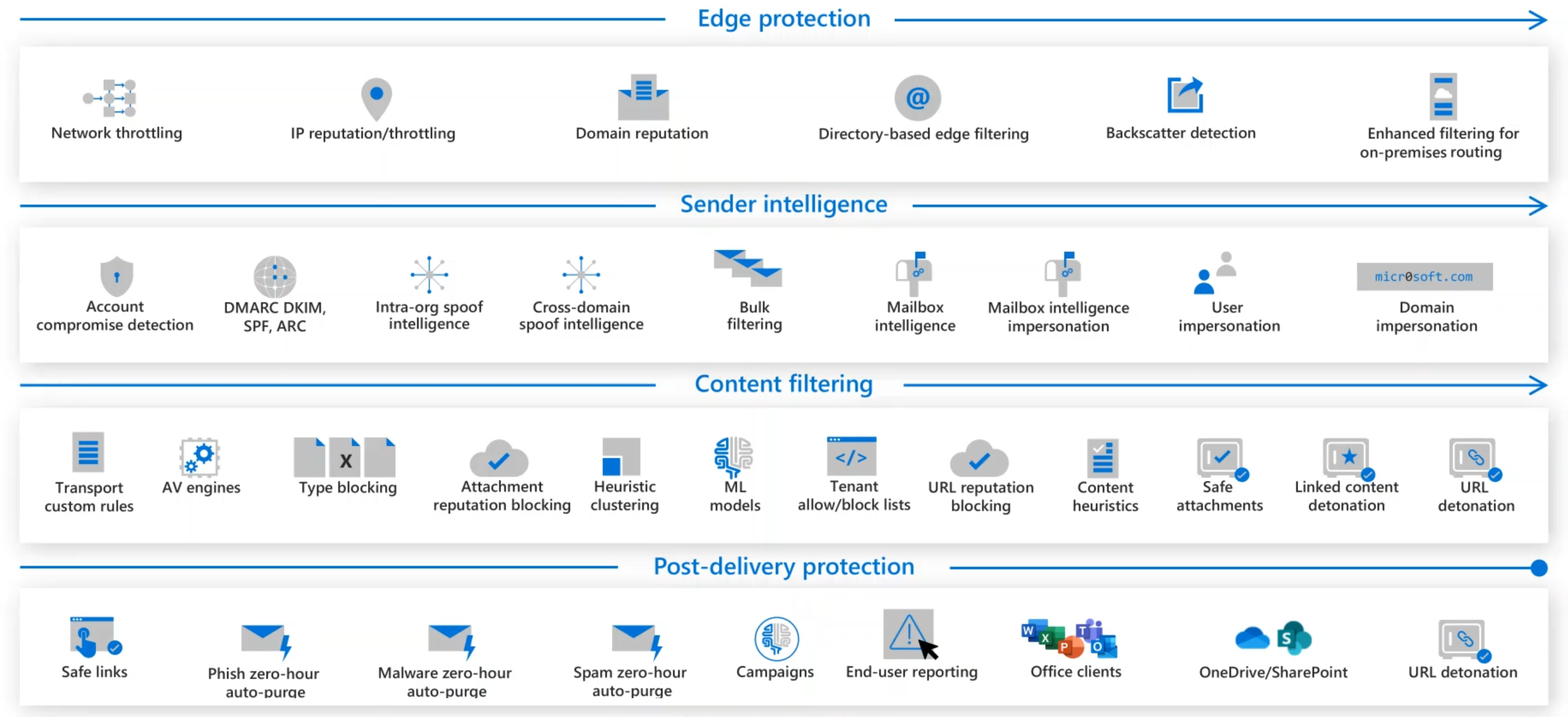
The edge protection layer
Note
The Edge protection layer and edge blocks should not be confused with the Edge browser. They are two different entities.
The edge protection layer is the first point of contact for an inbound message. It's made up of edge blocks that run automatically. Each edge block handles a different aspect of protection from network and IP reputation throttling through directory-based edge filtering and backscatter detection.

Here's a brief description of each edge block:
- Network throttling protects against Denial of Service (DOS) attacks by limiting the number of messages that can be submitted.
- IP reputation and throttling will block messages sent from known bad connecting IP addresses.
- Domain reputation will block any messages sent from a known bad domain.
- Directory-based edge filtering blocks attempts to harvest an organization's directory information through SMTP.
- Backscatter detection prevents an organization from being attacked through invalid non-delivery reports (NDRs).
- Enhanced Filtering for Connectors (also known as skip listing) uses the true source of email messages, even when traffic passes through another device before it reaches Office 365.
The sender intelligence layer
The next layer in the protection stack is sender intelligence. The focus of this layer is identifying the validity of the message sender. This layer checks each message for indicators of a compromised account, for spam, for spoofing, that the email sender is authorized and authenticated, and that the mailbox behaves within tolerance. You and your security team can configure each of these features to meet your organization's needs.

Here's a brief description of each feature in this layer:
- Account compromise detection alerts are raised when an account has strange behavior consistent with compromise.
- Email Authentication aims at ensuring that senders are authorized, genuine mailers. To avoid spoofing, you should use SPF, DKIM, DMARC, and ARC authentication methods.
- Spoof intelligence filters those allowed to 'spoof' from malicious senders who imitate organizational or known external domains.
- Intra-org spoof intelligence detects and blocks spoof attempts from a domain within the organization.
- Cross-domain spoof intelligence detects and blocks spoof attempts from a domain outside of the organization.
- Bulk filtering lets you configure a bulk confidence level (BCL) indicating whether the message was sent from a bulk sender that's more likely or less likely to send spam.
- Mailbox intelligence learns from standard user email behaviors. It leverages a user's communication graph (history of messages to and from) to detect when a sender only appears to be someone the user usually communicates with but is malicious.
- Mailbox intelligence for impersonation protection allows you to configure specific actions to take on messages if mailbox intelligence detects an impersonated user.
- User impersonation allows you to create a list of high-value targets (senders) that are likely to be impersonated.
- Domain impersonation detects sender domains that are similar to the recipient's domain in an attempt to look like an internal domain.
The content filtering layer
The next layer in the protection stack is content filtering. The primary focus of this layer is to check the content of the mail, looking for suspicious message structure and word frequency, hyperlinks, and attachments. Each email is subject to several checks, from mail flow rules to heuristics and machine learning models.

Here's a brief description of the checks that are carried out:
- Mail flow rules (also known as transport rules) evaluate all messages that flow through your organization based on the conditions, exceptions, and actions of enabled mail flow rules.
- Microsoft Defender Antivirus and two third-party Antivirus engines are used to detect all known malware in attachments.
- Common attachment filtering can block all attachments of the types you specify.
- Attachment reputation blocking will block known malicious files across all your Office 365 products.
- Heuristic clustering can determine that a file is suspicious based on delivery heuristics.
- Machine learning models act on the header, body content, and URLs of a message to detect phishing attempts.
- URL reputation blocking will block any message with a known malicious URL.
- Content heuristics can detect suspicious messages based on structure and word frequency within the body of the message, using machine learning models.
- Safe Attachments sandboxes every attachment for Defender for Office 365 customers, using dynamic analysis to detect never-before-seen threats.
- Linked content detonation treats every URL linking to a file in an email as an attachment, asynchronously sandboxing the file at the time of delivery.
- URL Detonation happens when upstream anti-phishing technology finds a message or URL to be suspicious.
The post-delivery protection layer
The last layer in the protection stack is post-delivery protection. This persistent layer manages how users interact with files and links not just in their mailboxes but across other collaborative tools like Microsoft Teams.

To achieve this, it calls upon a number of capabilities:
- Safe Links is Defender for Office 365's time-of-click protection. When a URL is selected, it's checked against the latest reputation before redirecting to the target site.
- Zero-hour auto-purge (ZAP) for phishing retroactively detects and neutralizes malicious phishing messages that have already been delivered to Exchange Online mailboxes.
- ZAP for malware retroactively detects and neutralizes malicious malware messages that have already been delivered to Exchange Online mailboxes.
- ZAP for spam retroactively detects and neutralizes malicious spam messages that have already been delivered to Exchange Online mailboxes.
- Campaign Views let you see the big picture of an attack by using the vast amounts of anti-phishing, anti-spam, and anti-malware data across the entire service.
- Report Message add-in and Report phishing add-in enable users to easily report false positives (good email, mistakenly marked as bad) or false negatives (bad email marked as good) to Microsoft for further analysis.
- Safe Links for Office apps offers the same Safe Links time-of-click protection, natively, inside supported Office apps like Word, PowerPoint, and Excel.
- Protection for OneDrive, SharePoint, and Teams offers the same Safe Attachments protection against malicious files, natively, inside OneDrive, SharePoint, and Microsoft Teams.
- Linked content detonation displays a warning page when the user selects the URL until the sandboxing of the file is complete and the URL is found to be safe.