Creating an agent
Tip
See the Text and images tab for more details!
Agents are applications built with generative AI models. Agentic AI moves beyond responding to prompts in a chat to define autonomous AI assistants that can be reused across apps, experiences, and services.
An agent in Microsoft Foundry is a packaged, reusable AI component that brings together three things:
- A model: the generative AI model the agent uses for reasoning.
- Instructions: the system prompt that defines the agent’s role, behavior, style, constraints, and output rules.
- Tools: the actions the agent can take.
Agents can:
- Call external tools (APIs, functions, retrieval) automatically
- Break goals into structured steps
- Maintain working memory during a conversation
- Process user input, decide actions, and generate structured outputs
Note
It's important to understand the difference between models and agents. Models encapsulate language understanding and intelligence to generate responses to prompts. Agents are packaged, task‑oriented workers built on top of that intelligence, often with specific domain knowledge, constraints, and capabilities.
Create an agent in Foundry portal
To create an agent in Foundry, you can start by exploring a model or just go straight to agent development. In Foundry, an agent is a named configuration that comprises:
- A generative AI model for language understanding and reasoning.
- Instructions that define the agent's role and responsibilities.
- Tools that enable the model to perform tasks.
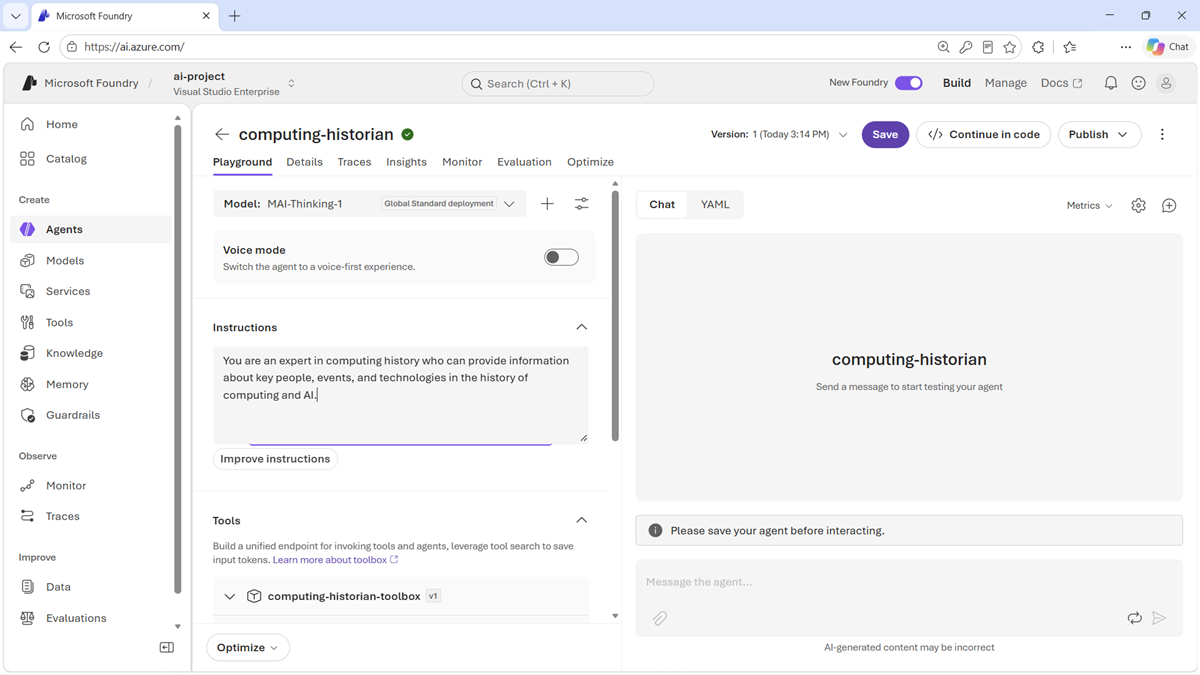
Tools in Foundry allow a model to perform actions by calling external systems. They represent capabilities such as searching the web, querying a database, running code, or performing an action.
When enabled in the model playground, the model can inspect available tools, then call them when relevant to a user request. Examples of tools include:
- Code Interpreter (data analysis, file handling).
- Using knowledge sources and web search.
- Custom functions or APIs.
Tools allow the model to:
- Take real actions (read/write files, search, update systems)
- Execute workflows
- Integrate into enterprise systems
Write code to use an agent
You can use an agent from a client application by using the Foundry Projects SDK to connect to the project and call it from a client using the Project API.
The Project API enables you to:
- Integrate agents into web apps, bots, or backend workflows
- Orchestrate multi‑step tasks
- Pass structured inputs or tool calls
- Run agents at scale with your Foundry deployments
Let's take a look at a Python code sample to use an agent:
# Before running the sample:
#    pip install "azure-ai-projects>=2.1.0"

from azure.identity import DefaultAzureCredential
from azure.ai.projects import AIProjectClient

endpoint = "https://ai-resrce.services.ai.azure.com/api/projects/ai-project"
agent_name = "helpful-agent"
user_message = "Hi helpful-agent"

with (
    DefaultAzureCredential() as credential,
    AIProjectClient(
        endpoint=endpoint,
        credential=credential,
        allow_preview=True,
    ) as project_client,
):
    # Bind the OpenAI client to the existing agent endpoint.
    openai_client = project_client.get_openai_client(agent_name=agent_name)

    # Get a response.
    conversation = openai_client.conversations.create()
    response = openai_client.responses.create(
        conversation=conversation.id,
        input=[{"role": "user", "content": user_message}],
    )

    print(f"Response output: {response.output_text}")