Describe the use of the Sales Research Agent in customer engagement
The Sales Close Agent – Research gathers intelligence about the opportunity itself—the stakeholders, the competitive landscape, and the deal health. A complementary capability, the Sales Research Agent, focuses on a different but related challenge: helping sellers communicate with those stakeholders in a way that feels relevant, timely, and genuinely personalized. While the Sales Close Agent – Research provides deal-level context, the Sales Research Agent works independently to enrich contact and account records with background information that strengthens outreach.
The Sales Research Agent is an AI-powered feature in Dynamics 365 Sales that continuously enriches lead and account records with background information. It draws from multiple sources, including news, professional network signals, and the relationship history stored in CRM. It acts as an always-on research assistant that builds context around the contacts a seller is working with, then uses that context to suggest relevant talking points and draft personalized outreach messages.
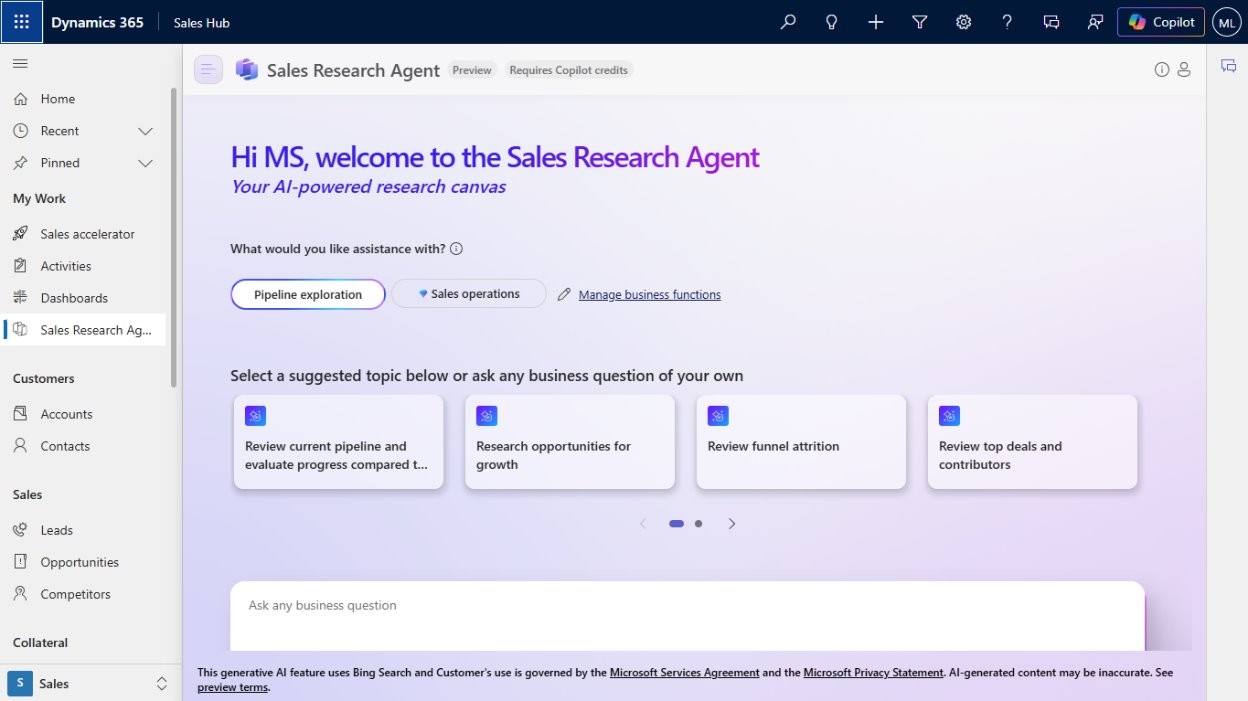
Core elements of the Sales Research Agent
- Research canvas: Provides a persistent workspace where you ask questions, review insights, and explore findings. Maintains context across multiple questions so research builds progressively instead of resetting each time.
- Natural-language query input: Lets you ask business questions in plain English (for example, "Why are opportunities stalling?"). The agent interprets intent and determines which sales data entities are relevant.
- Sales data connection: Connects directly to Dynamics 365 Sales data by default, including opportunities, accounts, contacts, activities, and outcomes.
- AI reasoning engine: Analyzes relationships, patterns, and correlations across multiple sales signals. Focuses on pipeline analysis, deal health, and sales operations rather than single metrics.
- Research blueprint: Combines narrative explanations, supporting visualizations, and summarized findings. It's designed to be decision-ready and shareable without requiring further interpretation.
- Interactive follow-up questions: You can continue asking questions within the same research context. The agent refines and extends existing analysis instead of starting over.
- Business context configuration: Lets you provide general or functional business context, such as typical sales cycle lengths by segment. Helps the agent interpret patterns in alignment with organizational priorities.
- Suggested next steps: Data-informed guidance included in each research blueprint. Helps translate insights into practical sales behaviors.
How the Sales Research Agent works
The Sales Research Agent connects directly to your Dynamics 365 Sales data. By default, it works with the CRM data you already store, such as opportunities, accounts, activities, and related records. You don't tell the agent how to analyze the data. You tell it what you're trying to understand. The agent then determines which data signals matter for that question and begins analyzing relationships and patterns across them.
Once the agent finishes reasoning over the data, it produces a research blueprint. The research blueprint combines a written narrative that explains what the agent found, visualizations that support the narrative, and suggested next steps that follow from those findings.
A key design principle is that the Sales Research Agent is explainable by design. Inside the research blueprint, sellers can review how the agent generated its conclusions and which data sources contributed to each insight.
The research canvas supports follow-up questions that build on existing research. After reviewing the initial blueprint, you don't need to leave the canvas or start over. For example, you might ask: "Does this behavior differ by customer type?" or "What actions were present in deals that eventually closed?" The agent refines and extends its analysis in place.
You can also provide business context to improve relevance. For instance, longer sales cycles might be normal for large hospitality customers but signal risk in small retail deals. Context allows the agent to identify meaningful needs instead of generic observations.
Each research blueprint includes suggested next steps aligned to what the agent found in the data. These aren't automated actions. They're guidance prompts that help sellers think about what to do differently—such as where follow-up engagement is missing or what areas customers need clarity on. Suggested next steps connect needs identification to actual selling behavior.
Real-world scenario: Preparing a stakeholder review
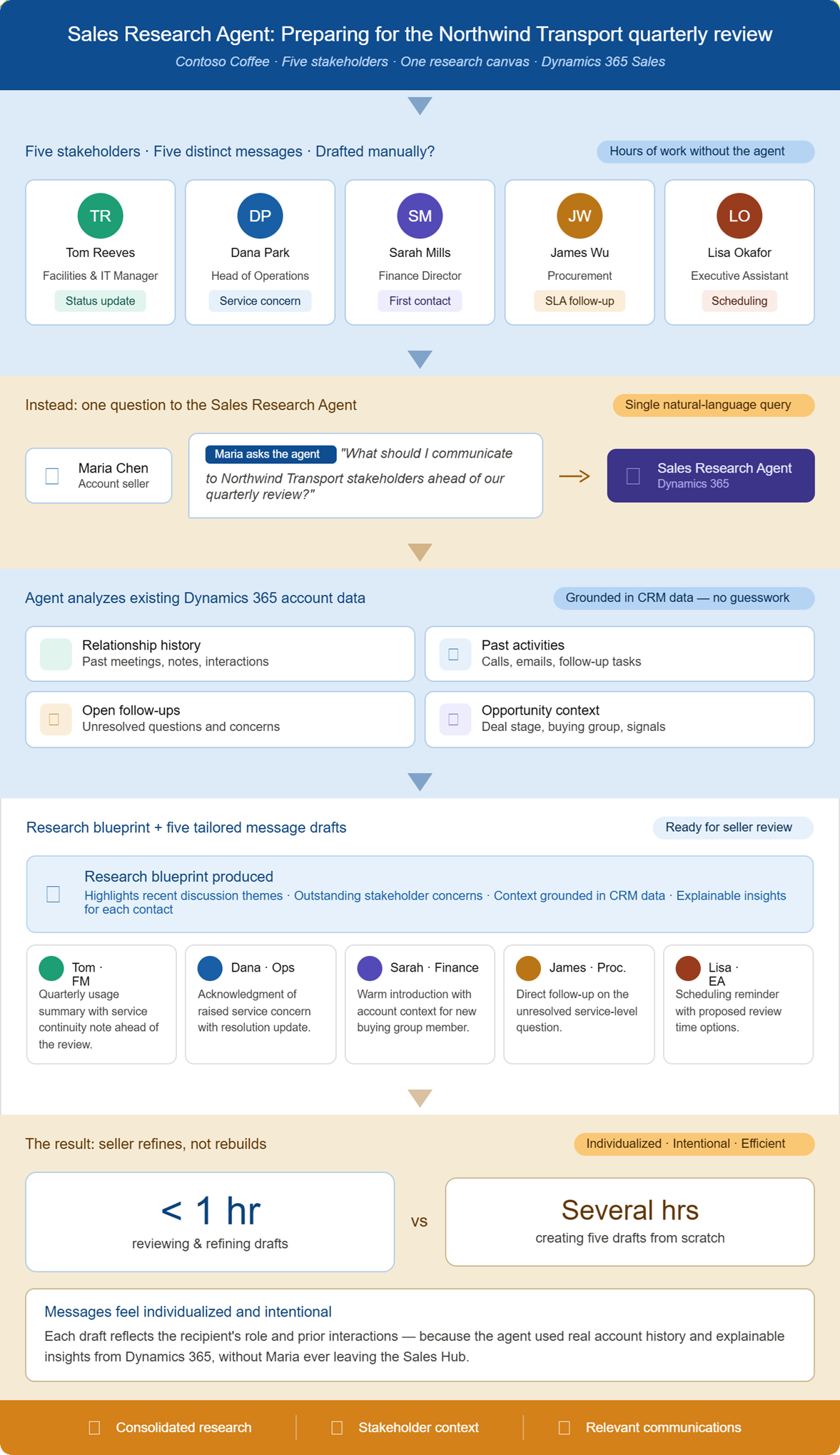
A Contoso Coffee seller is preparing for an upcoming quarterly review with Northwind Transport, a growing logistics customer with multiple offices and warehouses. Before the meeting, the seller needs to communicate with five stakeholders, each for a different reason:
- A brief status update for the Facilities & IT Manager
- A check-in with the Head of Operations on a previously raised service concern
- A first message to the Finance Director, recently added to the buying group
- A targeted follow-up for Procurement on an unresolved service-level question
- A scheduling reminder for the Executive Assistant supporting Northwind leadership
Drafting five tailored messages manually would require reviewing opportunity notes, past meetings, activities, and contact history across the account.
Instead, the seller opens the Sales Research Agent from the Dynamics 365 Sales Hub and asks a single question aligned to their goal: "What should I communicate to Northwind Transport stakeholders ahead of our review?"
The agent analyzes existing Dynamics 365 Sales data for the account, including relationship history, past activities, open follow-ups, and opportunity context. It produces a research blueprint that highlights recent discussion themes, outstanding concerns, and stakeholder-specific context—clearly explained and grounded in CRM data.
Using that same research canvas, the seller asks the agent to draft messages tailored to each stakeholder. Each draft reflects the recipient's role and prior interactions: operational concerns are acknowledged, open questions are addressed directly, and new stakeholders are approached with relevant context.
The seller spends under an hour reviewing and refining the drafts instead of several hours creating them from scratch. The messages feel individualized and intentional because the agent used real account history and explainable insights to shape the outreach.
This scenario demonstrates how the Sales Research Agent helps sellers consolidate research, understand stakeholder context, and prepare relevant communications efficiently—without leaving Dynamics 365 Sales or relying on generic messaging.