This diagram explains how the Azure Application Gateway components work together.
Routing configuration
One of the most important gateway configuration settings is the routing rules. The Azure Application Gateway has two primary methods of routing client requests: path-based and multiple sites.
Path-based routing
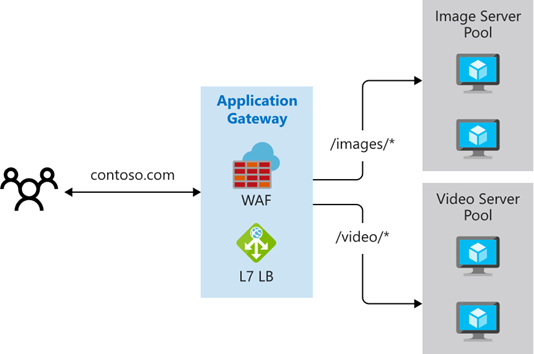
Path-based routing sends requests with different URL paths to different pools of back-end servers. For example, you could direct video requests to a back-end pool optimized to handle video streaming. You could also direct image requests to a pool of servers that handles image retrieval.
Multiple site routings
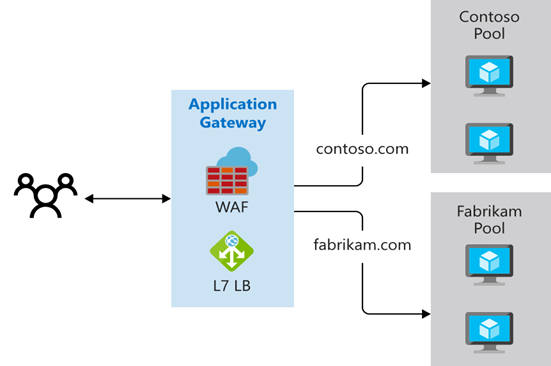
Multiple site routing configures more than one web application on the same Application Gateway instance. In a multiple site configuration, you register multiple DNS names (CNAMEs) for the IP address of the application gateway, specifying the name of each site. Application Gateway uses separate listeners to wait for requests for each site. Each listener passes the request to a different rule, which can route the requests to servers in a different back-end pool. For example, you could direct all requests for http://contoso.com to a specific backend pool.
This video reviews the routing methods.
Other routing capabilities
Along with path-based routing and multiple site hosting, there are a few other capabilities when routing with Application Gateway.
- Redirection. Redirection can be used to another site, or from HTTP to HTTPS. For example, redirecting HTTP requests to a secure HTTPS shopping site.
- Rewrite HTTP headers. HTTP headers allow the client and server to pass additional information with the request or the response.
- Custom error pages. Application Gateway allows you to create custom error pages instead of displaying default error pages. You can use your own branding and layout using a custom error page.