Explore Azure Traffic Manager
- 12 minutes
Azure Traffic Manager is a DNS-based traffic load balancer. This service allows you to distribute traffic to your public facing applications across the global Azure regions. Traffic Manager also provides your public endpoints with high availability and quick responsiveness. The most important point to understand is that Traffic Manager works at the DNS level, which is at the Application layer (Layer-7).
This video reviews Traffic Manager features and how the service works.
Key features of Traffic Manager
Traffic Manager offers the several key features.
| Feature | Description |
|---|---|
| Increase application availability | Traffic Manager delivers high availability for your critical applications by monitoring your endpoints and providing automatic failover when an endpoint goes down. |
| Improve application performance | Azure allows you to run cloud services and websites in datacenters located around the world. Traffic Manager can improve the responsiveness of your website by directing traffic to the endpoint with the lowest latency. |
| Service maintenance without downtime | You can plan maintenance on your applications without downtime. Traffic Manager can direct traffic to alternative endpoints while the maintenance is in progress. |
| Combine hybrid applications | Traffic Manager supports external, non-Azure endpoints enabling it to be used with hybrid cloud and on-premises deployments, including the burst-to-cloud, migrate-to-cloud, and failover-to-cloud scenarios. |
| Distribute traffic for complex deployments | Using nested Traffic Manager profiles, multiple traffic-routing methods are combined to create sophisticated and flexible rules to scale to the needs of larger, more complex deployments. |
How Traffic Manager works
Azure Traffic Manager enables you to control how network traffic is distributed to application deployments (endpoints) running in your different datacenters. Azure Traffic Manager uses DNS to direct the client requests to the appropriate service endpoint based on a traffic-routing method. For any profile, Traffic Manager applies the traffic-routing method associated to it to each DNS query it receives. The traffic-routing method determines which endpoint is returned in the DNS response.
Azure Traffic Manager supports different traffic-routing methods to determine how to route network traffic to the various service endpoints. You select the method that best fits your requirements.
This video reviews Traffic Manager routing methods.
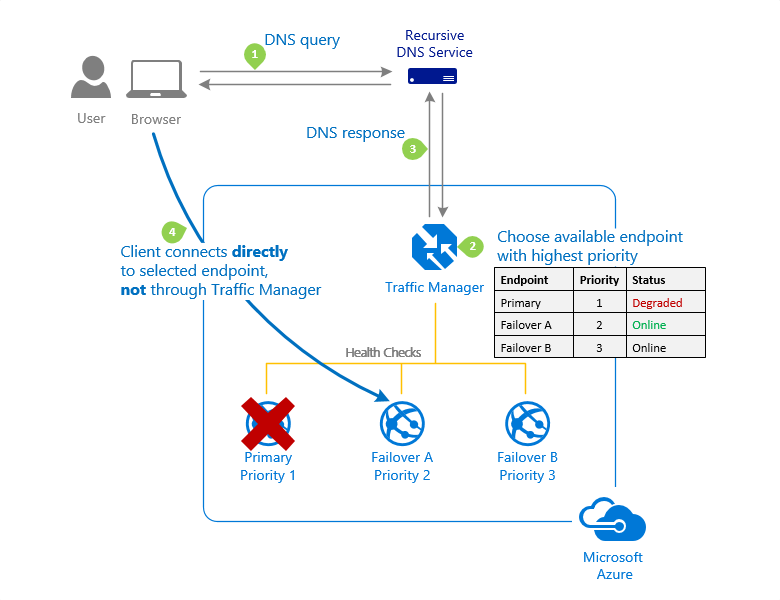
Priority routing method
Use the priority routing method for a primary service endpoint for all traffic. You can provide multiple backup endpoints in case the primary or one of the backup endpoints is unavailable.
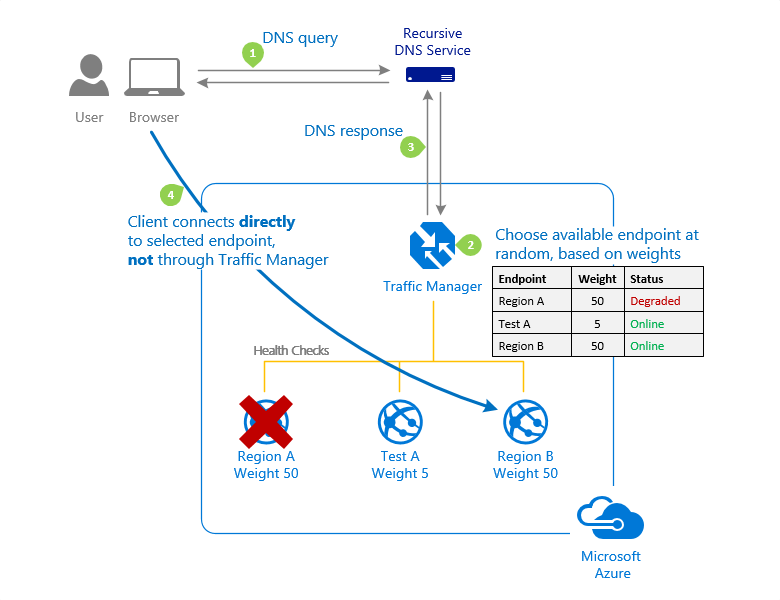
Weighted routing method
Use the Weighted routing method when you want to distribute traffic across a set of endpoints based on their importance. Set the weight the same to distribute evenly across all endpoints.
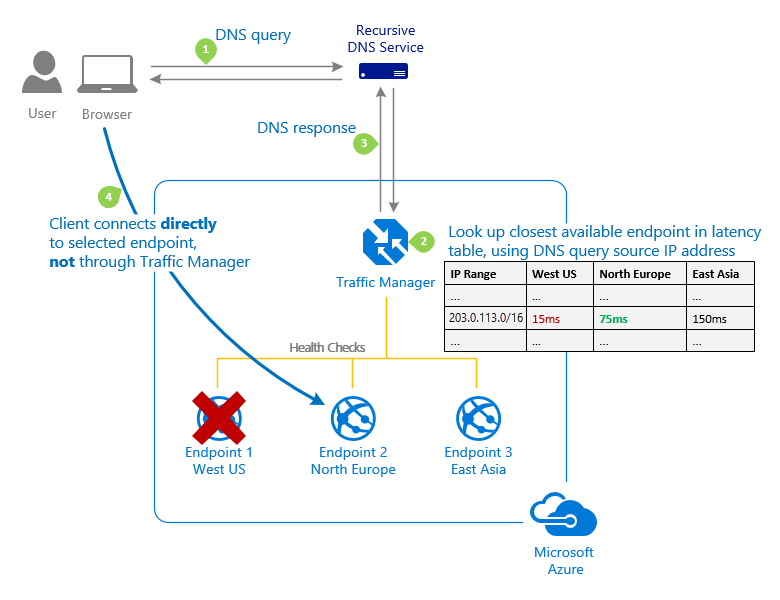
Performance routing method
Use the Performance routing method when endpoints are in different geographic locations. Users should use the "closest" endpoint for the lowest network latency.
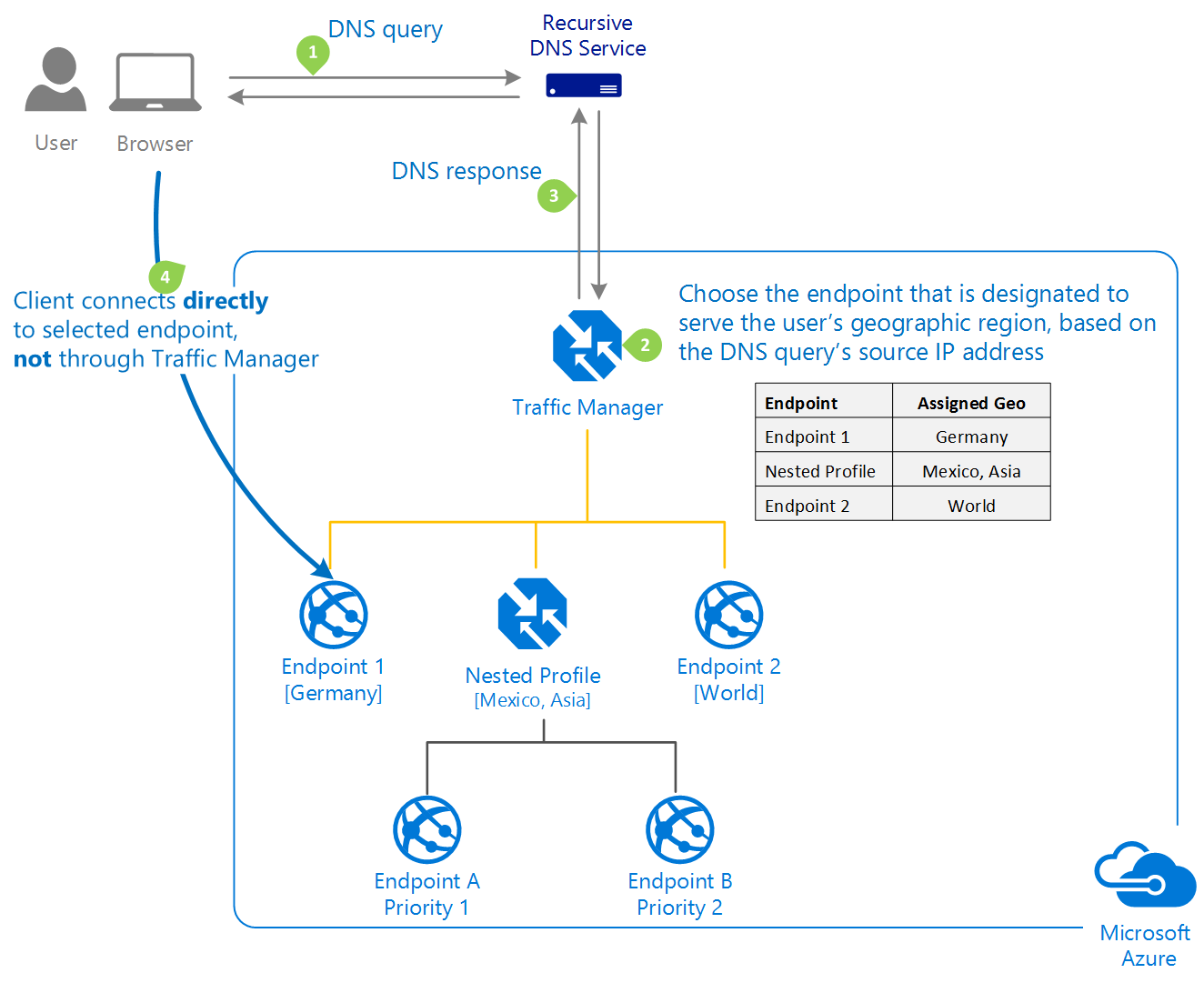
Geographic routing method
Use the Geographic routing method to direct users to specific endpoints based on where their DNS queries originate from geographically. Good choice for regional compliance requirements.
Note
The are two other routing methods: Multivalue and Subnet. Use the Multivalue routing method when you want to return multiple healthy endpoints in a single DNS query response. Use the Subnet routing method when you want to map user IP address ranges to specific endpoints.
Check your knowledge
Feedback
Was this page helpful?
No
Need help with this topic?
Want to try using Ask Learn to clarify or guide you through this topic?