Combine remote environments
In addition to profiles and Settings Sync, you can customize your remote development experience by combining remote environments with each other. Combining remote environments is a common practice that helps you use the best of each environment.
Combine dev containers with SSH
A common model is to combine a remote machine with a Docker container. Using a Docker container on a remote machine is useful for standardizing a development environment across a team while still applying the power of remote compute.
To use dev containers with the Remote - SSH extension, you need to install the extension on your local machine. You can install the extension by selecting the Extensions icon in VS Code and searching for Remote - SSH.
In addition, the remote machine needs to have Docker installed. You can find instructions for installing Docker in the VS Code documentation.
Connect to the SSH host
After you install the Remote - SSH extension, you can connect to a remote machine by using the Remote - SSH: Connect to Host command in the Command Palette. You can also use the Remote Explorer view to connect to a remote machine.
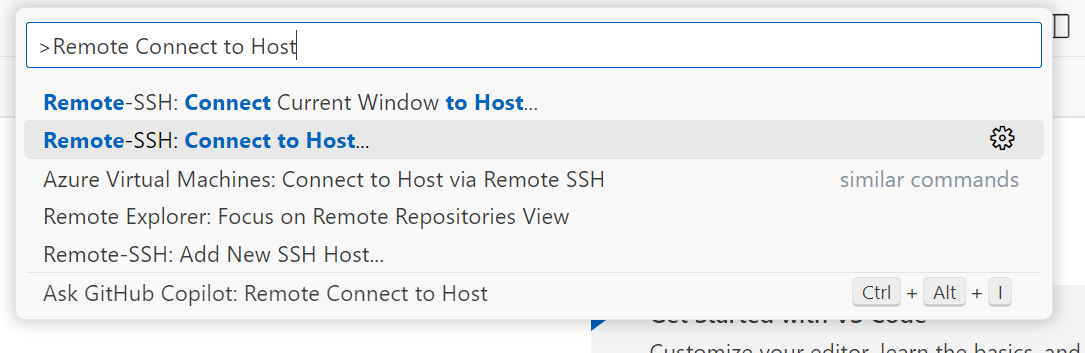
When you use the Remote - SSH: Connect to Host command, you specify the IP address of the machine that you want to connect to. You can also specify a username and port number if necessary.

Open the project on the remote machine in a dev container
After you connect to the remote machine, you can open a project with a dev container configuration by using the Dev Containers: Open Folder in Container command in the Command Palette. There's nothing special about running a dev container on a remote machine. The process is the same as running a dev container locally.
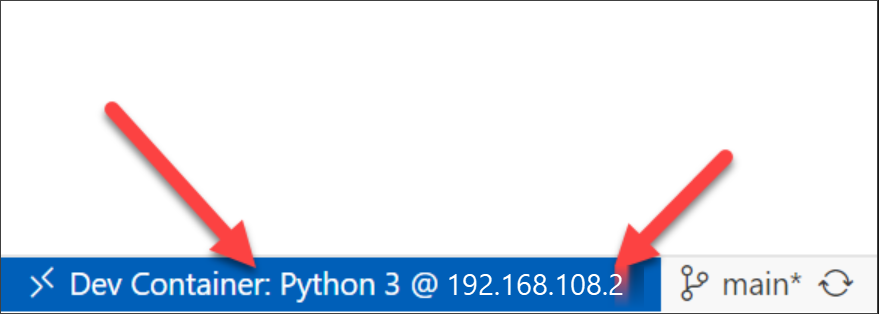
A dev container is now running on a remote machine. In this scenario, you're remotely connected to the virtual machine through SSH, and then you're remotely connected to the dev container through VS Code. You can apply the power of the remote machine while still having a consistent development environment with dev container configurations.