Audit Microsoft Copilot for Microsoft 365 interactions
Microsoft Purview Audit captures metadata for Copilot and AI application activities. This includes who was involved, when and where the activity occurred, and which Microsoft 365 resources were referenced. This helps you investigate usage and confirm compliance. To review the content of Copilot interactions, use Microsoft Purview Data Security Posture Management (DSPM) for AI, Communication Compliance, or Microsoft Purview eDiscovery. The tool you choose depends on your compliance requirements and investigation needs.
Copilot activities
Microsoft Purview Audit logs various Copilot activities, providing insight into how users engage with the tool. These logs include the services involved and the files accessed, which help ensure usage aligns with organizational standards and regulations.
| Friendly name | Operation | Description |
|---|---|---|
| Interacted with Copilot | CopilotInteraction | A user, or an admin or system acting on their behalf, entered prompts in Copilot. |
Search the audit log for Copilot activities
Before you start, sign in to the Microsoft Purview portal and go to the Audit solution.
Sign in to the Microsoft Purview portal.
Select Solutions > Audit.
Configure your search:
Set the Start date and End date.
Enter relevant keywords in Keyword Search.
Select administrative units from the Admin Units dropdown if applicable.
Under Activities - friendly names, expand Copilot activities and select Interacted with Copilot. You can also type Copilot in the search bar to locate it quickly.
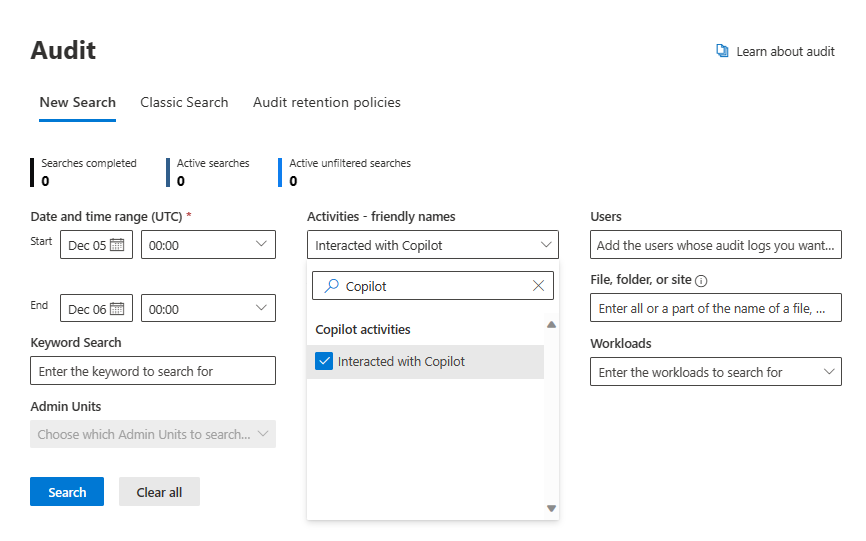
For Activities - operations names, type CopilotInteraction.
In Record types, select the record types linked to Copilot activities. Use the search box to type Copilot for quicker selection.

Name your search for future reference.
Specify users, or leave blank to include all users.
Enter names for specific files, folders, or sites, or leave blank to include all.
Select Search to start the job.

Scenario: Enhancing data security in healthcare with Copilot activity logs
As Copilot's role in managing healthcare-related documentation grows, securely logging all activities with patient data becomes increasingly important. The IT compliance team ensures that each activity with healthcare documents and data through Copilot is thoroughly logged, supporting compliance with health regulations and organizational data protection policies.
Responsibilities for the IT compliance team
- Compliance verification: Review logs to confirm all Copilot activities involving sensitive data meet healthcare regulations.
- Identifying anomalies: Look for unauthorized actions that could indicate a security risk.
- Audit management: Adjust audit settings to ensure comprehensive logging of Copilot data activities.
Technical actions for the IT compliance team
- Configure audit settings: Ensure Microsoft Purview Audit is capturing all relevant Copilot activities.
- Review logs regularly: Examine logs on a scheduled basis to identify anomalies or unauthorized access.
- Update security measures: Adjust policies or controls based on log analysis to improve data protection.