Use agents in Dynamics 365 Sales
Dynamics 365 Sales includes autonomous AI agents designed to handle complex, multi-step tasks across the sales lifecycle. The Sales Qualification Agent helps teams prioritize incoming leads, the Sales Opportunity Agent helps sellers manage and progress active opportunities, and the Sales Close Agent automates customer engagement for high-volume sales motions.
Use the Sales Qualification Agent to qualify leads effectively
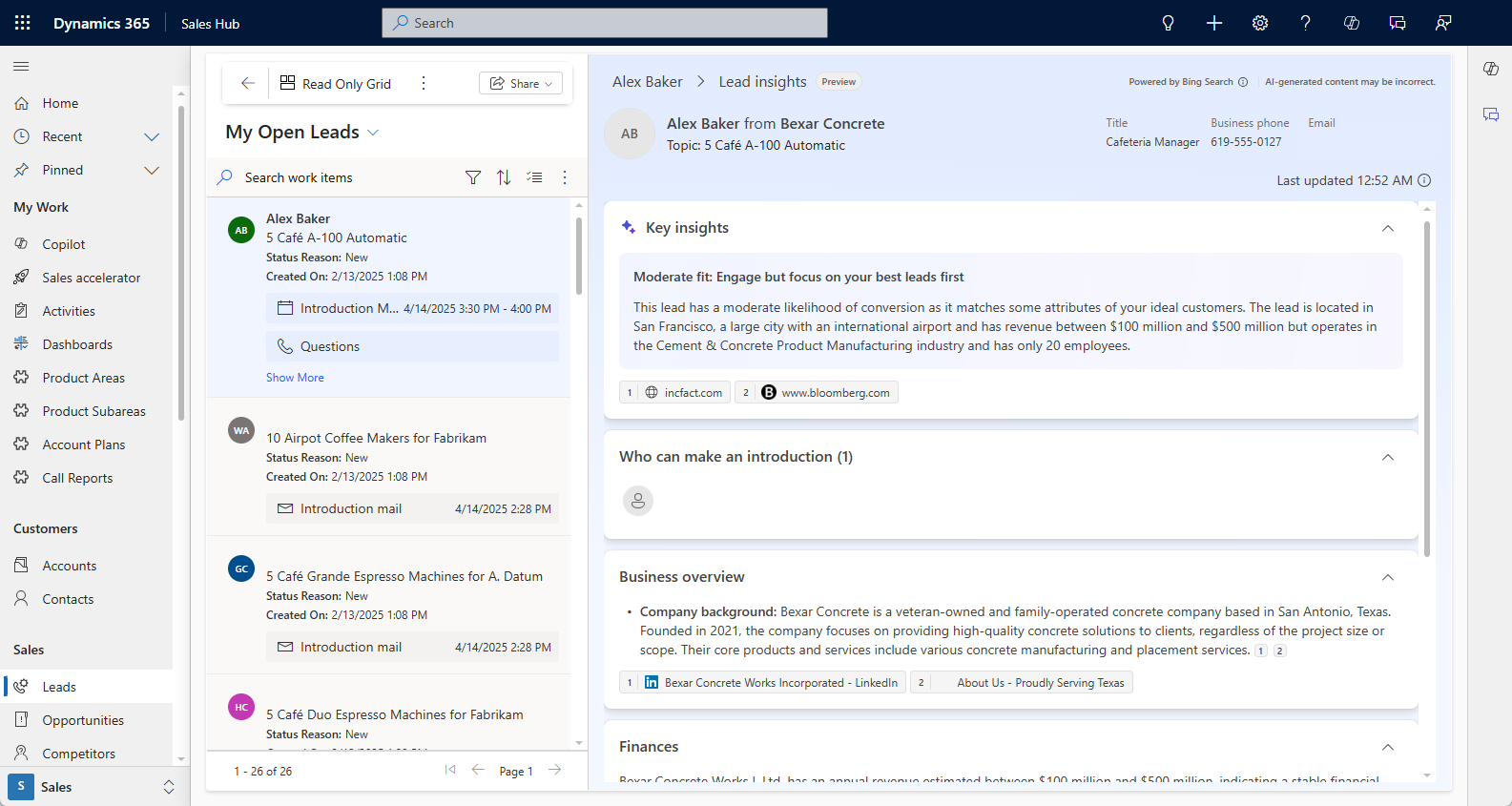
The Sales Qualification Agent evaluates leads based on:
Ideal Customer Profile (ICP): Attributes like industry, company size, and location.
Purchase interest: Signals derived from email interactions.
BANT criteria: Budget, Authority, Need, and Timeline.
Leads are categorized into high, moderate, or low fit based on these criteria. Sellers can focus on high-fit leads while disqualifying those that don’t meet the criteria.
Tip
Use the FIRE framework (Fit, Intent, Recency, Engagement) to further refine lead ratings.
The Sales Qualification Agent automates lead qualification using two modes:
Research-only mode: Focuses on gathering insights about leads based on criteria like lead source and geography.
Research and engage mode: Adds autonomous engagement with leads, including follow-ups and evaluation based on seller hand-off rules.
Manage opportunities with the Sales Opportunity Agent
The Sales Opportunity Agent helps sellers focus on the right opportunities at the right time by surfacing risk signals and providing deal intelligence. It enables sellers to:
Detect risks early, such as disengaged stakeholders, gaps in communication, or emerging competitive pressure.
Prioritize deals based on real-time signals, focusing effort where it has the most impact.
Gain a comprehensive view of buyer needs, stakeholder roles, competitor mentions, and deal health.
The agent integrates CRM updates, email threads, meeting intelligence, and web research to provide actionable insights. It flags risks, highlights promising opportunities, and delivers a unified view of deal health through action cards displayed in the opportunities list.
Automate engagement with the Sales Close Agent
The Sales Close Agent is designed for high-volume, repeatable sales motions where consistent customer follow-up is critical. It automates customer engagement so sellers don't have to manually manage every interaction. Key capabilities include:
Sending personalized outreach based on customer context and deal stage.
Responding to common customer questions using configurable playbooks.
Guiding customers through the sales funnel toward a purchase decision.
Ensuring compliance with organization-defined guardrails and escalation rules.
Analyze sales data with the Sales Research Agent
With the Sales Research Agent in Dynamics 365 Sales, you can use natural language to start a dialog with your data to help you gain a deep understanding of the sales performance of your team, territory, and product portfolio. When you ask a research question, the agent creates a research plan. It then gathers, analyzes, and transforms data into meaningful research outputs. These outputs are tailored to your context, business domain knowledge, and deep understanding of the business data, and are delivered to you as comprehensive, AI-generated research blueprints.
With the Sales Research Agent, you can:
- Create multibranch research journeys over your Dynamics 365 Sales data and augment it with any data from local files (Excel, PDF) for a comprehensive view of your business.
- Use AI-suggested, prebuilt topics that are optimized for your role to get started, or ask your own questions using natural language to seek insights into complex business problems.
- Use the AI cursor to click anywhere on the canvas to start a conversation, zoom into any research finding, change a visualization, or add more data.
- Go behind the scenes to see the reasoning behind the research outcomes.
- Save your workspaces for later use, update with new data, and regenerate blueprints or new research findings.
Note
There are additional costs associated with using the Sales Research Agent.
The Engage type works best for transactional deals, renewals, and scenarios where the sales process is well-defined and repeatable.
Monitor and optimize agent capacity usage in Dynamics 365 Sales
Both agents utilize tenant-assigned capacity for processing leads and generating insights. You can set up prepaid or pay-as-you-go capacity models. To monitor usage:
Access the Summary tab in the admin portal.
Review consumption metrics to ensure efficient resource allocation.
For more information, see Manage Copilot Studio credits and capacity.
Note
Responsible AI principles are integrated into these agents to ensure ethical and effective usage. Learn more about responsible AI practices in Responsible AI FAQ.