Understand Unity Catalog managed storage
Your organization likely has data governance policies that require specific types of data to reside in designated cloud storage locations. For example, you might need production data in one storage account and development data in another, or you might need to isolate sensitive customer data from operational data. Unity Catalog managed storage helps you meet these requirements while maintaining centralized governance and access control.
What is managed storage?
Managed storage in Unity Catalog refers to cloud storage locations where Unity Catalog stores data and metadata files for managed tables and managed volumes. Tables store structured data in a tabular format, while volumes provide governance for nontabular data files such as images, audio files, logs, or any other unstructured data that doesn't fit into a table schema.
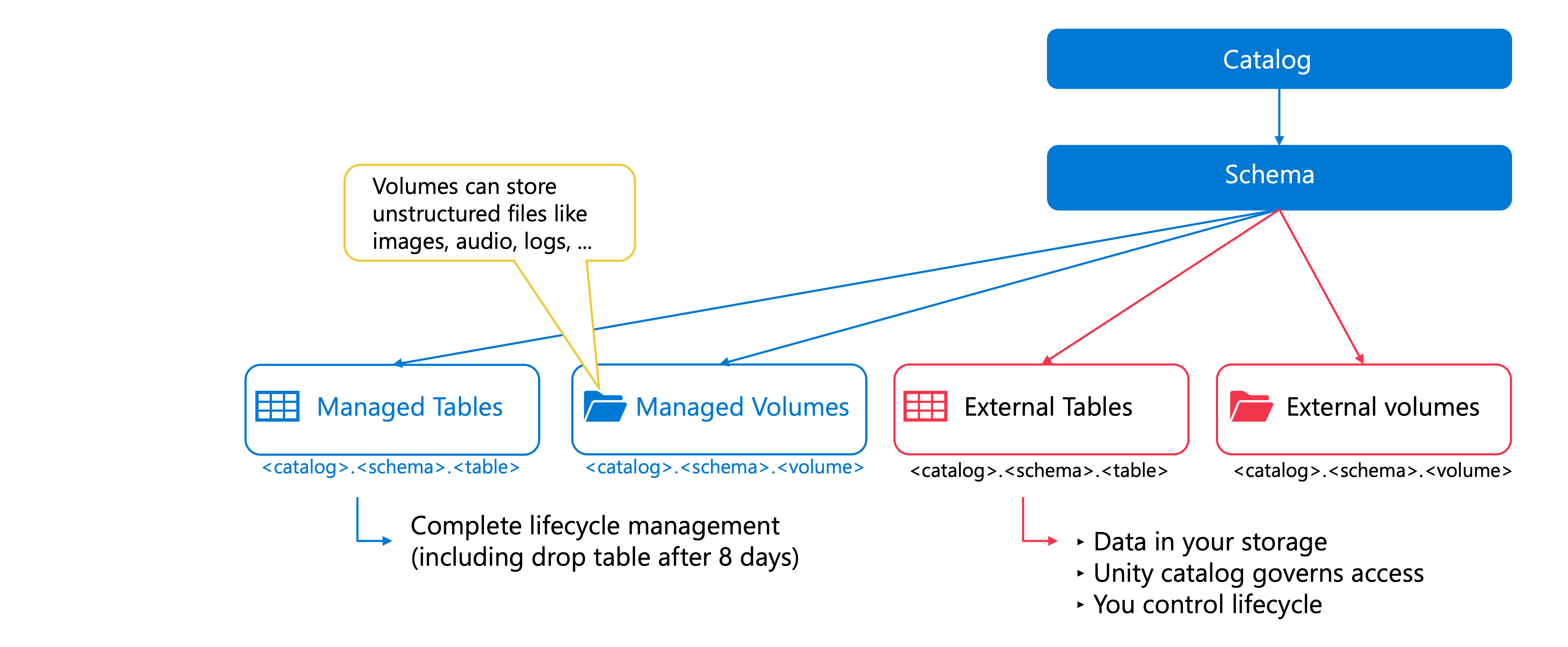
When you create a managed table or volume, Unity Catalog handles the complete lifecycle of the data—including where it's stored, how it's organized, and when it's deleted. This differs from external tables and volumes, where you manage the data lifecycle in your cloud storage, and Unity Catalog only governs access from Azure Databricks.
With managed storage, you specify a cloud storage path, and Unity Catalog takes care of the rest. This simplifies data management because you don't need to worry about file layouts or cleanup operations. When you drop a managed table, Unity Catalog automatically marks the underlying data files for deletion after eight days, along with removing the metadata.
Managed storage locations serve two key purposes. First, they provide physical data isolation by storing data in separate cloud storage containers or paths. Second, they align with your organizational structure and compliance requirements by letting you map catalogs and schemas to specific storage locations that meet regulatory or security policies.
How managed storage relates to Unity Catalog hierarchy
Unity Catalog organizes data using a three-level namespace: catalog, schema, and table. Managed storage locations can be defined at three corresponding levels in this hierarchy: the metastore level, the catalog level, and the schema level. Each level represents a different scope of data organization and isolation.
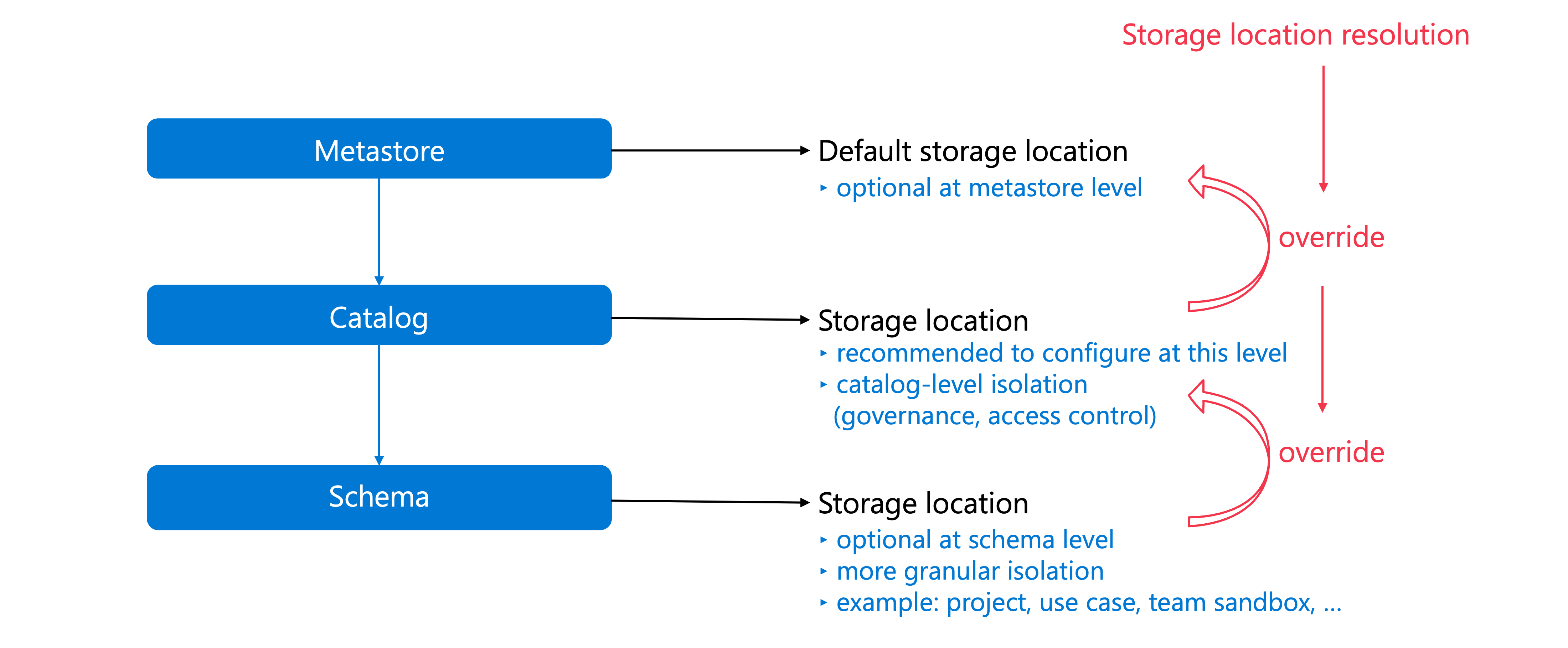
At the metastore level, you can optionally define a default storage location that serves as a fallback for any catalog or schema that doesn't have its own managed storage location. However, new workspaces enabled for Unity Catalog don't automatically include metastore-level storage, and Databricks recommends using catalog-level storage instead for better data isolation.
At the catalog level, you define storage locations that align with your organizational structure. Catalogs typically represent major organizational units, development lifecycle stages, or data classification categories. For example, you might create a catalog for production data with managed storage in a specific container, and another catalog for development data with storage in a different container. This catalog-level isolation is the recommended approach because it provides a clear boundary for data governance and access control.
At the schema level, you can define even more granular storage locations within a catalog. Schemas organize data into logical categories that are more specific than catalogs—typically representing individual projects, use cases, or team sandboxes. By assigning managed storage at the schema level, you can achieve fine-grained data isolation when needed.
Storage location resolution
When you create a managed table or volume, Unity Catalog determines where to store the data by following a resolution hierarchy. This hierarchy evaluates storage locations from the most specific (schema) to the most general (metastore).
Unity Catalog first checks whether the containing schema has a managed storage location. If a schema-level location exists, the data is stored there. This provides the most granular level of control over where your data resides.
If the schema doesn't have a managed storage location, Unity Catalog checks the containing catalog. If a catalog-level location exists, the data is stored in that catalog's managed storage location. This is the most common scenario and the recommended approach for most organizations.
If neither the schema nor the catalog has a managed storage location, Unity Catalog falls back to the metastore-level storage location. If no metastore-level location exists either, you won't be able to create managed tables or volumes, and you'll need to configure a managed storage location at one of these levels first.
This hierarchy gives you flexibility in how you organize and isolate data. You can start with catalog-level storage for most use cases and add schema-level storage when you need more granular control.
Storage root and storage location
When you define managed storage locations for catalogs or schemas, you specify a cloud storage path that Unity Catalog uses as the storage root. However, Unity Catalog doesn't store data directly in this path. Instead, it automatically adds hashed subdirectories to ensure each catalog and schema has a unique location, even if multiple objects share the same storage root.
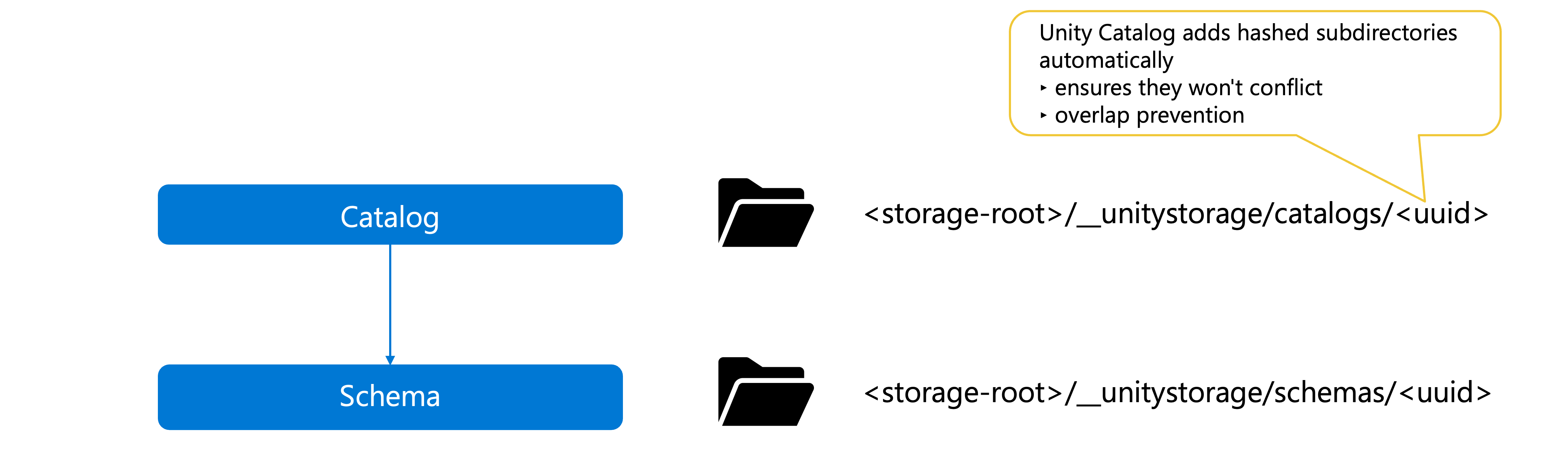
For catalogs, Unity Catalog appends subdirectories in the format __unitystorage/catalogs/<uuid>, where <uuid> is a unique identifier. For schemas, it uses __unitystorage/schemas/<uuid>. The complete path—the storage root plus these automatically generated subdirectories—becomes the storage location where managed tables and volumes actually store their data.
This automatic path management provides important benefits. You can configure multiple catalogs or schemas with the same base storage root, and Unity Catalog ensures they won't conflict by creating distinct subdirectories for each. You don't need to manually organize or manage these paths—Unity Catalog handles this automatically while maintaining the data isolation and governance you need.
Unity Catalog also enforces overlap prevention rules to maintain data governance integrity. When you create a catalog or schema with a managed storage location, Unity Catalog validates that the storage path doesn't overlap with other managed storage locations, external tables, or external volumes. This prevents conflicts and ensures clear boundaries between different data assets. If you attempt to create a managed storage location that overlaps with an existing location, Unity Catalog will reject the operation to protect your data governance model.