Update records with OData
To update an existing record by using OData, you need to use the PATCH request. Similar to using the POST request, you need to provide the record in the body of the request as a JSON document. However, this time, you need to specify the primary key of the record in the URL as well. With PATCH, you only send the fields that you want to change. Business Central supports POST to create, PATCH to modify, and DELETE to delete a record through OData.
Additionally, Business Central needs to make sure that you are updating the latest version of a record, which is why it's using a concurrency token. You must send this token as an HTTP header in the request. Then, Business Central can verify in the database that you are updating the latest version of a record and that no other user has updated the record in the meantime. To retrieve this token, you should first request the details of a specific record before you can update the values. When you perform a GET request to retrieve data, you receive a JSON document with an @odata.etag key in the document. The value of this key is your concurrency token and it needs to be copied and used in your PATCH request.

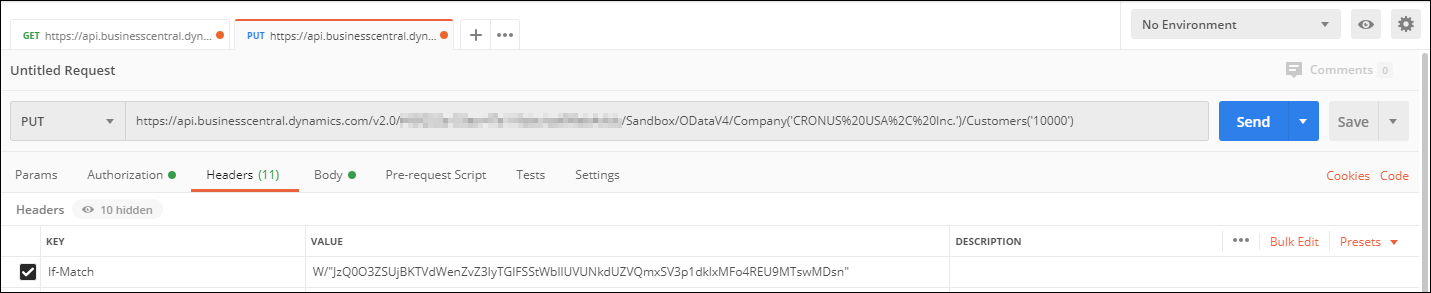
The etag value should be sent as the If-Match HTTP header. PATCH requests require
the If-Match header to be set, either with a retrieved etag or with *. You can
select headers and then add an If-Match header with the value of the etag, as
shown in the following example.
The @odata.etag value is a string value in a JSON document. A string value in a JSON document always starts and ends with a “ (double quote) character. But because the @odata.etag value itself also contains the double quote character in the string value, the double quotes in the @odata.etag are escape characters. When you use the value of the etag in the If-Match header, you need to remove these escape characters.
This means that a value of:
W/\"JzQ0O3ZSUjBKTVdWenZvZ3IyTGlFSStWbllUVUNkdUZVQmxSV3p1dk1xMFo4REU9MTswDsn\"
Becomes:
W/"JzQ0O3ZSUjBKTVdWenZvZ3IyTGlFSStWbllUVUNkdUZVQmxSV3p1dk1xMFo4REU9MTswDsn"
Also notice that the URL has targeted one specific record: the Customers record with primary key 10000.