Note
Access to this page requires authorization. You can try signing in or changing directories.
Access to this page requires authorization. You can try changing directories.
APPLIES TO:  Azure Data Factory
Azure Synapse Analytics
Azure Data Factory
Azure Synapse Analytics
Tip
Data Factory in Microsoft Fabric is the next generation of Azure Data Factory, with a simpler architecture, built-in AI, and new features. If you're new to data integration, start with Fabric Data Factory. Existing ADF workloads can upgrade to Fabric to access new capabilities across data science, real-time analytics, and reporting.
Important
A recent update of SAP Note 3255746 announces a security patch that blocks incoming calls to the ODP RFC API from third-party clients including Azure Data Factory’s SAP CDC connector. We advise customers to review this note for potential impacts before installing it in their SAP system. More information can be found in SAP notes 3255746 and 3439624.
Microsoft Fabric offers various alternatives to the SAP CDC connector in Azure Data Factory that are not affected by SAP Note 3255746, including:
- Mirroring for SAP Datasphere in Fabric (Generally Available): Provides an SAP supported way to export data via SAP Datasphere premium outbound integration and continuously mirror it into Microsoft Fabric for analytics and AI scenarios. Details can be found here.
- SAP Business Data Cloud Connect for Microsoft Fabric (Announced at Microsoft Ignite 2025, available later this year): An SAP and Microsoft jointly announced approach that enables customers to share data between SAP Business Data Cloud and Microsoft Fabric for analytics. Please review the SAP terms and conditions regarding limitations on using this data in downstream data solutions. Please see the joint announcement here: SAP and Microsoft accelerate business insights and AI innovation with SAP Business Data Cloud Connect for Microsoft Fabric.
- Copy Job in Fabric for SAP with ABAP Add-on (publicly available at Microsoft Build 2026): An extraction option based on an ABAP Add-on provided by Microsoft that enables customers to incrementally copy SAP data into external targets, which is not using the ODP RFC API.
- Third Party partner solutions with Open Mirroring in Fabric: SAP certified partner offerings provide alternative integration paths for extracting and integrating SAP data into Microsoft Fabric. For details, see: Open Mirroring Partner Ecosystem.
Introduction
Learn about the SAP change data capture (CDC) capabilities in Azure Data Factory and understand the architecture.
Azure Data Factory is an ETL and ELT data integration platform as a service (PaaS). For SAP data integration, Data Factory currently offers six general availability connectors:

Data extraction needs
The SAP connectors in Data Factory extract SAP source data only in batches. Each batch processes existing and new data the same. In data extraction in batch mode, changes between existing and new datasets aren't identified. This type of extraction mode isn’t optimal when you have large datasets like tables that have millions or billions of records that change often.
You can keep your copy of SAP data fresh and up-to-date by frequently extracting the full dataset, but this approach is expensive and inefficient. You also can use a manual, limited workaround to extract mostly new or updated records. In a process called watermarking, extraction requires using a timestamp column, monotonically increasing values, and continuously tracking the highest value since the last extraction. But some tables don't have a column that you can use for watermarking. This process also doesn't identify a deleted record as a change in the dataset.
SAP CDC capabilities
Microsoft customers indicate that they need a connector that can extract only the delta between two sets of data. In data, a delta is any change in a dataset that's the result of an update, insert, or deletion in the dataset. A delta extraction connector uses the SAP change data capture (CDC) feature that exists in most SAP systems to determine the delta in a dataset. The SAP CDC capabilities in Data Factory use the SAP Operational Data Provisioning (ODP) framework to replicate the delta in an SAP source dataset.
This article provides a high-level architecture of the SAP CDC capabilities in Azure Data Factory. Get more information about the SAP CDC capabilities:
- Prerequisites and setup
- Set up a self-hosted integration runtime
- Set up a linked service and source dataset
- Manage your solution
How to use the SAP CDC capabilities
The SAP CDC connector is the core of the SAP CDC capabilities. It can connect to all SAP systems that support ODP, which includes SAP ECC, SAP S/4HANA, SAP BW, and SAP BW/4HANA. The solution works either directly at the application layer or indirectly via an SAP Landscape Transformation Replication Server (SLT) as a proxy. It doesn't rely on watermarking to extract SAP data either fully or incrementally. The data the SAP CDC connector extracts includes not only physical tables but also logical objects that are created by using the tables. An example of a table-based object is an SAP Advanced Business Application Programming (ABAP) Core Data Services (CDS) view.
Use the SAP CDC connector with Data Factory features like mapping data flow activities, and tumbling window triggers for a low-latency SAP CDC replication solution in a self-managed pipeline.
The SAP CDC architecture
The SAP CDC solution in Azure Data Factory is a connector between SAP and Azure. The SAP side includes the SAP ODP connector that invokes the ODP API over standard Remote Function Call (RFC) modules to extract full and delta raw SAP data.
The Azure side includes the mapping data flow that can transform and load the SAP data into any data sink supported by mapping data flows. Some of these options are storage destinations like Azure Data Lake Storage Gen2 or databases like Azure SQL Database or Azure Synapse Analytics. The mapping data flow activity also can load the results in Data Lake Storage Gen2 in delta format. You can use the Delta Lake Time Travel feature to produce snapshots of SAP data for a specific period. You can run your pipeline and mapping data flows frequently by using a Data Factory tumbling window trigger to replicate SAP data in Azure with low latency and without using watermarking.
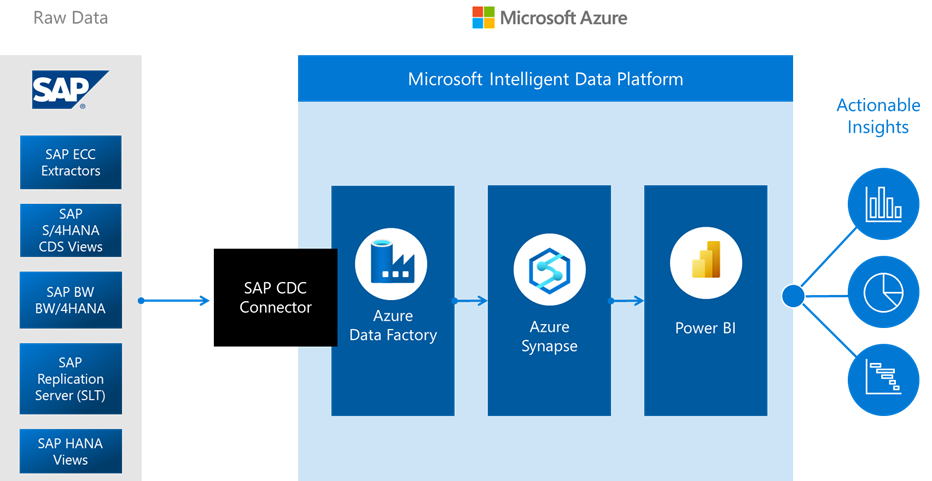
To get started, create an SAP CDC linked service, an SAP CDC source dataset, and a pipeline with a mapping data flow activity in which you use the SAP CDC source dataset. To extract the data from SAP, a self-hosted integration runtime is required that you install on an on-premises computer or on a virtual machine (VM) that has a line of sight to your SAP source systems or your SLT server. The mapping data flow activity runs on a serverless Azure Databricks or Apache Spark cluster, or on an Azure integration runtime. A staging storage is required to be configured in mapping data flow activity to make your self-hosted integration runtime work seamlessly with mapping data flow integration runtime.
The SAP CDC connector uses the SAP ODP framework to extract various data source types, including:
- SAP extractors, originally built to extract data from SAP ECC and load it into SAP BW
- ABAP CDS views, the new data extraction standard for SAP S/4HANA
- InfoProviders and InfoObjects datasets in SAP BW and SAP BW/4HANA
- SAP application tables, when you use an SAP LT replication server (SLT) as a proxy
In this process, the SAP data sources are providers. The providers run on SAP systems to produce either full or incremental data in an operational delta queue (ODQ). The mapping data flow source is a subscriber of the ODQ.
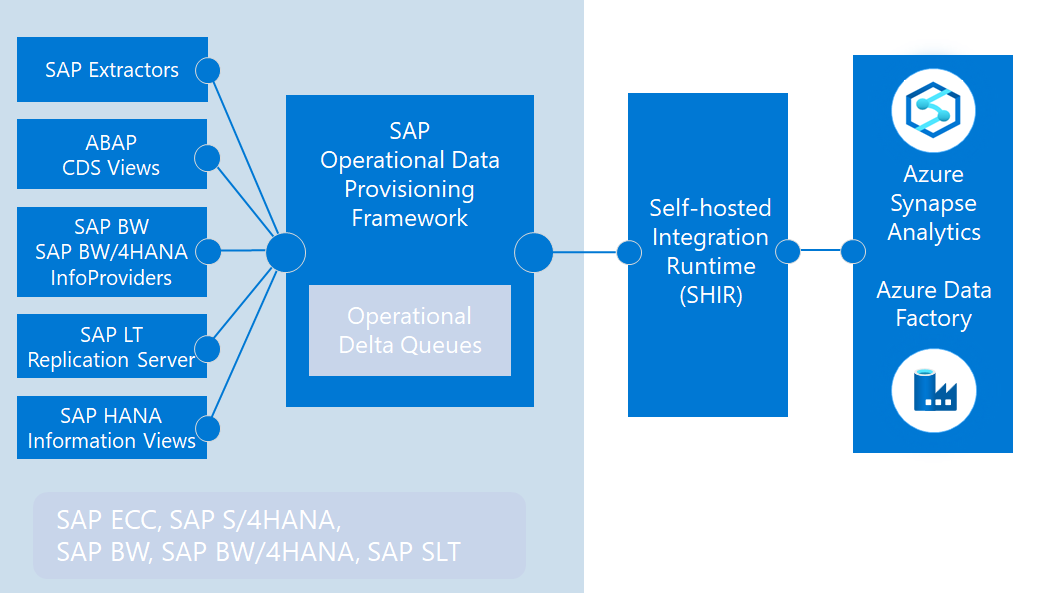
Because ODP completely decouples providers from subscribers, any SAP documentation that offers provider configurations are applicable to Data Factory as a subscriber. For more information about ODP, see Introduction to operational data provisioning.