Note
Access to this page requires authorization. You can try signing in or changing directories.
Access to this page requires authorization. You can try changing directories.
Kubernetes is an open-source system that automates deployment, scaling, and management of containerized applications. We recommend Azure Kubernetes Service (AKS) to deploy a managed Kubernetes cluster in Azure.
Organizations adopt Kubernetes on Azure at different rates. Your organization's journey will likely follow a path similar to how you adopt other technologies. You learn the fundamentals, align your organization around roles and responsibilities, and deploy production-ready workloads. From there, you iterate and grow your solution as customer and business demands change.
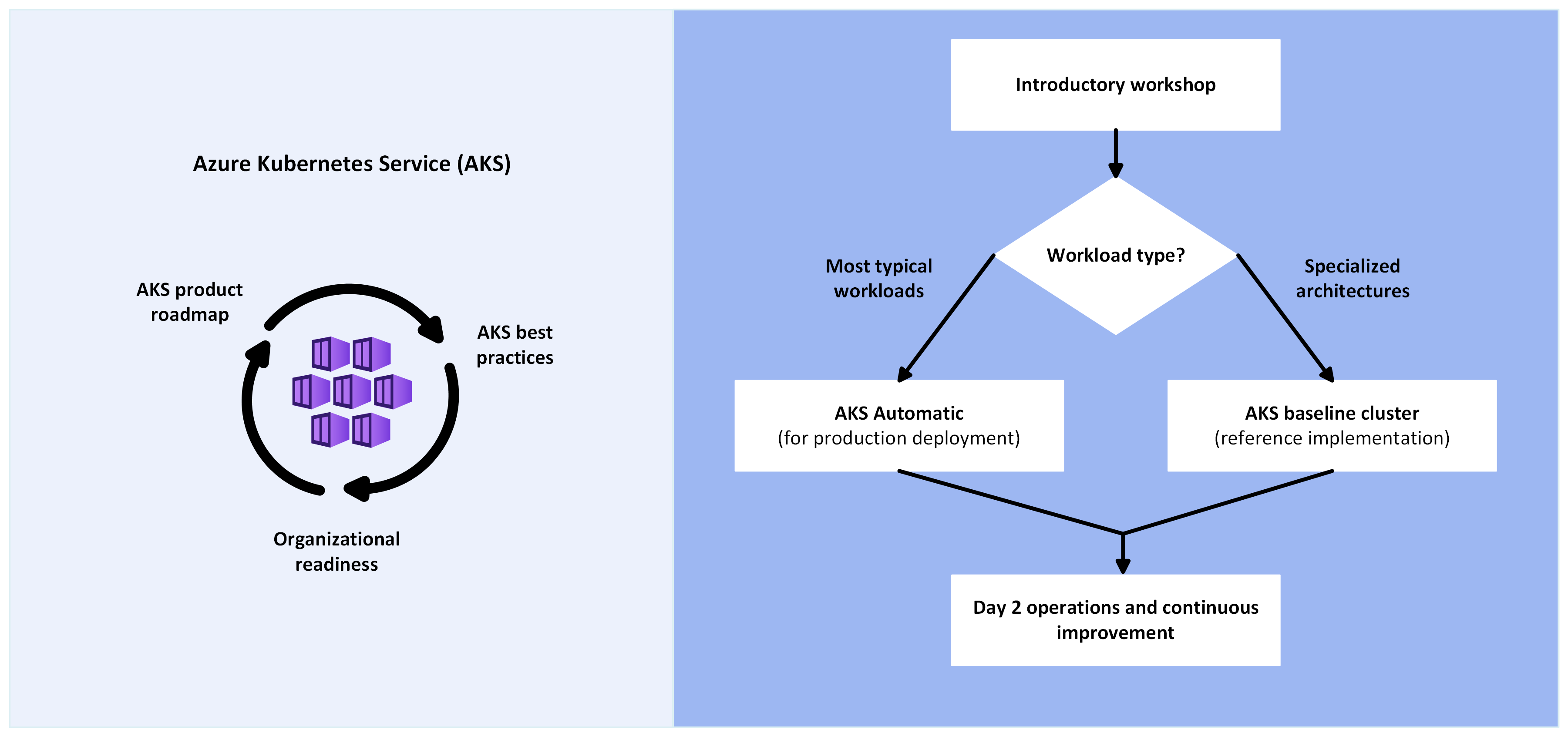
Introduction to AKS
If you're new to Kubernetes or AKS, start with Microsoft Learn. This free online platform provides interactive training for Microsoft products. The Introduction to Kubernetes on Azure learning path covers core concepts of containers, AKS cluster management, and workload deployment.
Path to production
After you understand the benefits and trade-offs of Kubernetes, evaluate whether AKS is the right Azure compute platform for your workload and establish organizational policies for this technology.
For most production workloads, start with AKS Automatic. AKS Automatic is preconfigured settings that follow Azure Well-Architected Framework recommendations. It includes built-in configuration for node management, scaling, security policies, and upgrades. This configuration reduces the time spent on platform engineering.
When your workload requires explicit control over networking, node pools, upgrade cadence, or authorization, use the AKS baseline cluster as a reference architecture for full customization with AKS Standard.
Choose your AKS path
The following table helps you select between AKS Automatic and AKS Standard based on your workload requirements:
| Your workload needs | Recommended path | Why |
|---|---|---|
| Early Kubernetes maturity, focused on fast delivery | AKS Automatic | Reduces platform management complexity; teams focus on applications, not infrastructure tuning. |
| Typical app hosting with standard security, scaling, and networking | AKS Automatic | Production-ready defaults preconfigured. Automatic node management, HPA/KEDA/VPA enabled, automatic upgrades, built-in SLAs, managed security policies, and efficient bin-packing. Lower platform engineering overhead. |
| Explicit control over node pools, networking topology, or upgrade cadence | AKS Standard following baseline architecture | Full customization via the AKS baseline cluster reference architecture. Supports advanced network configurations, custom CNI, and fine-grained component control. |
| Regulated environments requiring strict compliance controls and audit trails | AKS Standard following regulated cluster architecture | PCI DSS architecture demonstrates compliance patterns appliable to many regulated. It includes explicit control over every component, enables regulatory validation and compliance documentation. |
| Established platform engineering processes and architectural standards | AKS Standard | Supports advanced operational patterns and organizational standardization. |
AKS Automatic: Production-ready by default
AKS Automatic preconfigures and automates many operational tasks, reducing the number of decisions and manual configurations required to run production workloads.
What comes preconfigured with AKS Automatic
- Managed system node pools: AKS provisions and operates the system components on your behalf. You don't manage control plane virtual machines.
- Automatic scaling: Horizontal Pod Autoscaler (HPA), Kubernetes Event-Driven Autoscaler (KEDA), and Vertical Pod Autoscaler (VPA) are enabled automatically to match workload demand.
- Automatic upgrades: Cluster and node OS image upgrades are automated on a safe cadence.
- Built-in observability: Azure Monitor managed service for Prometheus (metrics) and Container insights (logs) are enabled by default.
- Built-in security controls: Deployment safeguards, workload identity, OIDC issuer, and API server virtual network integration are preconfigured to enforce Kubernetes best practices.
- Efficient resource utilization: Pods are bin-packed efficiently across nodes to maximize utilization and minimize idle capacity.
- Included SLAs: Pod readiness SLA (99.9% within 5 minutes) and uptime SLA (99.95%) are included.
For a complete feature comparison, see AKS Automatic vs. AKS Standard.
AKS Standard: Baseline architecture and specialized scenarios
When you need customization beyond AKS Automatic's preconfigured experience, use the AKS baseline cluster as a reference architecture. The baseline demonstrates production-ready design patterns, security controls, and operational best practices for AKS Standard.
Start your design from the baseline implementation and modify it to align with your workload's specific needs.
Specialized architectures for specific scenarios
The following baseline implementations describe how to set up components of the AKS baseline cluster for specific use cases beyond typical app hosting.
Microservices
When you run microservices in the baseline cluster, you must set up network policies and pod autoscaling and implement distributed tracing for observability.
High-security compliance
For regulated environments, enhance the baseline implementation by using stronger security controls and restricted cluster interactions. The following example demonstrates a cluster that runs a financially regulated workload.
Business continuity and disaster recovery
For resilient solutions, deploy multiple baseline cluster instances across regions in an active/active, highly available configuration.
Best practices
As part of ongoing operations, periodically check your cluster to ensure that it aligns with recommended best practices.
For AKS Automatic clusters: Many best practices are implemented by default. Review the AKS Automatic documentation to understand which patterns are preconfigured and where additional configuration might be needed for your workload.
For AKS Standard clusters: Start by aligning your cluster with the AKS baseline cluster and then apply recommendations from the best practices documentation.
For more information, see:
You might also consider evaluating a community-driven utility like the AKS Checklist as a way of organizing and tracking your alignment to these best practices.
Operations guide
After you deploy your workload on AKS, day-2 operations become a priority. The AKS day-2 operations guide helps you meet customer demands and handle incident response through optimized triage processes.
Workload and cluster monitoring
Enable monitoring on your AKS clusters to collect metrics and logs. Then analyze, visualize, and respond to that data to maintain optimal health and performance.
AKS Automatic clusters come with Azure Monitor managed service for Prometheus for metrics and Container insights for logs enabled by default. You can enable Azure Managed Grafana for advanced visualization if needed.
AKS Standard clusters require you to configure monitoring separately using Azure Monitor with managed service for Prometheus, Container Insights, and Azure Managed Grafana to provide end-to-end visibility across cluster and application layers.
Stay current with AKS
Kubernetes and AKS evolve rapidly. Review the roadmap to make informed architectural decisions and anticipate planned deprecations.
Other resources
The typical AKS journey ranges from learning about AKS to growing your existing clusters to meet new product and customer demands. The following resources provide reference material for specific situations along the way.
Example solutions
The following example solutions use AKS as their foundation:
Azure Arc-enabled Kubernetes
AKS provides a managed Kubernetes experience on Azure. But you might prefer to manage some workloads on your own Kubernetes clusters by using Azure Arc-enabled Kubernetes. Supported clusters include Red Hat OpenShift, SUSE Rancher Kubernetes Engine (RKE), and Canonical Charmed Kubernetes.
You can also use Azure Arc management with Kubernetes Cluster API Provider Azure clusters to benefit from Azure Resource Manager representation and cluster extensions like Azure Monitor container insights and Azure Policy. Azure Arc-enabled Kubernetes also supports AKS on Azure Local and Kubernetes clusters that run on other cloud providers.
Managed service provider
Managed service providers use Azure Lighthouse to manage resources for multiple customers. AKS supports Azure Lighthouse so that you can manage hosted Kubernetes environments and deploy containerized applications within your customers' tenants.
AWS or Google Cloud professionals
The following articles compare Azure services with other cloud platforms to help you get started quickly on Azure:
- Containers and container orchestrators for Amazon Web Services (AWS) professionals
- AKS for Amazon Elastic Kubernetes Service (EKS) professionals
- Migrate a web app from Amazon EKS to AKS
- Migrate an event-driven workload from Amazon EKS to AKS
- Containers and container orchestrators for Google Cloud professionals