Note
Access to this page requires authorization. You can try signing in or changing directories.
Access to this page requires authorization. You can try changing directories.
In Windows 7 and later, cascading menu implementation is supported through registry settings. Prior to Windows 7, the creation of cascading menus was possible only through the implementation of the IContextMenu interface. In Windows 7 and later, you should resort to Component Object Model (COM) code-based solutions only when the static methods are insufficient.
Note
For packaged (MSIX) desktop applications: If your app is distributed as an MSIX package or uses a sparse package for identity, you can register context menu entries declaratively in the package manifest using the desktop4:FileExplorerContextMenus extension. This avoids per-machine COM registration and works with the Windows 11 context menu. For details, see Integrate packaged desktop apps with File Explorer. The approaches described below remain appropriate for unpackaged (classic) Win32 applications.
The following screen shot provides an example of a cascading menu.
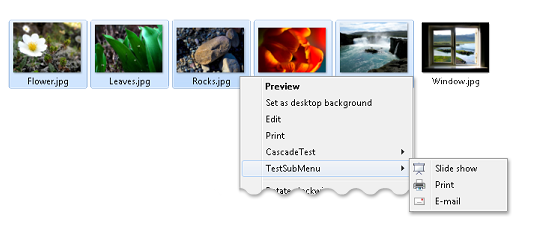
In Windows 7 and later, there are three ways to create cascading menus, which are described in the following sections.
- How to Create Cascading Menus with the SubCommands Registry Entry
- How to Create Cascading Menus with the ExtendedSubCommandsKey Registry Entry
- How to Create Cascading Menus with the IExplorerCommand Interface