
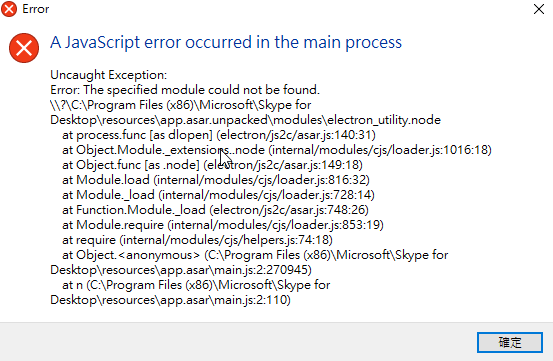
windows2016 install skype8.66 display a javascript error occurred in the main process error
' cx='32' cy='32' r='32' /%3E%3Ctext x='50%25' y='55%25' dominant-baseline='middle' text-anchor='middle' fill='%23FFF' %3EEH%3C/text%3E%3C/svg%3E)
ED huang
6
Reputation points
windows2016 install skype8.66 display a javascript error occurred in the main process error
Windows for business | Windows Server | User experience | Other
14 answers
Sort by: Most helpful
-
' cx='32' cy='32' r='32' /%3E%3Ctext x='50%25' y='55%25' dominant-baseline='middle' text-anchor='middle' fill='%23FFF' %3EA%3C/text%3E%3C/svg%3E) Кураколов Алексей 21 Reputation points
Кураколов Алексей 21 Reputation points2020-11-10T02:55:00.573+00:00 -
' cx='32' cy='32' r='32' /%3E%3Ctext x='50%25' y='55%25' dominant-baseline='middle' text-anchor='middle' fill='%23FFF' %3EAG%3C/text%3E%3C/svg%3E)
-
' cx='32' cy='32' r='32' /%3E%3Ctext x='50%25' y='55%25' dominant-baseline='middle' text-anchor='middle' fill='%23FFF' %3EM%3C/text%3E%3C/svg%3E) MauricioAG 1 Reputation point
MauricioAG 1 Reputation point2020-11-10T18:46:30.663+00:00 Thank you very much for this Workaround!
it works very well. -
 Claudiney Marques 6 Reputation points
2020-11-11T12:37:17.503+00:00 Depois que postei, vi que á havia compartilhado o link na qual resolveu o meu problema também.
-
' cx='32' cy='32' r='32' /%3E%3Ctext x='50%25' y='55%25' dominant-baseline='middle' text-anchor='middle' fill='%23FFF' %3ERC%3C/text%3E%3C/svg%3E)
Sign in to comment -
-
' cx='32' cy='32' r='32' /%3E%3Ctext x='50%25' y='55%25' dominant-baseline='middle' text-anchor='middle' fill='%23FFF' %3EEJ%3C/text%3E%3C/svg%3E) Eng Juan PablO 6 Reputation points
Eng Juan PablO 6 Reputation points2020-11-04T19:33:43.02+00:00 delete skype 8.66, after go to Windos + R and write %appdata% you will see the folder of skype delete this folder. now in %appdata% go to microsoft\skype for desktop delete this folder too.
now you server does have anything of skype.
donwload this https://drive.google.com/file/d/1kEOrmw26hAqQBRgKwDup1DBaEYmsfTBA/view
and extract in C:\program file(86)\microsoft\ (the archives go to here)
enter the C:\program file(86)\microsoft\skype for desktop take the skype.exe auxiliary button send to Desktop(create shortcut)
I think it explains better now
-
' cx='32' cy='32' r='32' /%3E%3Ctext x='50%25' y='55%25' dominant-baseline='middle' text-anchor='middle' fill='%23FFF' %3EAT%3C/text%3E%3C/svg%3E) Ancom TIB 1 Reputation point
Ancom TIB 1 Reputation point2020-11-05T11:23:25.563+00:00 It works, but after second run with administrative rights, Skype automatically updates to the latest version, and the problem backs.
UPD:
Came up with a workaround: added a deny rule in AppLocker for the Administrators group to start %PROGRAMFILES%\microsoft\Skype for Desktop* (the same path should be added to the permissive rule exceptions if it exists, and the "Application Identity" service should also work ).
Sign in to comment -
-
' cx='32' cy='32' r='32' /%3E%3Ctext x='50%25' y='55%25' dominant-baseline='middle' text-anchor='middle' fill='%23FFF' %3EMA%3C/text%3E%3C/svg%3E) Makarov Artem aka Robin 1 Reputation point
Makarov Artem aka Robin 1 Reputation point2020-11-05T08:42:51.597+00:00 Thanks, it helps for mine Win 2019 server too
-
' cx='32' cy='32' r='32' /%3E%3Ctext x='50%25' y='55%25' dominant-baseline='middle' text-anchor='middle' fill='%23FFF' %3EM%3C/text%3E%3C/svg%3E) MichaelZ 1 Reputation point
MichaelZ 1 Reputation point2020-11-04T10:10:41.643+00:00 We have the same Problem here on RDP Server 2016/2019
Installing the old Version does not help because it will update right after installing -
ED huang 6 Reputation points
2020-11-04T04:01:41.383+00:00 update
windows 2012 r2 same issue-
-
ED huang 6 Reputation points
2020-11-05T15:48:37.883+00:00 update 2
I have a joke
form ******@gmf-inc.com email
Server?
Skype currently only has the following version, not the server version:
Mac link: https://share.weiyun.com/5MJ3lfE
Windows link: https://share.weiyun.com/5lfb4Jq
Android link: https://share.weiyun.com/5ePvImG
Linux download link: https://share.weiyun.com/5kSuG4L
Sign in to comment -