Microsoft Security | Microsoft Entra | Microsoft Entra External ID
Managing external identities to enable secure access for partners, customers, and other non-employees

This browser is no longer supported.
Upgrade to Microsoft Edge to take advantage of the latest features, security updates, and technical support.
' cx='32' cy='32' r='32' /%3E%3Ctext x='50%25' y='55%25' dominant-baseline='middle' text-anchor='middle' fill='%23FFF' %3EAM%3C/text%3E%3C/svg%3E)
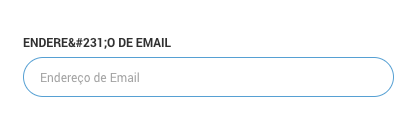
We have a problem with some of the translations added to our custom policy. The translations are added correctly in our custom policy with all characters being displayed correctly in the file. The file has the UTF-8 encoding.
For some reason, translations with special characters such as ç are displayed HTML encoded, but only in the label of the email field. We don't have any JS active that creates this behavior. Is this just a bug in B2C?
Lines in custom policy:
<LocalizedString ElementType="UxElement" StringId="logonIdentifier_username">Endereço de Email</LocalizedString>
<LocalizedString ElementType="ClaimType" ElementId="signInName" StringId="DisplayName">Endereço de Email</LocalizedString>
The translation is in pt-br (Portuguese Brazilian).
Managing external identities to enable secure access for partners, customers, and other non-employees
Answer accepted by question author

Hi @Anders Madsen · Thank you for reaching out.
I tested using the string Endereço de Email in my B2C custom policy (policy url) but couldn't reproduce the issue. The only issue I am aware of is with the <DataUri>urn:com:microsoft:aad:b2c:elements:contract:unifiedssp:2.1.0</DataUri> under <ContentDefinition Id="api.signuporsignin"> which doesn't translate certain strings and to translate those strings, unifiedssp:1.1.0 has to be used as of now.
You may try switching page layout version from unifiedssp:2.1.0 to unifiedssp:1.1.0 if that helps. Please refer to https://learn.microsoft.com/en-us/azure/active-directory-b2c/page-layout to identify the difference between various page layout versions.
-----------------------------------------------------------------------------------------------------------
Please "Accept the answer" if the information helped you. This will help us and others in the community as well.
It must be something that we are doing wrong somehow then. Will update this thread when I figure it out.
Thank you for your response 🙂
' cx='32' cy='32' r='32' /%3E%3Ctext x='50%25' y='55%25' dominant-baseline='middle' text-anchor='middle' fill='%23FFF' %3EO%3C/text%3E%3C/svg%3E)
And unfortunately it seems I cannot use the 1.1.0 layout version, the only available are 2.1.0 and 2.1.1
@AmanpreetSingh-MSFT I have the same problem I believe, here https://learn.microsoft.com/en-us/answers/questions/245412/azure-b2c-languages-bug.html .
I am using the builtin userflow.