
Thank you for your answer
Reza-Ameri
TeemoTang-MSFT
I have two issues now
- I only have one Volume and in the settings section I can not select another space vloume .
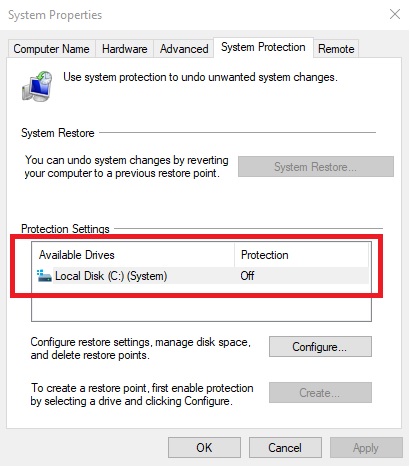
- Do I need to enable system protection to do this?
This browser is no longer supported.
Upgrade to Microsoft Edge to take advantage of the latest features, security updates, and technical support.
' cx='32' cy='32' r='32' /%3E%3Ctext x='50%25' y='55%25' dominant-baseline='middle' text-anchor='middle' fill='%23FFF' %3EME%3C/text%3E%3C/svg%3E)
HI
I have some questions
I have Windows 10 Enterprise
Thank you for your answer
Reza-Ameri
TeemoTang-MSFT
I have two issues now

Question 1:If you only have one volume, you need an external disk or USB driver for image backup.
Question 2: Yes, you need.
No, image backup or other backup method must using two volume, backup can't store in the same location with original data, network location, external disk, USB drive or Cloud storage.
I think you want to create a full system backup in Windows 10, in Windows 7, we usually called it System Backup Image.
Yes, we can do the same thing in Windows 10.
Source:
https://www.cnet.com/how-to/how-to-create-a-full-system-backup-in-windows-10/
-------------------------------------------------------------------------------------
If the Answer is helpful, please click "Accept Answer" and upvote it.
Information posted in the given link is hosted by a third party. Microsoft does not guarantee the accuracy and effectiveness of information.
Note: Please follow the steps in our documentation to enable e-mail notifications if you want to receive the related email notification for this thread.
' cx='32' cy='32' r='32' /%3E%3Ctext x='50%25' y='55%25' dominant-baseline='middle' text-anchor='middle' fill='%23FFF' %3ERA%3C/text%3E%3C/svg%3E)
Previous version comes from File History and System Restore.
Take a look at:
https://support.microsoft.com/en-us/windows/backup-and-restore-in-windows-10-352091d2-bb9d-3ea3-ed18-52ef2b88cbef