Azure SQL Database
An Azure relational database service.
This browser is no longer supported.
Upgrade to Microsoft Edge to take advantage of the latest features, security updates, and technical support.
' cx='32' cy='32' r='32' /%3E%3Ctext x='50%25' y='55%25' dominant-baseline='middle' text-anchor='middle' fill='%23FFF' %3EVS%3C/text%3E%3C/svg%3E)
We have set the Azure SQL audit log for log Analytics and saved the configuration.
Burt from the Log Analytics Workspace & under LOGS blade cannot find the AUDIT logs for query purpose?
An Azure relational database service.
Thanks for the prompt reply. I have changed the scope and selected the exact DB and also made changes to the query as well. No results. Yet another query says there are 8k+ recs.
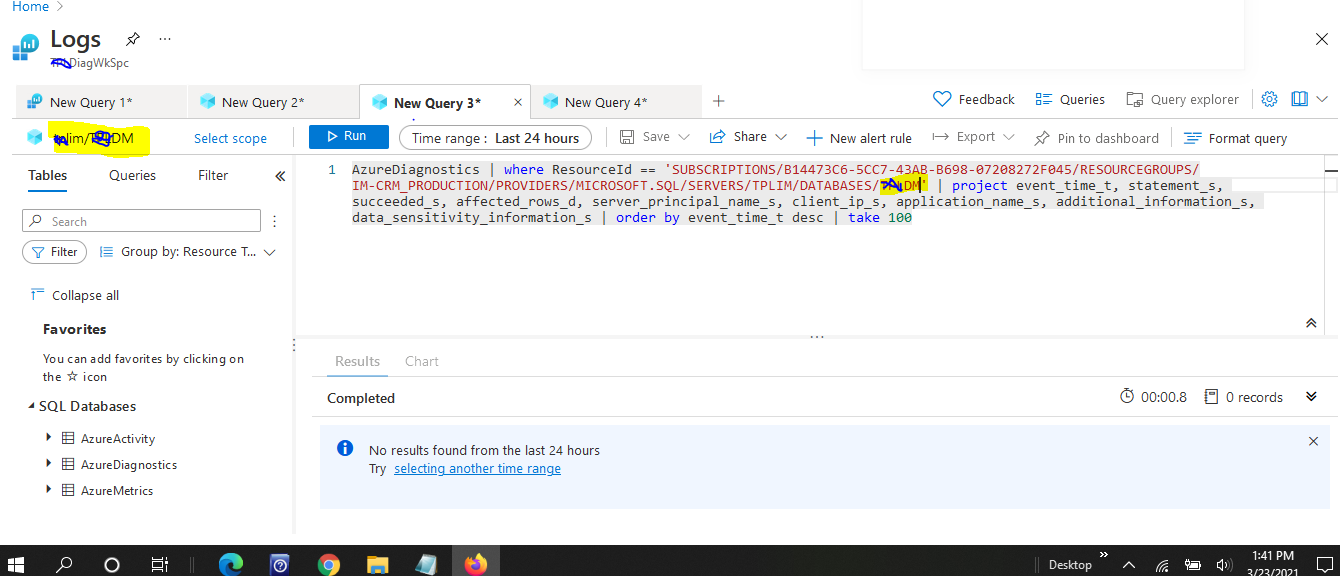
zureDiagnostics | summarize totalNumberofRecords = count() by ResourceId | sort by totalNumberofRecords desc" which just returned only the MASTER database but not other ones ????? this had returned 8000+ recs for the MASTER database but not others
Also I don't see SQL DATABASES under favorites as seen from your screeshot....
Hi Anurag,
Thanks for the response. I ran the query provided by you but still no rows returned . Pl see below.

AzureDiagnostics | where ResourceId == 'SUBSCRIPTIONS/B14473C6-5CC7-43AB-B698-07208272F045/RESOURCEGROUPS/IM-CRM_PRODUCTION/PROVIDERS/MICROSOFT.SQL/SERVERS/xvxvxvxvx/DATABASES/MASTER' | project event_time_t, statement_s, succeeded_s, affected_rows_d, server_principal_name_s, client_ip_s, application_name_s, additional_information_s, data_sensitivity_information_s | order by event_time_t desc | take 100
i got the resource id from this query
AzureDiagnostics | summarize totalNumberofRecords = count() by ResourceId | sort by totalNumberofRecords desc" which just returned only the MASTER database but not other ones ?????
' cx='32' cy='32' r='32' /%3E%3Ctext x='50%25' y='55%25' dominant-baseline='middle' text-anchor='middle' fill='%23FFF' %3EAS%3C/text%3E%3C/svg%3E)
Hi @Vivek Singh , thanks for replying back.
I was looking into the query you provided and you have MASTER db mentioned there hence it is returning the data related to MASTER DB only. I have highlighted it in the below screenshot.

Please change to the name of appropriate database where you need to capture the queries of.
Also to see the SQL Database, we need to see the scope of the particular database. I have highlighted the 'Select Scope' in below screenshot.

Let me know if that helps or we can discuss further on the same..
Hi @Vivek Singh , welcome to Microsoft Q&A forum.
You can find the audit logs by running the queries on to Log Analytics Workspace as shown below:
AzureDiagnostics
| where ResourceId == '/SUBSCRIPTIONS/xxxxxxxxx/RESOURCEGROUPS/ANURSHAR-DATABASES/PROVIDERS/MICROSOFT.SQL/SERVERS/YOURSERVERNAME/DATABASES/YOURDBNAME'
| project event_time_t, statement_s, succeeded_s, affected_rows_d, server_principal_name_s, client_ip_s, application_name_s, additional_information_s, data_sensitivity_information_s
| order by event_time_t desc
| take 100

Also, you can set the scope as mentioned in above screenshot to the Azure SQL Database. There are multiple queries you can write and they will show the appropriate results accordingly.
Please let us know if this helps or else we can discuss further.
----------
If answer helps, please mark it 'Accept Answer'