Issues with DCOM

Anonymous
2025-05-18T17:55:03+00:00

Hello! Wanted to ask for assistance with something. I'm still getting this DCOM error:


These all seem to lead up to this mouse issue:
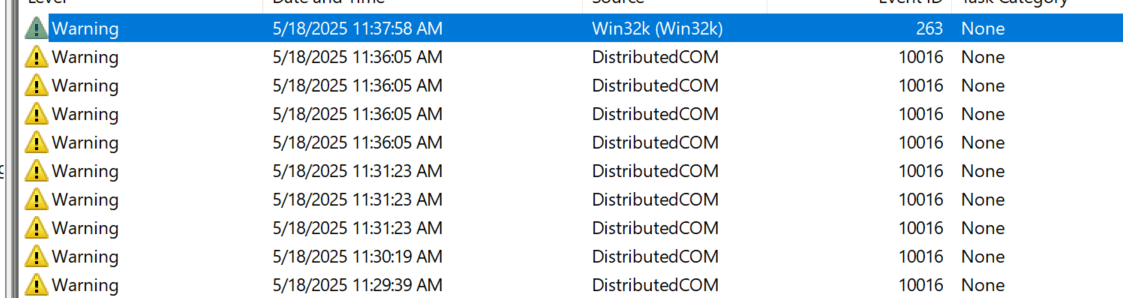
Not quite sure how to fix these, I tried to do the DCOM one before but then it gave me these issues as I opened it up:
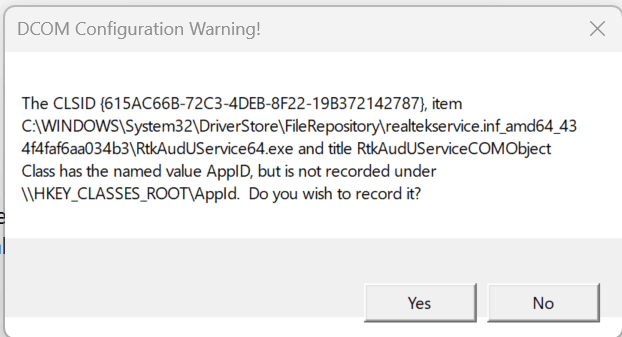
Not sure if it would just be best for me to do some kind of Windows reinstall or repair or not. But yeah, and even when I get into the DCOM Config and after these warnings, I can't seem to even FIND {2593F8B9-4EAF-457C-B68A-50F6B8EA6B54}. Almost wondering too if this stuff is causing my PC to have really small "freezes". It lasts maybe for a split second where I can't move my mouse or anything and then it goes away. My drivers are up to date, NVIDIA recently released an update for drivers with more stability for Windows 11 24h2 and I feel like I have seen better performance. But there's always this weird little freeze that happens every now and then, causes my sound to also freeze when this happens and this time at least, it happened when THESE errors showed up. So I'm wondering if there's something off going on there.

Specs:

Processor/CPU: Intel(R) Core(TM) i9-14900K 3.20 GHz

GPU: ASUS Tuf Gaming GeForce RTX 4090 - Overclock Edition
RAM: 32.0 GB - Speed 6400 MHz

Motherboard: MSI MPG Carbon Max Wifi II ATX LGA1700

SSD: 4TB
PSU: 1500W
Windows 11 version 24H2

Windows for home | Windows 11 | Performance and system failures

Locked Question. This question was migrated from the Microsoft Support Community. You can vote on whether it's helpful, but you can't add comments or replies or follow the question.

0 comments No comments

3 answers

Sort by: Most helpful
  1. Anonymous
    2025-05-23T17:53:39+00:00

    Hi

    This my 2nd follow-up regarding your issue. We would like to know if the issue you have raised to us is still on-going. If yes, please reply to the thread so we can continue troubleshooting your concern.

    Regards,

    Fritz-Bald

    Microsoft Community

    Moderator

    Was this answer helpful?

    0 comments No comments
  2. Anonymous
    2025-05-21T17:56:48+00:00

    Hi

    We have noticed that you have not responded to our last message in your Community post. We would like to know whether the issue you have raised with us is still ongoing. If yes, please reply to our thread and continue our conversation.

    We await your response.

    Regards,

    Fritz-Bald

    Microsoft Community

    Moderator

    Was this answer helpful?

    0 comments No comments
  3. Anonymous
    2025-05-19T17:36:58+00:00

    Good day!

    Welcome to Microsoft Community. Thank you for sharing your concern with us today and we hope that all is well. I understand you're experiencing DCOM errors and small freezes on your Windows 11 system. To address the DCOM error related to {2593F8B9-4EAF-457C-B68A-50F6B8EA6B54}, you can try the following steps:

    Steps to Fix the DCOM Error

    1. Check Registry for CLSID & AppID:
      • Open Registry Editor (regedit).
      • Navigate to: HKEY_CLASSES_ROOT\CLSID{2593F8B9-4EAF-457C-B68A-50F6B8EA6B54}
      • Note the AppID associated with it.
    2. Modify DCOM Permissions:
      • Press Win + R, type , dcomcnfg and hit Enter.
      • Go to Component Services > Computers > My Computer > DCOM Config.
      • Locate the AppID you found earlier.
      • Right-click and select Properties.
      • Under Security, modify Launch and Activation Permissions:
        • Add SYSTEM and LOCAL SERVICE.
        • Grant Local Activation and Local Launch permissions.

    Regards,

    Fritz-Bald

    Microsoft Community

    Moderator

    Was this answer helpful?

    0 comments No comments







