Can't find publish button in Visual Studio 2019

Shingo Oscar 1 Reputation point
2021-08-12T07:08:00.9+00:00

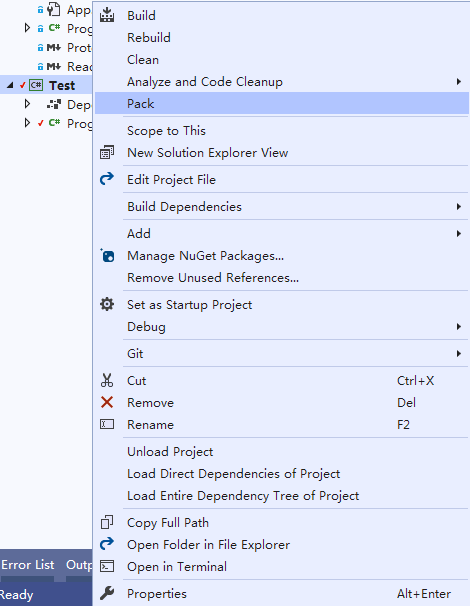
Test is a console application, target framework is .net core 3.1, and I have added PublishSingleFile to the project file, but I can't find the publish button in the context menu.

122623-54454545.png

Developer technologies | Visual Studio | Other
A family of Microsoft suites of integrated development tools for building applications for Windows, the web, mobile devices and many other platforms. Miscellaneous topics that do not fit into specific categories.
Developer technologies | C#
An object-oriented and type-safe programming language that has its roots in the C family of languages and includes support for component-oriented programming.
{count} votes

2 answers

Sort by: Most helpful
  1. PengGe-MSFT 3,386 Reputation points
    2021-08-13T09:28:21.95+00:00

    Hi @Shingo Oscar

    Thank you for reporting it in Microsoft Q&A.

    I created a C# console project to test, the ‘Publish’ button is available.

    You can try to re-install C# workloads, repair and update Visual Studio.

    You can also run devenv /safemode command to start Visual Studio without any extensions, you can refer to this document.

    Sincerely,
    Peng
    *
    If the answer is helpful, please click "Accept Answer" and upvote it.
    Note: Please follow the steps in our documentation to enable e-mail notifications if you want to receive the related email notification for this thread.

    0 comments No comments

  2. Luppnow, L. (La'Chelle) 0 Reputation points
    2025-01-12T18:15:33.58+00:00

    I solved this by updating the .vbproj file. I had to add the Project Type Guids to the "PropertyGroup" tag. <ProjectTypeGuids>{349c5851-65df-11da-9384-00065b846f21};{F184B08F-C81C-45F6-A57F-5ABD9991F28F}</ProjectTypeGuids>. In this case GUID 349c5851-65df-11da-9384-00065b846f21 is for ASP.NET MVC 5 and F184B08F-C81C-45F6-A57F-5ABD9991F28F for VB.NET. Have a look at GitHub List of GUIDS. Multiple Guids can be added, separated by a semicolon.

    0 comments No comments

Your answer

Answers can be marked as 'Accepted' by the question author and 'Recommended' by moderators, which helps users know the answer solved the author's problem.