Microsoft 365 and Office | SharePoint | Development
The process of building custom applications and tools that interact with Microsoft SharePoint, including SharePoint Online in Microsoft 365.

This browser is no longer supported.
Upgrade to Microsoft Edge to take advantage of the latest features, security updates, and technical support.
' cx='32' cy='32' r='32' /%3E%3Ctext x='50%25' y='55%25' dominant-baseline='middle' text-anchor='middle' fill='%23FFF' %3EPB%3C/text%3E%3C/svg%3E)
I am a little bit confused how branching is working in Visual Studio Code with Git. I came to Git world from MSFT and try to understand how to handle the branching in Git.
I have 2 branches: DEV and DEV-ScriptEditorWebPart.
DEV is the branch where all the final version of the code are add to deploy to DEV environment for testing.
DEV-ScriptEditorWebPart is feature branch where new code is generated.
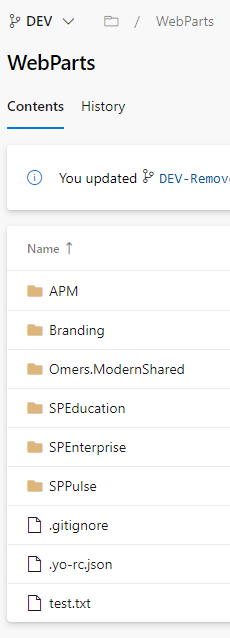
When I look at the DevOps files are stored correctly.
DEV BRANCH
DEV-ScriptEditorWebPart

As you see feature branch contains folder that is not in DEV, which what I expect.
From my previous experience with MSFT I would expect the same would be in VS Code. However, it is not the case or at least I am missing some fundamental knowledge of how Visual Studio Code is working with Git and DevOps.
Following the snapshot of the Visual Studio Code, I have opened. Initial Branch is DEV. As you can see, it also shows me a lot of untracked files from another branch in Source Control which should not be there.

When I try to switch it to feature branch I am getting next message
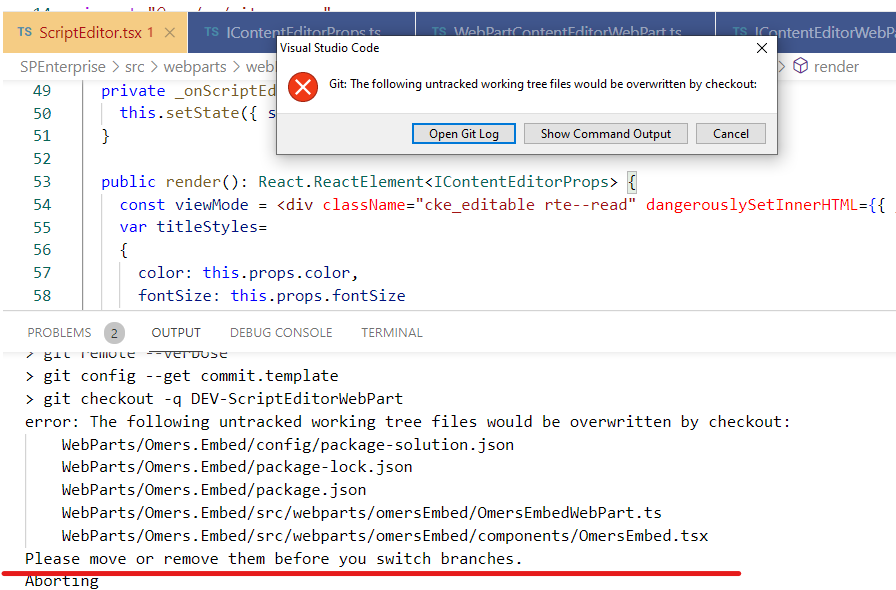
Per my understanding it is correct. DEV doesn't have this Omers.Embed folder and for sure for DEV, it is untracked. However, I cannot switch to the folder where these files belong to.
What might be the problem here?
The process of building custom applications and tools that interact with Microsoft SharePoint, including SharePoint Online in Microsoft 365.
A family of Microsoft suites of integrated development tools for building applications for Windows, the web, mobile devices and many other platforms. Miscellaneous topics that do not fit into specific categories.
' cx='32' cy='32' r='32' /%3E%3Ctext x='50%25' y='55%25' dominant-baseline='middle' text-anchor='middle' fill='%23FFF' %3ER%3C/text%3E%3C/svg%3E)
Hi @Pavel Brokhman ,
would you please provide us with an update on the status of your issue?
"if you want to keep them" - it is not exactly what I want. I just try to figure out how to use git with branches without causing any errors.
Let's say I have branch DEV, DEV-UpdatedFiles, DEV-AddedFiles, DEV-DeletedFiles.
Ideally I want following:
-- I want to be able to switch between DEV to DEV-UpdatedFiles or DEV-AddedFiles or DEV-DeletedFiles without exception similar the ones I explained before or at least to understand why it happens. Once it switched I would like to see in the Source Control Pane files that belong to corresponded branch only. For instance, I don't want to see added files from DEV-AddedFiles branch in, let's say, DEV-UpdatedFiles.
-- I want to able to switch between feature branch to DEV and in source control pane to see no files, because I didn't do any updates in DEV.
It is what I want eventually to achieve, which cannot be done with Git as I understood. So, at least I want to be sure, I can switch between DEV to feature branch and back without exception and I don't want to loose files accidently.
So, let me rephrase your suggestion. When next time I will get the same exception when I try to switch between DEV to feature branch I need to run
 git add -A
 git stash
 git pull
if -A is not working I should try next code:
 git fetch --all
 git reset --hard origin/<branch-name>
Hi @Pavel Brokhman ,
git reset --hard origin/<branch-name>
will force “git pull” to overwrite local files which might destroy your local files
' cx='32' cy='32' r='32' /%3E%3Ctext x='50%25' y='55%25' dominant-baseline='middle' text-anchor='middle' fill='%23FFF' %3EPB%3C/text%3E%3C/svg%3E)
It is still not clear. I asked for the steps for my case scenario. What should be done if I see this message? What does it mean "destroy your local files"?
I have explained the steps I am doing on daily / weekly basis. I want to be sure if I destroy files as you say I am not loosing my data. So, do you know what exactly would happen when I do these steps?
if you know please give me full answer with examples not just "use this command". When should I use this command? Why is it? What will happen? and so on.
Hi @RaytheonXie_MSFT ,
When you say use this command or another could you provide more information?
You say "use git clean --dry-run". When should I use it, with DEV branch or feature one? What exactly would happen with files? Are they going to be deleted from the folder?
If command is used in DEV branch, what would happen when I switch to feature branch? Will it pull all the files from DevOps? and so on....
Can you give the step by step instructions if it happens again? As I said currently I just used checkout command with force to switch to another branch.
Hi @Pavel Brokhman ,
"git clean --dry-run" will delete the files from the folder,so if you want to keep them,we can try following steps
To pull so local files are not overwritten from version control, we can also stage and then stash by using the commands below
git add -A
git stash
git pull
With git add -A, we are staging all changes.
If git add -A doesn't work for you,please try fetching and resetting
git fetch --all
git reset --hard origin/<branch-name>
With git fetch –all, we can fetch all remote branches. Fetch will update local copies of remote branches, but will not update local branches that track remote branches. To achieve this, we need to do a git pull –all.
Hi @Pavel Brokhman ,
We can use git clean --dry-run to delete the files not git add.
That command will output a list of files that Git will remove if you run git clean -f, and might avoid to remove something you didn’t want to
If an Answer is helpful, please click "Accept Answer" and upvote it.
Note: Please follow the steps in our documentation to enable e-mail notifications if you want to receive the related email notification for this thread.
There is something that I would like to add.
When I do switch in the VS Code it executes next command:
git checkout -q DEV-ScriptEditorWebPart
This command cause the issue I have described before.
However, when I add -f it works and now it switches to feature branch and there are no untracked files.

It is really confusing. Why do I see untracked files for the branch where these files do not belong too originally and how to avoid it? I don't want to do some global changes that would stop tracking it. Eventually I will merge feature branch to DEV. So, in the future DEV will contain new files as well.