Azure Virtual Machines
An Azure service that is used to provision Windows and Linux virtual machines.
This browser is no longer supported.
Upgrade to Microsoft Edge to take advantage of the latest features, security updates, and technical support.
' cx='32' cy='32' r='32' /%3E%3Ctext x='50%25' y='55%25' dominant-baseline='middle' text-anchor='middle' fill='%23FFF' %3EA%3C/text%3E%3C/svg%3E)
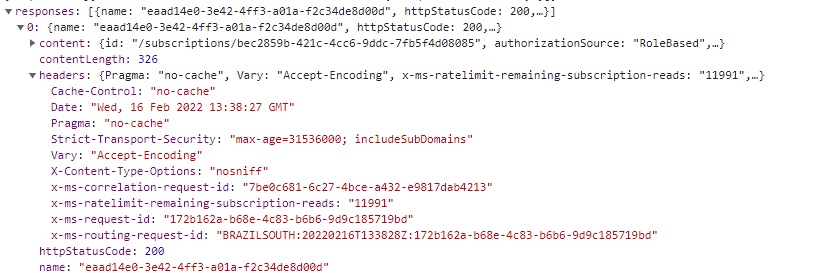
Good afternoon. I am wondering if anyone has a solution to the subscription drop down bar not loading at all. it is preventing me from creating a new VM in Azure. See attached pic to see what I mean:

It's been stuck like that for the past few days. I have tried doing the usual things such as clearing cookies, cache, different browsers, even using another VM to try in there. No luck, everything is hung up. Has anyone encountered this and, if so, is there a work around? I am new to Azure so I am unfamiliar with how it operates.
Thanks in advance.
An Azure service that is used to provision Windows and Linux virtual machines.
' cx='32' cy='32' r='32' /%3E%3Ctext x='50%25' y='55%25' dominant-baseline='middle' text-anchor='middle' fill='%23FFF' %3EVG%3C/text%3E%3C/svg%3E)
hello, i'm having the same problem since yesterday, other friends who also use azure free subscription are also having the same problem loading the subscription
hello, i'm having the same problem since yesterday, other friends who also use azure free subscription are also having the same problem loading the subscription,im in brazil
' cx='32' cy='32' r='32' /%3E%3Ctext x='50%25' y='55%25' dominant-baseline='middle' text-anchor='middle' fill='%23FFF' %3EKM%3C/text%3E%3C/svg%3E)
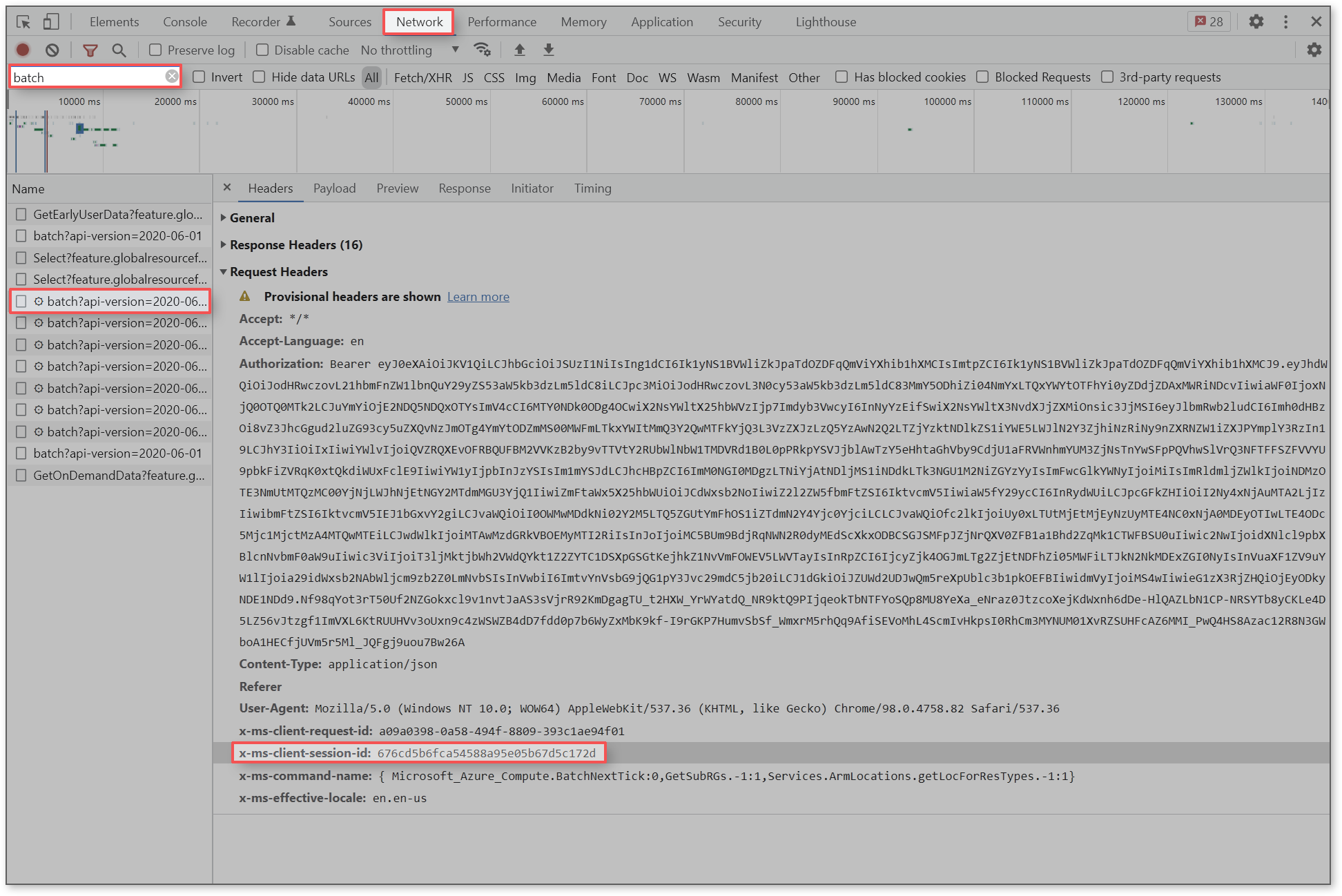
Thank you for providing additional details, @vanda guedes ! Can you provide a Session ID when this happens?
Collecting Session IDs
' cx='32' cy='32' r='32' /%3E%3Ctext x='50%25' y='55%25' dominant-baseline='middle' text-anchor='middle' fill='%23FFF' %3EFS%3C/text%3E%3C/svg%3E)
I have the same issue in the Chrome browser. In Microsoft Edge subscription is loaded successfully.
Interesting. So you are seeing this issue in Chrome but not Edge?
The problem has disappeared. I just checked the issue in Chrome.
@Fedor Shihantsov , a hotfix was recently deployed. Are you still running into the dropdown issue?
@Fedor Shihantsov , I should have read this comment first. We've deployed a hotfix and I'm happy to hear that the issue has been resolved.
' cx='32' cy='32' r='32' /%3E%3Ctext x='50%25' y='55%25' dominant-baseline='middle' text-anchor='middle' fill='%23FFF' %3EDD%3C/text%3E%3C/svg%3E)
I had same issue in chrome browser. It worked in Edge. What could be the issue?
Answer accepted by question author
Hello, @Anonymous !
Edit:
We're seeing an increased number of reports from people who are running into an issue where their subscription is not updating in the dropdown menu while trying to create a VM.
2/16 Update: A fix has just been deployed that should resolve the issue (2/16 at 7:30pm PST). Please let us know if you continue to run into this.
Trends in feedback:
portal.azure.com?feature.fxmarketplacesubs=true If you have time, we're looking for more information from people who are running into this:
az account list --output table Collecting Session IDs
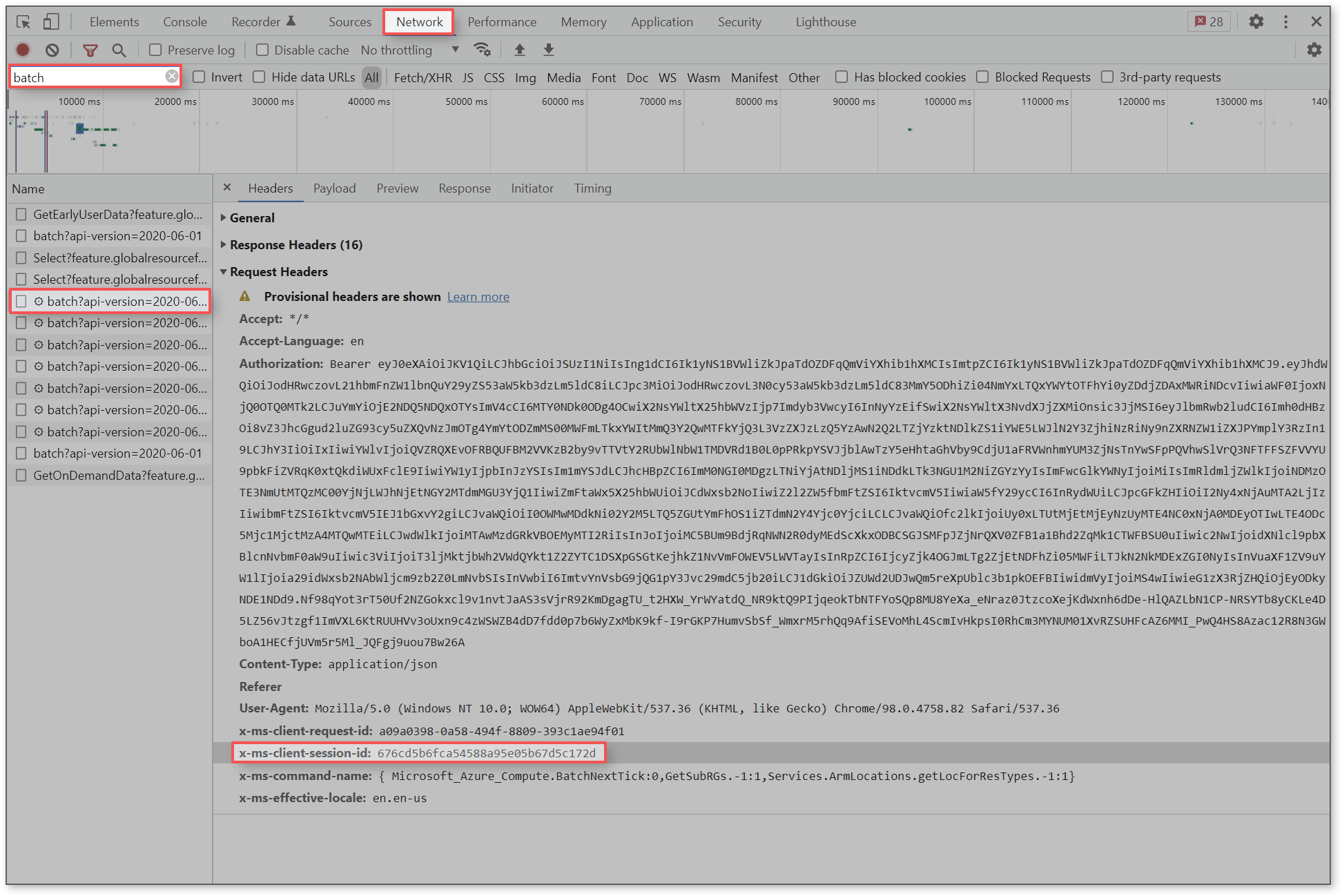
Temporary Workaround
As a temporary workaround, you can create VMs using Azure PowerShell:
https://learn.microsoft.com/en-us/azure/virtual-machines/windows/quick-create-powershell
Login
Connect-AzAccount
Create a resource group
New-AzResourceGroup -Name myResourceGroup -Location 'EastUS'
Create a virtual machine
New-AzVm `
    -ResourceGroupName 'myResourceGroup' `
    -Name 'myVM' `
    -Location 'East US' `
    -VirtualNetworkName 'myVnet' `
    -SubnetName 'mySubnet' `
    -SecurityGroupName 'myNetworkSecurityGroup' `
    -PublicIpAddressName 'myPublicIpAddress' `
    -OpenPorts 80,3389
----------
It sounds like you've run through most of the troubleshooting steps I'd recommend if your subscription isn't loading when you try to create a VM. There are a couple more I'd add to the list--namely making sure that you are in the right Azure directory and that you have the right role assigned to your account. Once you've tried all of the following, the next step is to create a support request (and I'd be happy to help with that if you would like).
What do you do if you have subscription loading or sign-in issues in the Azure portal?
This is taken from our troubleshooting documentation which provides detailed instructions for each step:
https://learn.microsoft.com/en-us/azure/cost-management-billing/manage/troubleshoot-sign-in-issue
If none of the above works and you continue to run into this issue, then you may need to create a support request.
If you need to urgently create a VM, consider using Azure CLI or PowerShell (however there is currently a hotfix being deployed for Azure CLI version 2.33.0 that would prevent you from creating a VM--you would need to downgrade to an older version).
Thanks for your help. I have retried the suggestions and made sure I was the owner of the account. It still doesn't work so I think I will have to go to support for this. Thanks for your help however.
No worries! Another report just came in with the same issue so I'm trying to figure out what is causing this. I'll update you if I find anything out (and do let me know if support ends up saying anything). If you need any assistance with the support request, please feel free to reach out.
' cx='32' cy='32' r='32' /%3E%3Ctext x='50%25' y='55%25' dominant-baseline='middle' text-anchor='middle' fill='%23FFF' %3EPM%3C/text%3E%3C/svg%3E)
@Anonymous - Are you still seeing the issue? If yes, did you create a support request already? Please share the SR#. Also would like to know the region you are creating the VM in.
@ngromikov - Please confirm if you too are still seeing the issue? If yes, which region?
We have seen ARM request failures for West Europe yesterday and are now mitigated.
' cx='32' cy='32' r='32' /%3E%3Ctext x='50%25' y='55%25' dominant-baseline='middle' text-anchor='middle' fill='%23FFF' %3EFC%3C/text%3E%3C/svg%3E)
' cx='32' cy='32' r='32' /%3E%3Ctext x='50%25' y='55%25' dominant-baseline='middle' text-anchor='middle' fill='%23FFF' %3EP%3C/text%3E%3C/svg%3E)
Hi,
Even I have been facing the same issue past 4 days. Can someone tell me if it has been solved or is there an other way to it?
' cx='32' cy='32' r='32' /%3E%3Ctext x='50%25' y='55%25' dominant-baseline='middle' text-anchor='middle' fill='%23FFF' %3ETM%3C/text%3E%3C/svg%3E)
Hello,
did anyone know, if this will work, when i create a new subscripton?
Regards,
Thomas
' cx='32' cy='32' r='32' /%3E%3Ctext x='50%25' y='55%25' dominant-baseline='middle' text-anchor='middle' fill='%23FFF' %3EKM%3C/text%3E%3C/svg%3E)
@Anonymous Are you still seeing the issue?
There was an Azure outage as shared on the Azure status page. It is resolved now. Please let me know if you are still seeing issues.

' cx='32' cy='32' r='32' /%3E%3Ctext x='50%25' y='55%25' dominant-baseline='middle' text-anchor='middle' fill='%23FFF' %3EN%3C/text%3E%3C/svg%3E)
Alas
This still does not work, when creating any other service there is a subscription, when creating a machine it does not work.
Thank you for reporting this, @ngromikov . We're continuing to investigate this.
Hi Justin,
since yesterday, i have the same problem!
Regards
Thomas
Thank you for reporting this, @Thomas Meier ! I'll update this thread as I learn more.