Note
Access to this page requires authorization. You can try signing in or changing directories.
Access to this page requires authorization. You can try changing directories.
Note
Agent mode was formerly known as Research Agent.
Agent mode lets users get answers to complex, exploratory questions in a Genie Agent using multi-step reasoning and hypothesis testing. When you ask a question, Agent mode creates and refines a research plan, runs multiple SQL queries, learns from each result, and iterates until it has enough evidence to deliver a comprehensive report with citations, visualizations, and supporting tables. This page covers Genie Agents Agent mode; for the developer-focused Agent mode that automates code, pipelines, and dashboards, see Genie Code Agent mode.
Note
Genie Agents were formerly known as Genie Spaces.
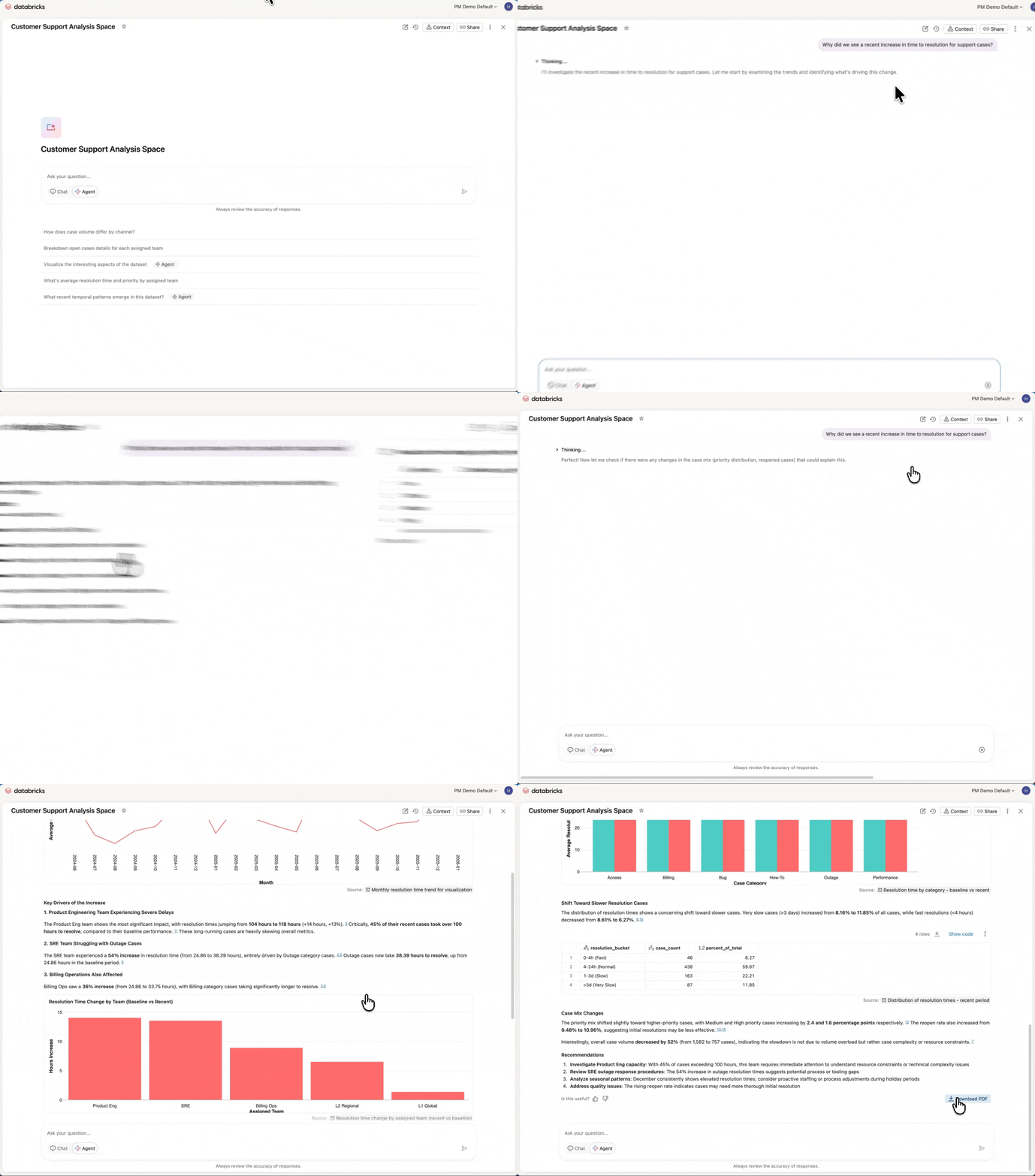
Unlike standard Genie queries, Agent mode:
- Creates research plans: Develops a structured approach and hypotheses for answering complex questions.
- Runs multiple queries: Executes several SQL queries to gather evidence from different angles.
- Learns and iterates: Continuously adjusts its approach based on what it discovers, refining its reasoning until it's confident in the answer.
- Delivers comprehensive reports: Provides detailed summaries with citations, visualizations, and supporting tables.
Agent mode is designed for both complex, exploratory questions and straightforward data questions like:
- What are our top-selling products this quarter?
- What customer segments are most profitable?
- Why did revenue spike in June 2025?
- How can we reduce order cancellations this holiday season?
- What factors contributed to customer churn last quarter?
- Which marketing campaigns had the best ROI and why?
Requirements and availability
To use Agent mode, your workspace must meet the following criteria.
Have a well-prepared Genie Agent
Agent mode relies heavily on the context within your Genie Agent to reason about your data. You must meet all requirements for setting up a Genie Agent. See Required permissions.
To optimize your Genie Agent for Agent mode, follow the comprehensive guidance in:
- Create and manage a Genie Agent: Initial setup and configuration
- Curate an effective Genie Agent: Best practices for setting up an effective Genie Agent
- Tune Genie Agent quality: Adding SQL examples, instructions, and knowledge store context
Regional availability
| Region | Availability |
|---|---|
| Americas & Europe workspaces | Available (cross-Geo not required) |
| Australia, New Zealand, and Japan workspaces | Available (cross-Geo not required) |
| All other regions | Available only if cross-Geo is enabled. See Enable cross-Geo processing. |
Use Agent mode
To ask questions using Agent mode:
- Open a Genie Agent.
- Click
 the Agent mode icon in the chat box.
 - Enter a question and send your prompt. Agent mode begins its research and may ask follow-up questions to clarify your intent. Agent mode responses may take longer to generate than standard Genie Agent responses. While Agent mode is reasoning, you can click Answer now to stop the reasoning and get an answer based on the context gathered so far. When complete, it answers with a final report containing specific findings, visualizations, and citations to research steps.
- After the report is generated, you can send additional clarification prompts to refine your report or generate new reports on different research questions. You can provide feedback to help improve Agent mode.
Export Agent mode reports
You can export Agent mode reports as PDF files for sharing or offline review. After Agent mode completes a report, click  Download PDF at the bottom right of the report to download it, including findings, visualizations, and citations.
What questions can Agent mode answer?
Agent mode performs best when you ask specific, data-driven questions about your business data. It handles both straightforward queries and complex questions that need multi-step reasoning, such as:
- Why did revenue spike in June 2025?
- What are our top-selling products this quarter?
- How can we reduce the number of order cancellations this holiday season?
- Tell me how our new product is doing in EMEA
- What customer segments are most profitable?
- What factors contributed to customer churn last quarter?
- Which marketing campaigns had the best ROI and why?
Frequently asked questions
Are there additional costs for Agent mode?
Agent mode is currently free, with no additional costs beyond the standard warehouse compute costs associated with running SQL queries. Starting July 8, 2026 at 00:00 UTC, Genie products, including Agent mode, are billed following a pay-as-you-go pricing model that includes a free per-user monthly allowance. For details, see the release note. To monitor and control spend, see Manage budgets and cost controls for Genie.
Does Agent mode use different data than standard Genie?
No. Agent mode uses the same context and data as the standard Genie experience. To learn about the context that Genie uses to generate responses, see How Genie Agents generates a response and How data access works.
Is Agent mode available through the API?
No, users can only submit Agent mode prompts through the Azure Databricks UI.
What models power Agent mode?
Agent mode uses Sonnet models. Genie is a managed service that continuously evaluates models from multiple providers and uses the most performant and accurate options. For more information, see Databricks AI assistive features trust and safety.
How do I provide feedback on Agent mode?
Share feedback with your Databricks account team. In particular, Databricks is seeking feedback in the following areas:
- Research steps: Whether Agent mode investigates the right dimensions and generates accurate SQL.
- Answer summaries: Preferences for format, level of detail, and clarity.
- Usability: Any challenges in finding, enabling, or using the feature.
- Context handling: Whether Agent mode uses relevant context effectively.
- Success stories: Examples where Agent mode delivered valuable insights.