Note
Access to this page requires authorization. You can try signing in or changing directories.
Access to this page requires authorization. You can try changing directories.
Important
This feature is in Beta. To use it, a workspace admin must turn on Unity Gateway Managed Configuration from the Previews page. See Manage Azure Databricks previews.
Use mobile device management (MDM) and the Unity Gateway CLI to distribute your team's coding agent setup. Admins publish the configuration in the workspace, and developers use their familiar agents with the configured models, MCP servers, and skills.
Supported MDM software:
- Jamf Pro (macOS), with a ready-to-use provisioning script
Your MDM software runs a provisioning script with administrator privileges on each device. The script installs ug, the Databricks CLI, and the coding agents, then runs ug configure to apply your workspace's coding agent configuration for every developer on the device. Developers then launch their agent without administrator privileges and sign in with their own Azure Databricks account.
Note
MDM provisioning configures Claude Code and Codex, which have machine-wide settings. It doesn't configure GitHub Copilot CLI or GitHub Copilot in Visual Studio Code. Developers set up GitHub Copilot themselves with ug configure --agents copilot.
Roll out with MDM
Configure coding agents
Enable the agents your team uses and publish the configuration in your workspace. See Configure coding agents.
Each enabled agent needs at least one model in the configuration that the service principal from the next step can use. For example, Claude Code needs Claude models. ug configure skips any agent without models.
Create a provisioning service principal
The MDM policy uses a service principal only to read the published configuration while it runs. Developers authenticate as themselves. The script uses the service principal's credentials temporarily, so that ug can connect to the workspace and download the coding agent configuration.
Add a service principal to your workspace, for example
ug-mdm-provisioning.Leave only the Workspace access entitlement enabled. The service principal doesn't need other entitlements. See Manage entitlements.
Grant the service principal access to the models, MCP servers, and skills in the published configuration, including the required Unity Catalog privileges. See Grant access to models, MCP servers, and skills.
On the service principal's Secrets tab, click Generate secret. Choose a lifetime that matches your rotation policy. Under Scope, click Other APIs, add the
ai-gatewayandunity-catalogscopes, and set each to Read. See Step 1: Create an OAuth secret.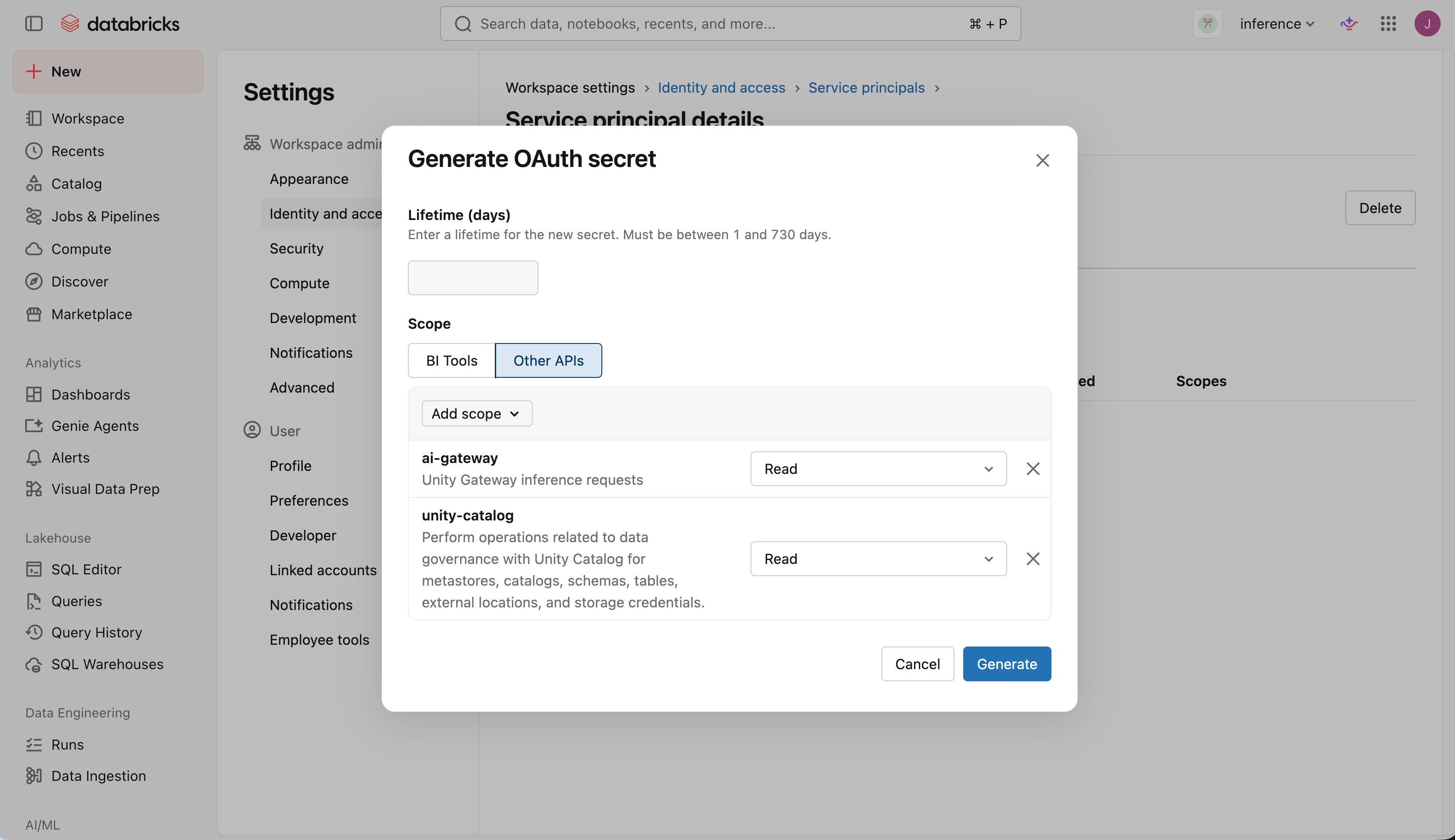
Copy the client ID and secret. You can't view the secret again after you close the dialog.
Deploy with your MDM software
Important
Install ug in a shared location that every user on the device can run, not in the root user's home directory. ug configure records the path to ug in the machine-wide agent settings, and each developer's agent runs ug from that path to authenticate.
Jamf Pro (macOS)
These steps deploy Claude Code and Codex to macOS devices with Jamf Pro. Each device needs:
- Network access to your workspace URL, PyPI (
pypi.organdfiles.pythonhosted.org), GitHub (github.comandraw.githubusercontent.com),astral.sh,nodejs.org, andregistry.npmjs.org. - Command Line Tools for Xcode, or permission for the script to install them with
softwareupdate.ugis installed from GitHub, which requiresgit.
Add the script
In Jamf Pro, go to Settings > Computer Management > Scripts > New, and name the script
Unity Gateway provision.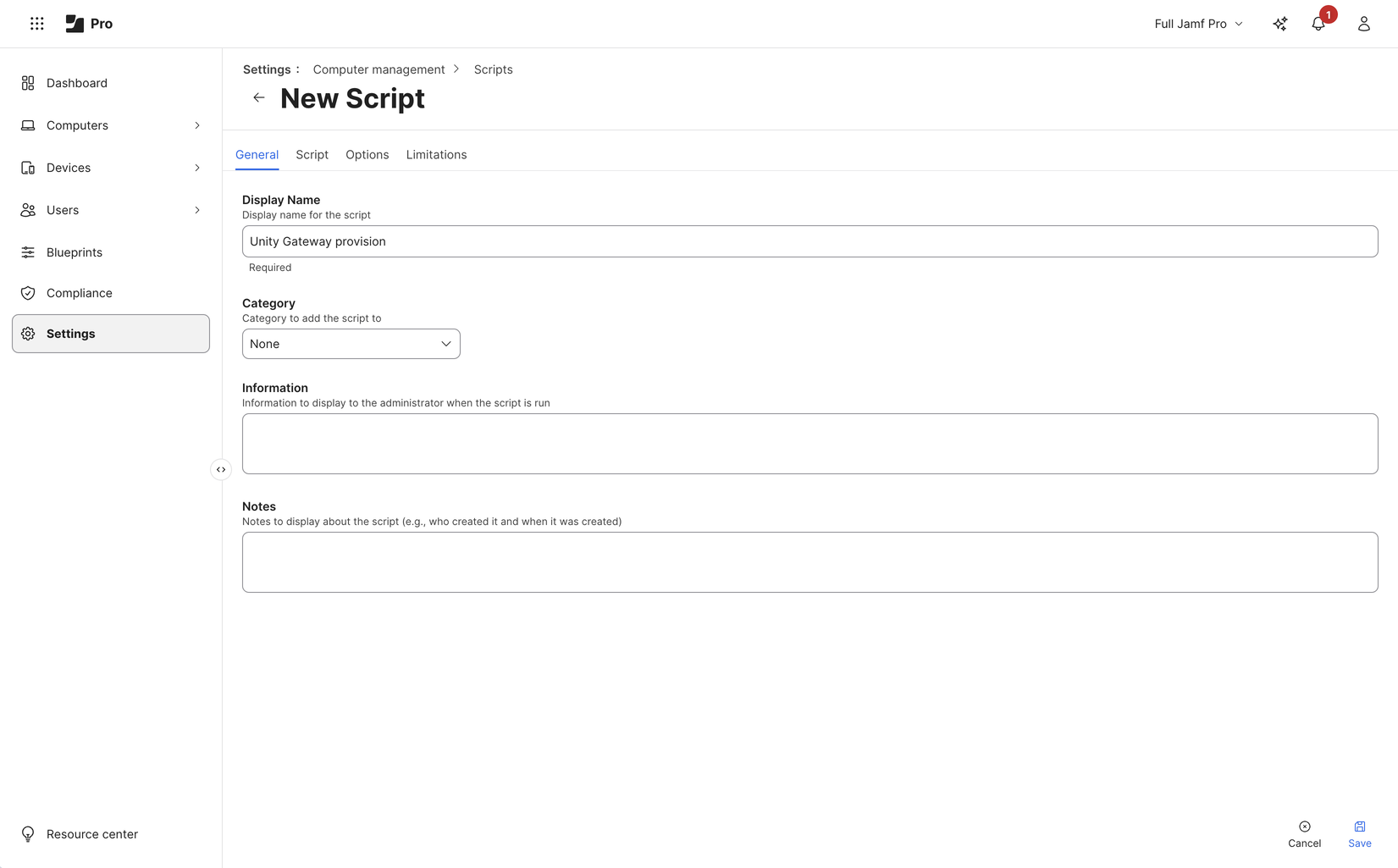
On the Script tab, paste the following script:
View the provisioning script
#!/bin/bash
#
# macOS MDM provisioning script, written for Jamf Pro policies: install
# ug, the Databricks CLI, Claude Code and Codex machine-wide and run
# `ug configure` as root, which installs the workspace policy at
# /etc/unitygateway/managed-settings.json. It also adds `claude` and
# `codex` aliases to /etc/zshrc and /etc/bashrc, so users launch with
# `claude` or `codex` in a new terminal, with no sudo.
#
# Jamf parameters ($1-$3 are reserved by Jamf):
#   $4  Databricks workspace URL, starting with https://
#   $5  Service principal OAuth client id
#   $6  Service principal OAuth client secret
#
# The token is used for this run only; developers sign in with their own
# OAuth. Needs access to PyPI, GitHub, astral.sh, nodejs.org and npmjs.org.

set -euo pipefail
umask 022
export HOME=/var/root
export PATH=/usr/local/bin:/usr/bin:/bin:/usr/sbin:/sbin
WORKSPACE="${4%/}"
PREFIX=/usr/local/unity-gateway
NODE_VERSION=22.23.5
NODE_SHA256=89fadefd7798158d8990ca9ed7dbb58f8ca7593adb92fe3da8a445db99415533
UG_REPO=https://github.com/databricks/unity-gateway
UV_URL=https://astral.sh/uv/install.sh
CLI_URL=https://raw.githubusercontent.com
CLI_URL="$CLI_URL/databricks/setup-cli/main/install.sh"
CLT_MARKER=/tmp/.com.apple.dt.CommandLineTools
CLT_MARKER="$CLT_MARKER.installondemand.in-progress"

# ug must be in a shared path: the machine-wide agent settings
# run it by absolute path for every user.
export UV_TOOL_DIR="$PREFIX/tools"
export UV_TOOL_BIN_DIR=/usr/local/bin
export UV_PYTHON_INSTALL_DIR="$PREFIX/python"
export UV_PYTHON_PREFERENCE=only-managed
# ug's npm installer must put agents on every user's PATH, not in root's home.
export npm_config_prefix=/usr/local
mkdir -p /usr/local/bin

# Get ug from git
if ! xcode-select -p >/dev/null 2>&1; then
  touch "$CLT_MARKER"
  clt="$(softwareupdate -l 2>/dev/null \
    | sed -n 's/^\* Label: \(Command Line Tools.*\)$/\1/p' \
    | tail -n1)"
  softwareupdate -i "$clt"
  rm -f "$CLT_MARKER"
fi

if ! command -v uv >/dev/null; then
  curl -LsSf "$UV_URL" \
    | env UV_INSTALL_DIR=/usr/local/bin UV_NO_MODIFY_PATH=1 sh
fi
uv tool install --force "git+$UG_REPO"

if [ ! -x /usr/local/bin/databricks ]; then
  curl -fsSL "$CLI_URL" | sh
fi

# ug configure installs missing agents with npm; provide a shared Node.js runtime.
if ! command -v node >/dev/null || ! command -v npm >/dev/null; then
  tmp="$(mktemp -d)"
  trap 'rm -rf "$tmp"' EXIT
  package="node-v$NODE_VERSION.pkg"
  /usr/bin/curl -fsSL -o "$tmp/$package" \
    "https://nodejs.org/dist/v$NODE_VERSION/$package"
  printf '%s  %s\n' "$NODE_SHA256" "$tmp/$package" | /usr/bin/shasum -a 256 -c -
  /usr/sbin/installer -pkg "$tmp/$package" -target /
fi

# Get short lived credential; curl reads the client id and secret from
# stdin (-K -) so they don't appear in its arguments.
resp="$(printf 'user = "%s:%s"\n' "$5" "$6" \
  | curl -sS -K - \
      -d grant_type=client_credentials \
      --data-urlencode 'scope=ai-gateway:read unity-catalog:read' \
      "$WORKSPACE/oidc/v1/token")"
if ! DATABRICKS_BEARER="$(printf '%s' "$resp" \
    | plutil -extract access_token raw -o - -)"; then
  echo "Token request to $WORKSPACE failed: $resp" >&2
  exit 1
fi
export DATABRICKS_BEARER

/usr/local/bin/ug configure --global --mdm --workspace "$WORKSPACE" \
  --agents claude,codex </dev/null
unset DATABRICKS_BEARER resp

# Aliases for every user's interactive zsh and bash shells. The block is
# rewritten on each run, which restores it if a macOS update resets
# the file.
for rc in /etc/zshrc /etc/bashrc; do
  [ -f "$rc" ] || continue
  sed -i '' '/^# BEGIN unity-gateway/,/^# END unity-gateway/d' "$rc"
  cat >>"$rc" <<'ALIASES'
# BEGIN unity-gateway (managed by MDM)
alias claude='UG_SKIP_OS_SETTINGS=1 ug claude'
alias codex='UG_SKIP_OS_SETTINGS=1 ug codex'
# END unity-gateway
ALIASES
done
On the Options tab, label Parameter 4
Workspace URL, Parameter 5Client ID, and Parameter 6Client secret.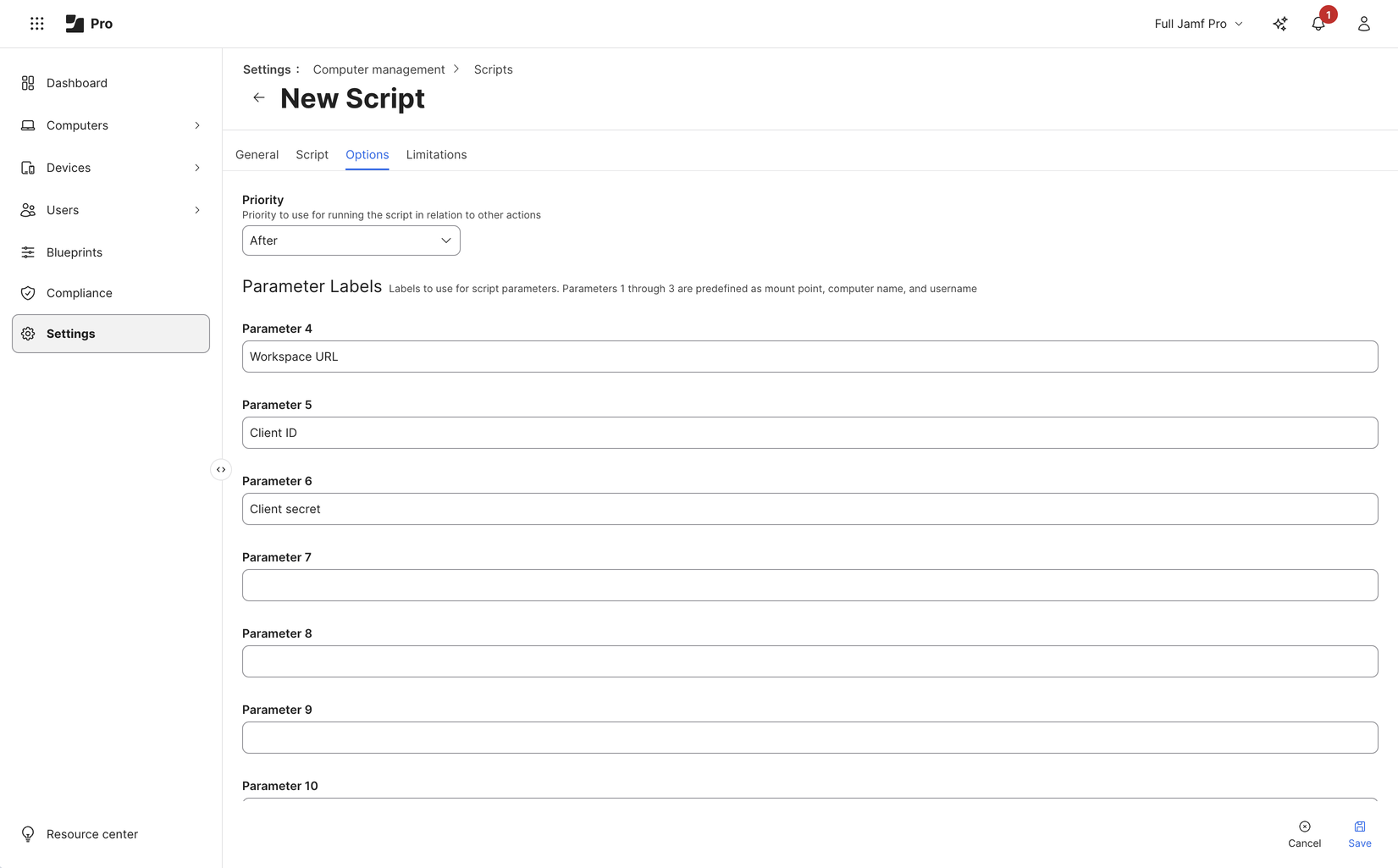
Click Save.
The script reinstalls ug on each run and installs the Databricks CLI only when it's missing. If Node.js or npm is missing, the script installs the official Node.js 22.23.5 package after checking its pinned SHA-256 checksum. ug configure then reuses existing agents on the shared PATH, or installs Claude Code and Codex through npm with Unity Gateway's built-in installer. Agents the workspace doesn't enable aren't installed. The script doesn't otherwise update Node.js, the agents, or the CLI; to keep them current, modify the script to match how you update software on your devices.
Macs provisioned with the earlier version of this script keep their native agent installations; running the new script is not a migration to npm. To move those Macs to npm, remove the old native installations with your software-management process, and then run the policy again.
Create the policy
Go to Computers > Policies > New.
In General, set Trigger to Recurring Check-in and Execution Frequency to Once every day. Each device runs
ug configuredaily, which applies configuration updates you publish in the workspace.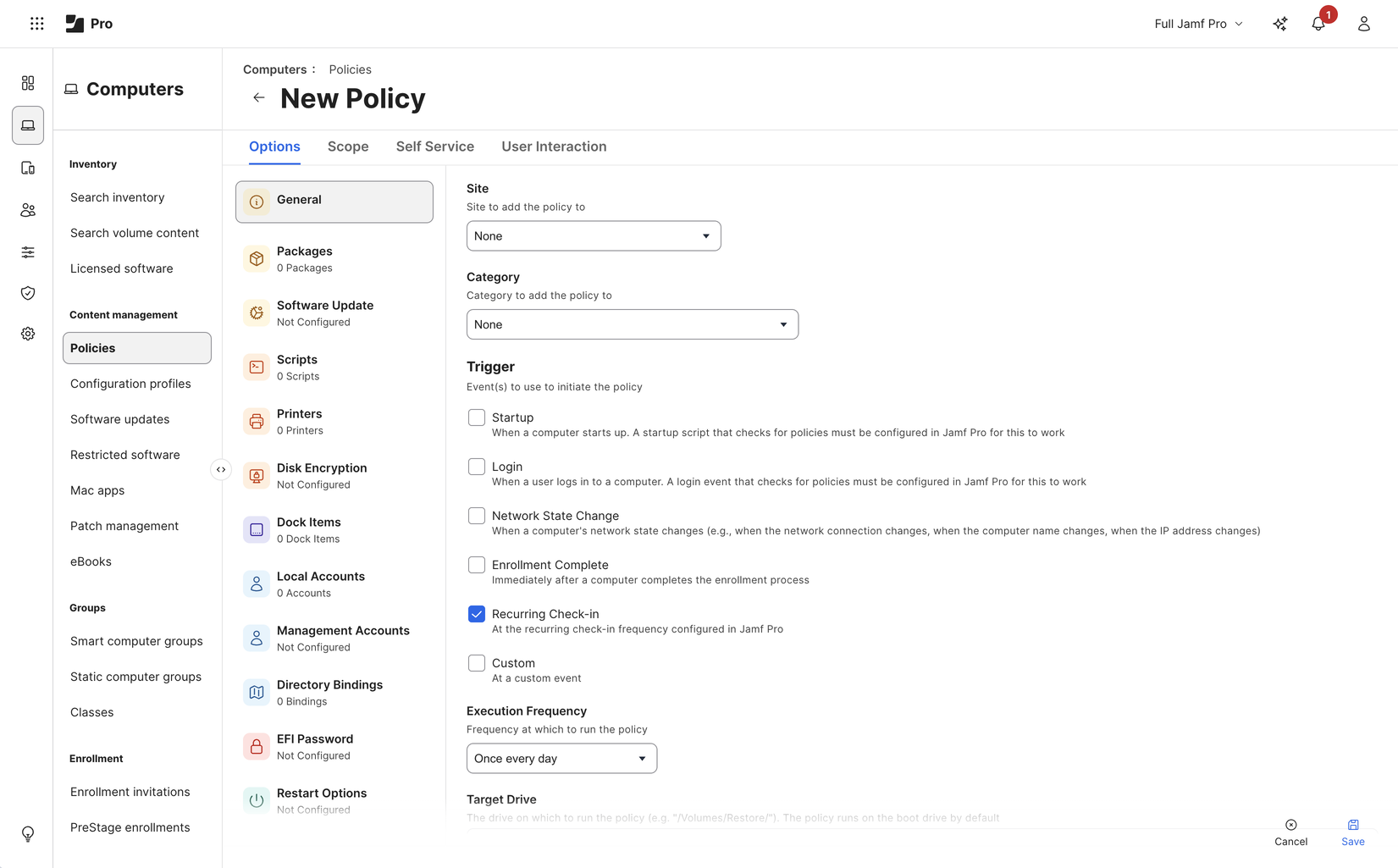
In Scripts, add
Unity Gateway provisionwith Priority set to After. Enter the parameters:Parameter Value 4 (Workspace URL) Your workspace URL, starting with https://.5 (Client ID) The service principal's client ID. 6 (Client secret) The service principal's secret. 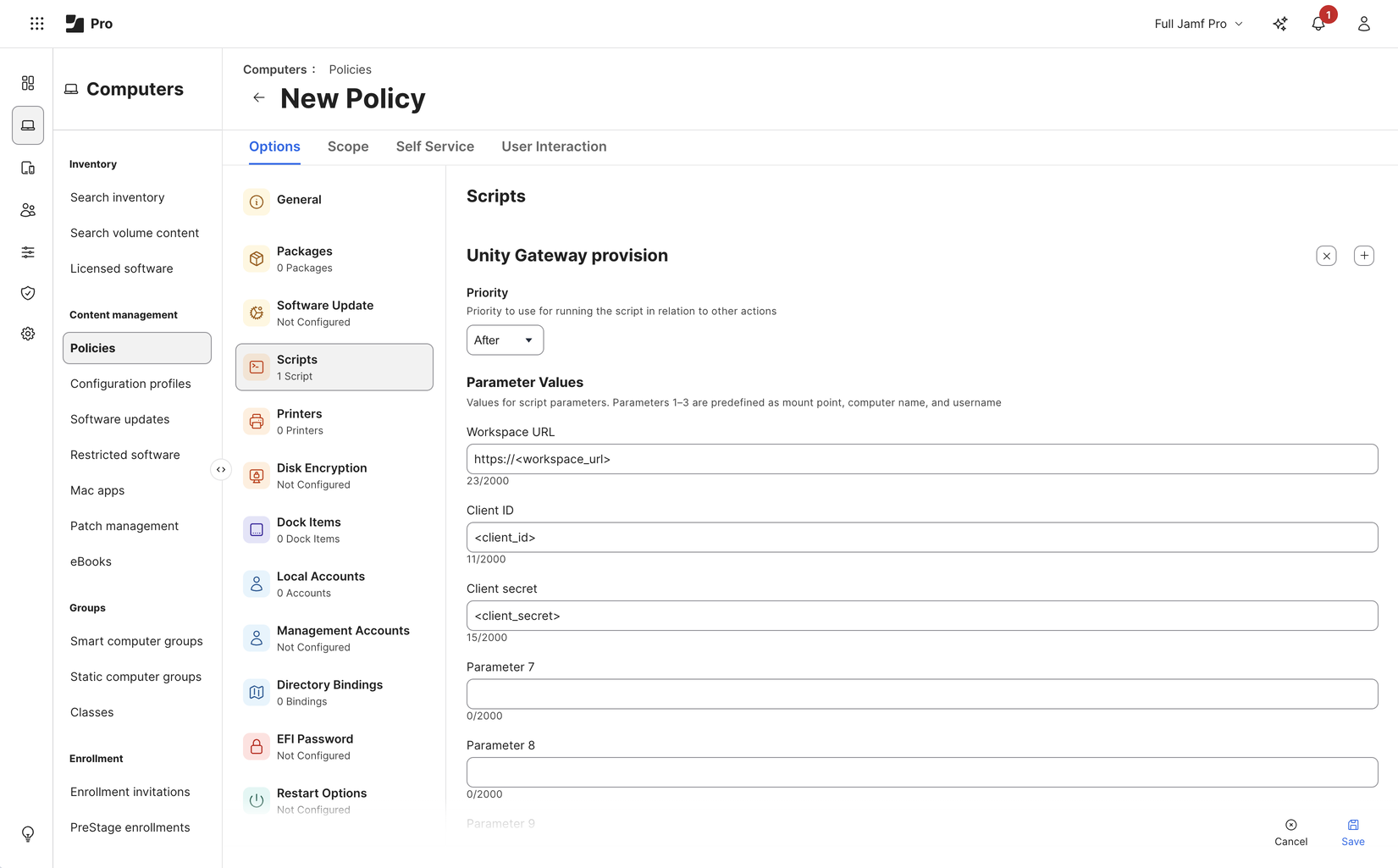
In Scope, select the devices to target. Start with a small group of pilot devices.
Click Save. Jamf Pro runs the policy on each targeted device at its next check-in.
Tell your developers
After the policy runs on a device, developers open a new terminal and run claude or codex as usual. The first launch opens a browser where the developer signs in to Azure Databricks. Coding agent activity is then attributed to the individual developer, not the service principal.
Roll out Claude desktop
The same ug configure run also configures the Claude desktop app for every user on the device. To support Claude desktop, install it in your provisioning script before the script runs ug configure. The Jamf Pro script above doesn't install Claude desktop.
When a user first opens Claude desktop, they sign in with their own Azure Databricks account. Users can also import their claude.ai projects and chats.
Verify the rollout
On a pilot device, sign in with the developer's operating-system account and check that:
- The agent opens and responds using a configured model.
- The configured MCP servers and skills are available, and the developer can use them.
- Requests appear in Unity Gateway usage tracking, and traces appear if tracing is enabled. See Monitor coding agent activity.
Repeat these checks after you change the provisioning script or the published configuration.
Maintain credentials and configuration
To rotate the service principal's secret:
- Generate a new secret for the service principal.
- Update the secret in your MDM policy.
- After the policy runs on your devices, delete the old secret.
To update the configuration, publish changes in the workspace. Devices apply them the next time the policy runs. See Sync configuration updates.
Troubleshooting
| Error | Cause |
|---|---|
Token request to ... failed: {"error":"invalid_client"...} |
The client ID or secret in the MDM policy is wrong, or the secret expired. |
Token request ... failed: ... Scopes ... are not assigned to the client |
The secret doesn't have the ai-gateway:read and unity-catalog:read scopes. |
None of the coding agents enabled by your workspace configuration are available |
No enabled agent has models the service principal can use, for example Claude Code configured without Claude models. |